
Participating Frequently
April 26, 2017
Answered

Lumetri Vignette Bug

  • April 26, 2017
  • 5 replies
  • 8283 views

Since I updated to the latest Premiere Pro (2017.1 v11), I am having some odd troubles with Lumetri. When I apply a vignette adjustment, the vignetting appears momentarily, then vanishes.
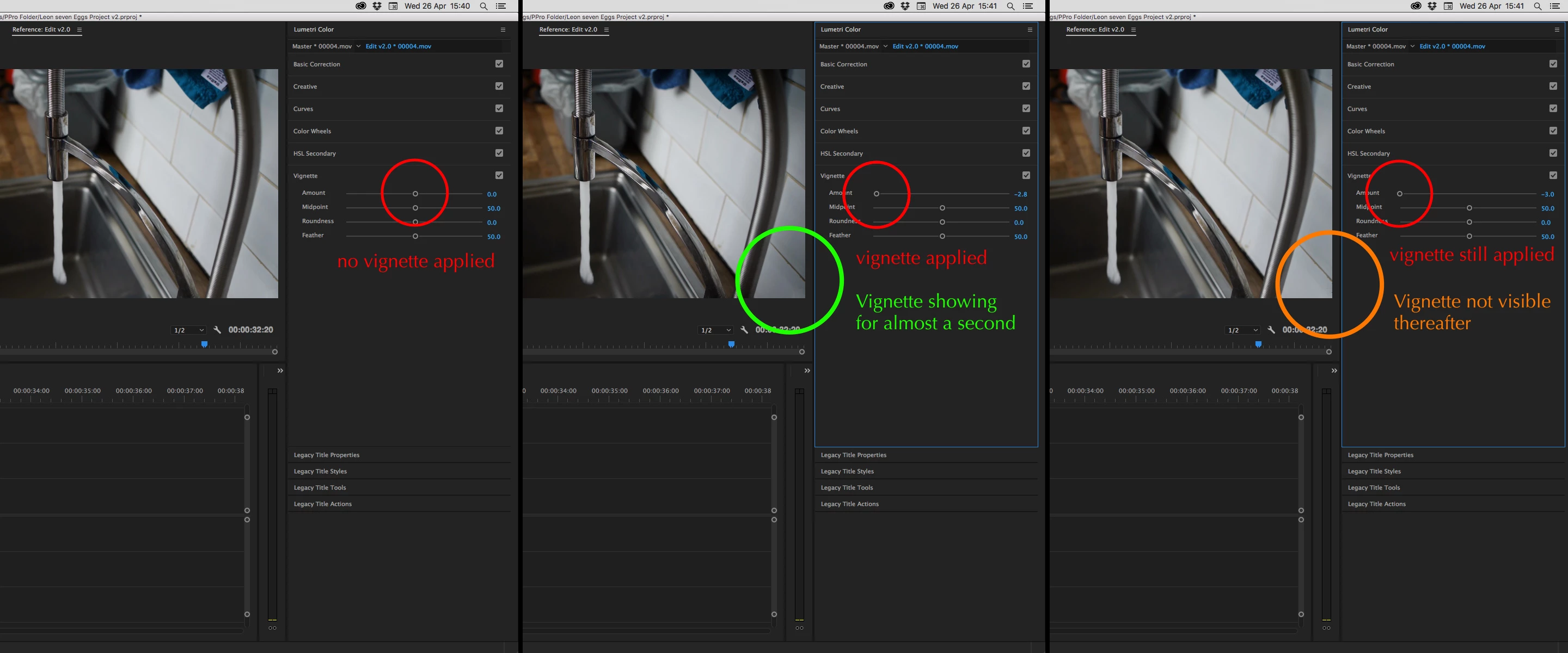
I'm running a an early 2008 2 x Quad-core intel Xeon with 20GB ram, NVIDIA GeForce GT 120 512 MB

Thanks community!

This topic has been closed for replies.
Correct answer stefan_gru

Tell the team this is a problem: Feature Request/Bug Report Form

5 replies

Participant
June 21, 2020

If anyone still face this problem, make sure the paused resolution is set to Full

Participant
July 7, 2020

So I'm running Premiere Pro v.14.0 om a new Mac Pro 2020 (302 GHz 16-core Intel Xeon W, 96 GB RAM) with Catalina (10.15.2) and I'm having this issue. Every time I render out a clip with a vignette, the vignette disappears. Even if the vignette is on it's own adjustment layer, it visually disappears though the settings for the vignette are still there. What the heck is going on? This never happened on my previous version of Premiere. Make me regret updating.

Participating Frequently
June 5, 2017

This bug has not been fixed... if a layer has any other effect than Lumetri, the vignette won't appear

Kevin-Monahan
Community Manager
Community Manager
July 22, 2017

Hi Ronnie,

I'm also experiencing this bug in my personal projects, as well. I'll file a bug. Sorry for the frustration. I see this with 4K footage, even with my proxies. With smaller frame sizes, the effect behaves normally. Probably another case of needing better hardware, it seems. However, this works just fine in CC 2015.3 even with the 4K footage.

What kind of footage and system are you working with? That would be helpful to know.

Thanks,
Kevin

Kevin Monahan - Sr. Community and Engagement Strategist – Adobe Pro Video and Audio
til32699188
Participant
January 26, 2019

Hi Kevin,

My vignette midpoint effect disappears after rendering, any idea how I can fix this bug?

Thanks in advance,

Asher

Participating Frequently
April 27, 2017

The vignette function and all the other components of Lumetri Color work fine in After Effects. If you perform a Dynamic Link to AE, the vignette which is not working in Premiere Pro, works perfectly well once it reaches AE. The problem is purely in Premiere.

stefan_gru
stefan_gruCorrect answer
Inspiring
April 27, 2017

Tell the team this is a problem: Feature Request/Bug Report Form

Participating Frequently
April 28, 2017

Hey Stefan,

Okay, I've filled in a bug report.

Cheers everyone.

Anthony

Inspiring
April 26, 2017

I'm running Windows 10 on a Mac Pro:

Quad core Intel

16gb ram

Nvidia GT 750M

I wouldn't be surprised if its a performance related issue - For me, when I turned off other effects layers, the Lumetri vignette would work. But if I combined it with other effects (eg. Neat Video denoise plugin) it would pop up for a split second and disappear, just like you mentioned.

Inspiring
April 26, 2017

I had the same issue before the update.

Participating Frequently
April 26, 2017

Oh weird. I guess in that case, the problem is not yet properly fixed. What system are you running? I wondered if the problem was due to my ageing MacPro or my insignificant GPU.

Thanks

R Neil Haugen
Legend
April 26, 2017

Do you have Mercury Acceleration on or not? With that GPU it might not even be available, that's an ancient GPU now.

Neil

Everyone's mileage always varies ...