MahaB82A
November 25, 2021
Answered

Mac for Video Editing

  • November 25, 2021
  • 5 replies
  • 3336 views

It is recommended Mac computers for video editing. Some of you may using mac. Please tell me what is the computer specification for video deiting.

This topic has been closed for replies.
Correct answer Conrad_C

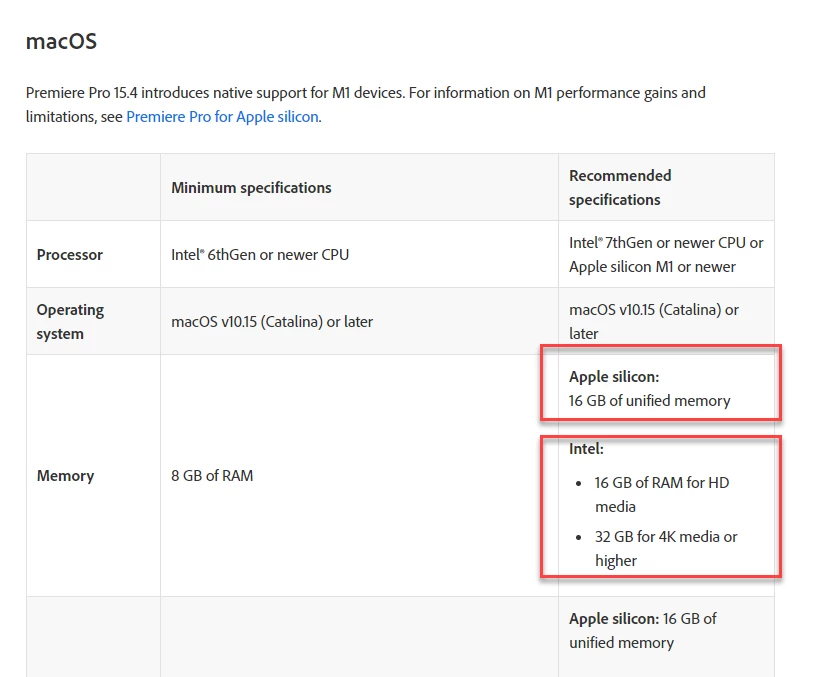
What does it say? Apple silicon 16 GB memory is similar to Intal memory of 32 GB or higher? Link is given above by Ann Bens 


Apple silicon:

16 GB of unified memory


Intel:

16 GB of RAM for HD media
32 GB for 4K media or higher


The problem you are running into is that you require a desktop, but Apple has not completed the transition to Apple Silicon on the desktop.


For laptops, Apple has a full line of efficient, powerful Apple Silicon computers from the affordable MacBook Air to the MacBook Pro M1 Pro/Max, all of which are used for video editing. The Apple laptops with M1 Pro/Max processors can be upgraded to 64GB unified memory.


For desktops, Apple has replaced only the Mac mini and the base iMac. Those low-end Macs support only up to 16GB RAM. The midrange and pro end of the desktop Macs can have more than 16GB RAM but are currently based on Intel processors, so they are not recommended.


That is why you’re seeing specs for a computer you can’t find. The best Apple Silicon Mac specs for video editing became available last month for Apple laptops, but the Apple desktop you want does not yet exist.


Apple said their transition from Intel to Apple Silicon would take two years. Right now they are one year into it (halfway through), and that is why the line of Apple Silicon desktop Macs is not yet complete.


Some time in the next year, the powerful pro-level Apple Silicon desktop Mac you want will be released. The only problem is that none of us know when Apple plans to release it.

5 replies

Participant
August 5, 2023

Absolutely, Mac computers are indeed well-regarded for video editing due to their powerful hardware, stable operating system, and efficient software ecosystem. If you're considering using a Mac for video editing, you'll want to look for certain specifications to ensure smooth and efficient performance. Here are some key factors to consider:


Processor (CPU): A powerful multi-core processor is essential for video editing tasks. Look for at least an Intel

Core i7 or better, or an Apple-designed M1 chip for the latest models.


Graphics Card (GPU): A dedicated graphics card with ample video memory will significantly accelerate rendering and playback. For Mac laptops, aim for models with dedicated GPUs like AMD Radeon Pro or NVIDIA GeForce. For desktops, consider high-end cards like AMD Radeon Pro Vega or NVIDIA RTX series.


RAM: Video editing is memory-intensive, so more RAM will help handle large video files and complex projects.

.smoothly. Aim for 16GB or more, ideally 32GB or higher for professional-grade editing  


Storage: Opt for SSDs (Solid State Drives) over traditional HDDs for faster read/write speeds. Consider getting a sizable internal SSD for your working projects, and if possible, an external high-capacity SSD or RAID storage for archiving.


Display: A high-resolution and color-accurate display is crucial for precise editing work. Retina displays on MacBooks and Retina 5K displays on iMacs are excellent options.


Connectivity: Ensure the Mac has multiple ports for peripherals like external hard drives, cameras, and monitors. Having Thunderbolt 3/4 ports can be a significant advantage for fast data transfer.


Operating System: macOS provides excellent video editing software options, including Final Cut Pro X and Adobe Premiere Pro. Make sure you are running the latest macOS version compatible with your hardware.


Cooling System: Video editing can put a strain on the computer, causing it to heat up. Ensure the Mac has a

robust cooling system to avoid performance throttling during intensive tasks.


Keep in mind that these specifications can vary based on your budget and the scale of your video editing projects. For professional-grade work or handling high-resolution footage (e.g., 4K, 8K), investing in higher-end hardware is recommended. However, even mid-range Macs can deliver satisfactory performance for most video editing needs.


Always consider future-proofing your purchase as video editing software and formats evolve over time. Upgrading individual components on Mac laptops is often limited, so if you have the flexibility, opt for a desktop Mac that allows for easier upgrades.


Remember to research specific Mac models and compare their specifications before making a decision. Whether you choose an iMac, MacBook Pro, or Mac Pro, a properly configured Mac for video editing can significantly enhance your editing experience and productivity. Happy video editing!

Legend
August 21, 2023

I bought an entry level refurb MacStudio a few months ago from apple and I'm very happy with it...  And I also generate low to medium resolution proresproxy proxies upon ingest which is extremely important if your working with 4K material that in a compressed format like avchd/mxf...  I actually get pretty good performance working with the camera original, but proxy generation is part of my standard workflow and is very helpful when your sequence starts to get complicated and effects heavy...  

MahaB82A
MahaB82AAuthor
January 17, 2023

It is happy to know both systems are best because I already anchored with Windows 11.  

Community Expert
November 25, 2021

I took a look at Macbook Pros on the Apple website and in the customize section

i found that you can choose a 32GB unified RAM. 

anyway check this for lots of info:

https://larryjordan.com/articles/configuring-a-2021-m1-macbook-pro-for-video-editing/

MahaB82A
MahaB82AAuthor
November 25, 2021

Thanks. I am not interested in laptop only in desktop.

Legend
November 25, 2021

In this case, I would not recommend a Mac at this point. You see, every single Intel-powered Mac comes with a GPU that does not function as well in Premiere Pro as Nvidia GPUs do (and all recent Intel-powered Macs only come with AMD Radeon GPUs or only integrated Intel graphics). In fact, all of the major core components of the Intel-powered Macs are now one or two full generations old at this point. And as no new Intel-powered Macs are being developed any longer, you would be just wasting money at that point. Stick with Windows only, in your case.


And that's not to mention the performance: The most powerful Intel-powered iMac does not perform sufficiently better or faster in Premiere Pro than even a base-model M1 Mac Mini or 24" iMac to justify the substantially higher price and massively increased power consumption.

Legend
November 25, 2021

Also, Apple is well into the transition away from Intel-powered systems to Apple's own-designed ARM-based M1-series silicon for the CPU architecture. Therefore, I do not recommend any of the remaining Intel-powered Macs at this time. Only the "Apple Silicon"-powered (M1, M1 Pro or M1 Max) Macs should be considered, going forward.

MahaB82A
MahaB82AAuthor
November 25, 2021

Problem is I use Windows and RAM is 32GB. Task Manager shows 42% of the RAM is used. Apple M1 Chip maximum ram is 16GB. Only Intal Core has a ram option from 16GB to 64GB.


https://www.apple.com/ca_edu_93120/shop/buy-mac/mac-mini


Ann Bens
Community Expert
Community Expert
November 25, 2021

Both systems are good for editing.


Adobe Premiere Pro CC System Requirements

MahaB82A
MahaB82AAuthor
November 25, 2021

I wish to know whether this type of folder organising is possible in windows.