Answered
Main Menu Disappeared
I have Premiere Pro 2022 Version 22.5. I'm on Windows 10.
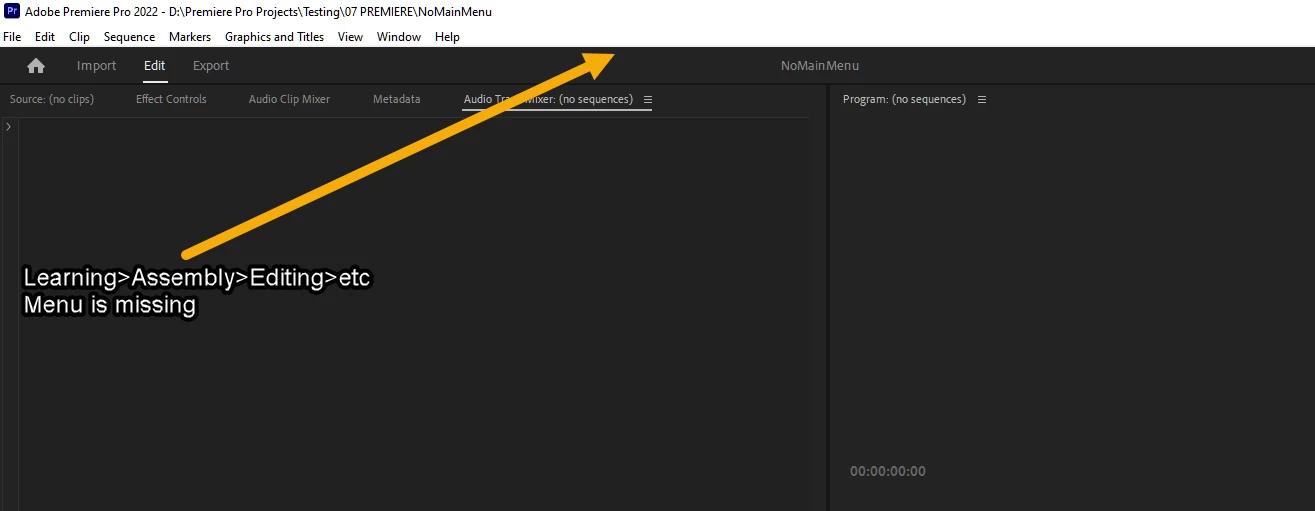
The Main Menu with Learning>Assembly>Editing>Color has disappeared from all of the Workspaces. Reset to Saved Layout doesn't restore the menu.
It's this one:

I have Premiere Pro 2022 Version 22.5. I'm on Windows 10.
The Main Menu with Learning>Assembly>Editing>Color has disappeared from all of the Workspaces. Reset to Saved Layout doesn't restore the menu.
It's this one:
Tricky! I had been there but didn't notice a skerrick of that menu coyly peeping out from behind that Workspaces icon. I had to select the pipe and drag it out blinking into the light. Would never have found it. Cheers Steve.
Already have an account? Login
Enter your E-mail address. We'll send you an e-mail with instructions to reset your password.
 AdChoices