

Maintaining subclip metadata - banging head against wall :(
I have 6 AVI files ranging from 30 - 55 minutes in length - captured back in the day over firewire from a miniDV camera. Each file contains dozens and dozens of slated individual takes (it's a short film). I created subclips for each take. I added a lot of metadata to each subclip, camera angle/shot size/scene/setup/take# and even the dialog that is spoken in each take. Great right?
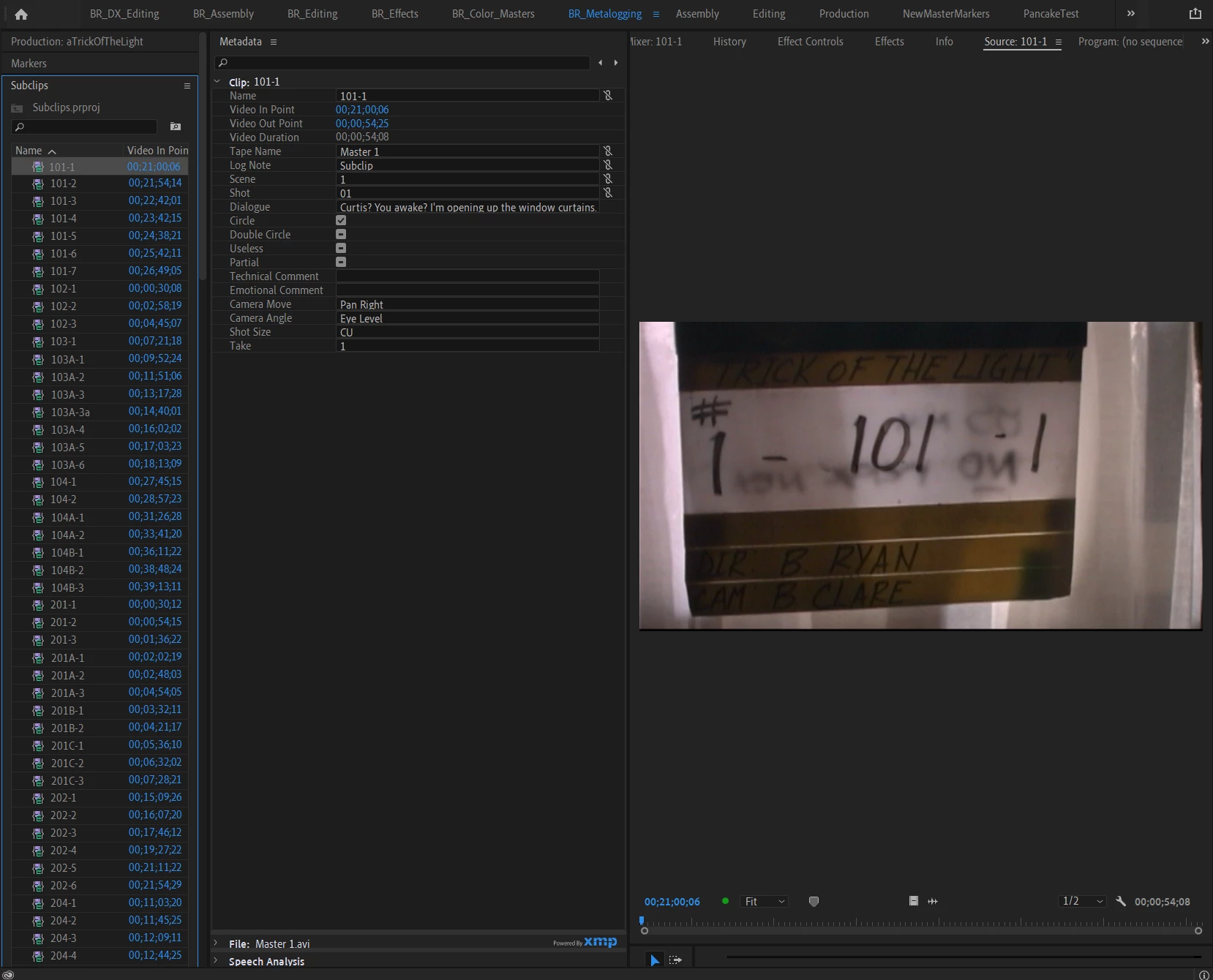
I've decided to use the Production feature, as my project file was getting pretty large. So for simplicity's sake, let's say I just have two project files in my Production - the above "Subclips" project (which only contains the subclips) and a "Scene 01" project, which contains a single sequence. I select the subclips I require for the scene and pull them from the Subclips project into the Scene01 project - and presto! my Scene01 project has the clips in the sequence, though the project itself still just has one item in it - the sequence file (and thus the beauty of Production feature).
However, when I select the same clip in my Scene 01 file and look at metadata, it does not contain metadata anymore - I suppose because it is now another "instance" of the subclip?
Of course the subclips in the "Subclips" project (and in the Scene01 project) ultimately point back to one of the 6 "master" AVI files, e.g. if I match frame it will pull up relevant AVI file. So there is no point in my "Dynamically Linking" my metadata with source clip - as my sour clips are 45 minute long video files, so, e.g. if I use the Scene dynamically linked metadata field and input "01" on a subclip for scene 01, it will mark the entire 45 min long AVI file as being scene 01, though many of the takes within that file are fore scene 02.
I want to maintain my metadata when I use subclips. I've tried looking into exporting and importing metadata, and even went so far as to export each subclip in the original format as a new piece of media (which works) - but I'm wondering if I've lost some quality - I obviously want to use the original footage, as initially captured.
I think I understand the difference between source clips, subclips and instances of each - but have to wonder, with all footage these days being captured on media cards, how the workflow should go when you have single large files with many setups and takes. Perhaps it's done during the "Capture" - but I can't go back in time and recapture the files from the miniDV (they are lost).
Am I making sense? I'm sure I'm missing something fundamental about the subclip workflow - but have searched high and low and so threw in the towel and am asking for help here.
Thanks for any replies!
 AdChoices