
Participant
January 11, 2018
Question

Major Premiere Pro CC relinking issue - Bad file names and file path

  • January 11, 2018
  • 3 replies
  • 1320 views

I've been trying to open a premiere pro project on a different machine with all assets located in a different root directory. Normally I'd expect premiere to bring up a re-link dialogue but instead it opens straight into my project showing all media offline. When I select media to re-link it looks like the file name and file path are all screwed up (image attached). Because of the odd file name I have to relink each clip individually, one by one. Any ideas on how to resolve this issue? Is there a way to reset the file names of all media in a project?

In the middle of a commercial project. Desperate for help!
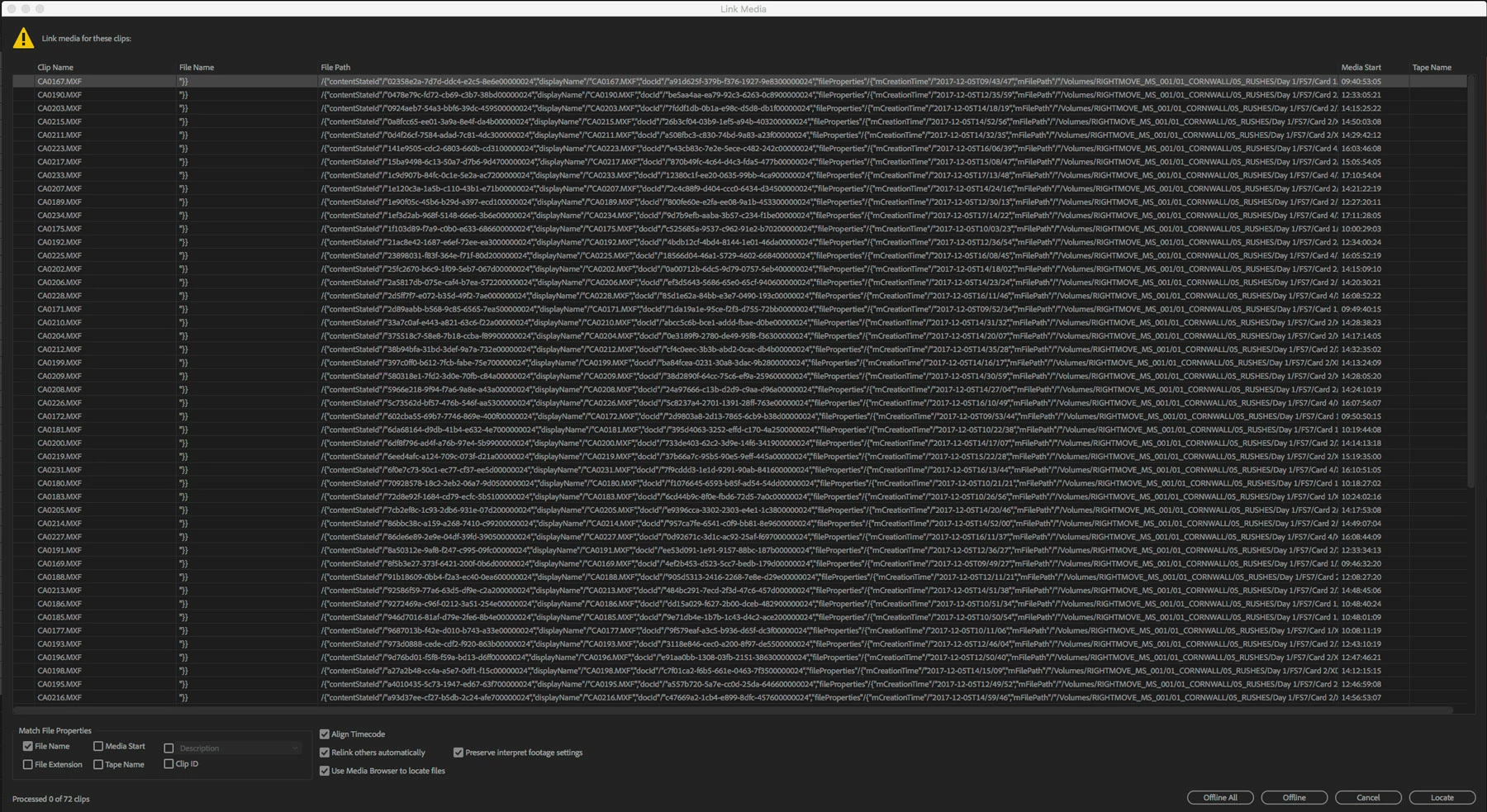
    This topic has been closed for replies.

    3 replies

    Participant
    January 20, 2018

    Prokopi <forums_noreply@adobe.com> 於 2018年1月11日 下午6:33 寫道:

    Major Premiere Pro CC relinking issue - Bad file names and file path

    created by Prokopi <https://forums.adobe.com/people/Prokopi> in Premiere Pro CC - View the full discussion <https://forums.adobe.com/message/10095863#10095863>

    I've been trying to open a premiere pro project on a different machine with all assets located in a different root directory. Normally I'd expect premiere to bring up a re-link dialogue but instead it opens straight into my project showing all media offline. When I select media to re-link it looks like the file name and file path are all screwed up (image attached). Because of the odd file name I have to relink each clip individually, one by one. Any ideas on how to resolve this issue? Is there a way to reset the file names of all media in a project?

    In the middle of a commercial project. Desperate for help!

    https://forums.adobe.com/servlet/JiveServlet/downloadImage/2-10095863-1392589/900-491/premiere-glitch.jpg <https://forums.adobe.com/servlet/JiveServlet/showImage/2-10095863-1392589/premiere-glitch.jpg>

    If the reply above answers your question, please take a moment to mark this answer as correct by visiting: https://forums.adobe.com/message/10095863#10095863 and clicking ‘Correct’ below the answer

    Replies to this message go to everyone subscribed to this thread, not directly to the person who posted the message. To post a reply, either reply to this email or visit the message page:

    Please note that the Adobe Forums do not accept email attachments. If you want to embed an image in your message please visit the thread in the forum and click the camera icon: https://forums.adobe.com/message/10095863#10095863

    To unsubscribe from this thread, please visit the message page at , click "Following" at the top right, & "Stop Following"

    Start a new discussion in Premiere Pro CC by email <mailto:discussions-community-premiere@adobe-v8.hosted.jivesoftware.com> or at Adobe Community <https://forums.adobe.com/choose-container.jspa?contentType=1&containerType=14&container=3381>

    For more information about maintaining your forum email notifications please go to https://forums.adobe.com/thread/1516624 <https://forums.adobe.com/thread/1516624>.

    This email was sent by Adobe Community because you are a registered user.

    You may unsubscribe <https://forums.adobe.com/unsubscribe.jspa?email=vivienliew9696%40gmail.com&token=99b79d5dd5421e74e87cb4171c62cd8845e814c563cbb2734d782d375241d9db> instantly from Adobe Community, or adjust email frequency in your email preferences <https://forums.adobe.com/user-preferences!input.jspa>

    Legend
    January 11, 2018

    I'm thinking Step 3H below might solve this.

    Unofficial Premiere Pro Troubleshooting Guide

    yenaphe
    Inspiring
    January 11, 2018

    Do you still have access to the original project on the original machine ?

    If so, you can try to do a "file > Project Manager > collect files" to a folder of your choice and then move that folder to your new machine. Every assets will have been relinked from this new folder (it creates a proper project file in said folder).

    Hope this helps,

    Seb

    KeithH_RTN
    Participating Frequently
    April 11, 2018

    I had the same issues. It seems like Adobe doesn't know what the eff to do and just releases updates without testing them. There were 3 different problems I was having, this one being one of them, and every time they said that their only real solution was to go back a version. Adobe is turning out to be worse than Apple's first release of FCP X.

    The real answer to this particular question is unless you have the time to relink every clip you have one by one, then you have to downgrade back to 12.0.1. Sorry everyone