

Hagen Schmiedel
Inspiring
March 31, 2019
Answered

Make a cut on all markers at the same time

  • March 31, 2019
  • 2 replies
  • 13283 views

Hey Community,


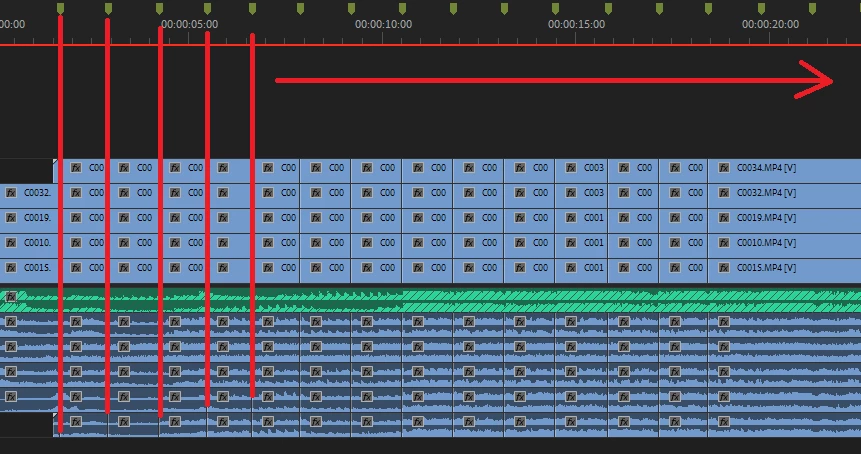
I'm searching for a shortcut or a "script action" to have the ability to make a "cut through everything" at every marker I've already set simultaneously.


That would save so much time. Does anyone have a solution for that?
 

Correct answer Hagen Schmiedel

Short update... 

I created a keyboard shortcut in premiere for "go to next marker" on my "H"-key, wich basically moves the playhead to the next marker when I press "H" on my keyboard. Then I created a shortcut for "Add edit to all Tracks" to my "G"-key wich adds a cut through the whole timeline, exept for tracks that are locked.
Now I can press alternately H and G on my keyboard and cut everything in just seconds. 


2 replies

Participant
July 31, 2022

I asked this question for million years, I hope they would do an update for this. I can't beleive they didn't do this for years 😞 By the way thanks for your shortcuts trcik anyway 

Hagen Schmiedel
Hagen SchmiedelAuthorCorrect answer
Inspiring
September 18, 2020

Short update... 

I created a keyboard shortcut in premiere for "go to next marker" on my "H"-key, wich basically moves the playhead to the next marker when I press "H" on my keyboard. Then I created a shortcut for "Add edit to all Tracks" to my "G"-key wich adds a cut through the whole timeline, exept for tracks that are locked.
Now I can press alternately H and G on my keyboard and cut everything in just seconds. 


Participant
July 13, 2022

Hello, Yes this does work. However, if you make a range for a marker and you want to make cuts on the ins and out markers, this doesn't work. For some reason, adobe took out the "go to next marker" function to also go to the "out-marker". It only goes to the "in-marker". My only solution right now is to go with the above method, and then go back to make cuts one-by-one. 

To make it easier, I make the shortcut key Shift+G as a "add edit" so that I can hold down shift while draggin my slider to the next out point that it magetically aligns with. Very tedious second half. There really should be a script for this.