
Participant
June 21, 2019
Question

Make essential graphics text panel larger

  • June 21, 2019
  • 2 replies
  • 1584 views

Hi there,

I have recently been creating some motion graphics templates on After Effects to use in Premiere Pro but I am having trouble expanding the text box that is created when you select "Source Text" as a modifier.
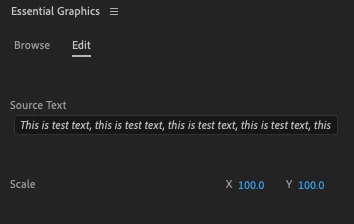
As you can see even though there is only test text in there, I can't actually see the end of the text box which makes it very frustrating when trying to type out long paragraphs.

If anyone has a solution that would be great!

Thank you very much,

Jck

2 replies

Participant
June 21, 2019

Thank you for this simple answer, I hadn't thought about doing this! Do you know if there are any more ways of expanding the text without expending the whole essential graphics panel?

MarekMularczyk
Community Expert
Community Expert
June 21, 2019

I don't think you can expand the text field. But you can redock the Essential Graphics panel, so for example you could dock it at the top of your screen and make it run across the entire width of your screen.

Adobe Community ExpertAdobe Certified Professional
MarekMularczyk
Community Expert
Community Expert
June 21, 2019

Are you saying that when you make your Essential Graphics panel wider the text frame doesn't expand?

Adobe Community ExpertAdobe Certified Professional
Participant
June 27, 2023

This is fine if you have a long sentence - but the text box is locked to 3 lines height, there should be a way to make this bigger! It's infuriating actually how small the text box is

Participant
October 18, 2024

I too find this extremely frustrating. Would be great to be able to expand the panel text box