
MahaB82A
January 10, 2025
Answered

Make Subclips

  • January 10, 2025
  • 1 reply
  • 507 views

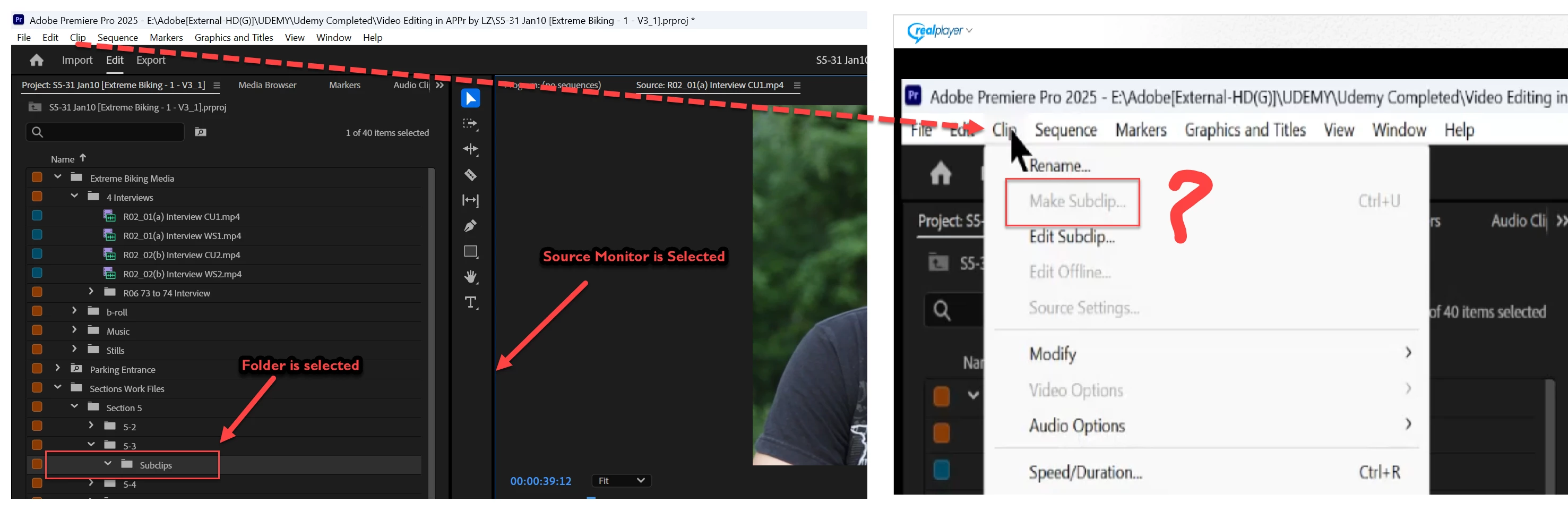
I am doing a tutorial which is in older version, my APPr is a newer version. I want to make a subclip. For that I selected source monitor & subclip folder but Make Subclip tool is greyed out. How to fix it? Video also attached.


Correct answer Kevin-Monahan

SM= "Source Monitor." Open the clip there, make your In and Out point selection, then choose to make the subclip. I hope that helps, @MahaB82A.


Cheers,
Kevin


1 reply

Ann Bens
Community Expert
Community Expert
January 10, 2025

You need to select a clip and open that in the SM (not a folder).


MahaB82A
MahaB82AAuthor
January 10, 2025

Sorry, I couldn't follow you. 

Kevin-Monahan
Community Manager
Kevin-MonahanCommunity ManagerCorrect answer
Community Manager
January 10, 2025

SM= "Source Monitor." Open the clip there, make your In and Out point selection, then choose to make the subclip. I hope that helps, @MahaB82A.


Cheers,
Kevin


Kevin Monahan - Sr. Community and Engagement Strategist – Adobe Pro Video and Audio