Participant
December 21, 2023
Answered

Manipulating fonts inside MOGRT's

  • December 21, 2023
  • 2 replies
  • 4370 views

Hello. I have a collection of lower thirds that I use inside Premiere and can change the color of but not the font. Can I update these so I can change the fonts in Premiere? Thanks.

This topic has been closed for replies.
Correct answer Theresa Rostek

HI @USIP AV344002503297 ,


It's possible!

  1. File -> Open the mogrt in After Effects. It will ask you where to put the project folder on disk, select a location, click OK.
  2. Go to Window -> Essential Graphics
  3. Find the text input(s) you want to update
  4. Click on Edit Properties
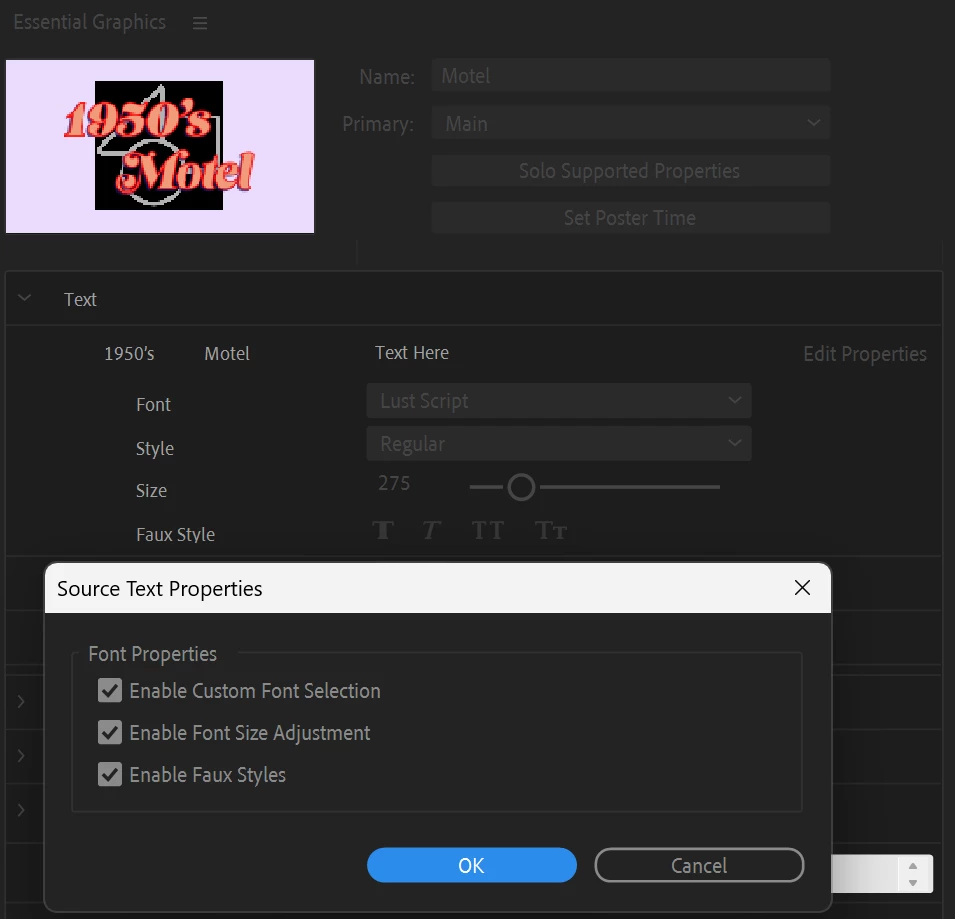
  5. Select Enable Custom Font Selection. You can choose Enable Font Size Adjustment and Enable Faux Styles if you want. Click OK


  1. Select Export Motion Graphics Template... at the bottom. Save the project, and select the destination you need the mogrt to be. (Local Templates Folder is common, but if you use "manage additional folders", you can send it there) You may leave the checkboxes checked or unchecked. Click OK
  2. The most important step is to now test your mogrt in Premiere Pro. Try changing the font and see that the custom font works with all of the different options in the mogrt. See if everything works as you need it to, or you might want some other controls added in. Go back to After Effects to fix, or enjoy your updated mogrt.


Cheers,

Theresa

2 replies

Theresa Rostek
Community Manager
Theresa RostekCommunity ManagerCorrect answer
Community Manager
December 21, 2023

HI @USIP AV344002503297 ,


It's possible!

  1. File -> Open the mogrt in After Effects. It will ask you where to put the project folder on disk, select a location, click OK.
  2. Go to Window -> Essential Graphics
  3. Find the text input(s) you want to update
  4. Click on Edit Properties
  5. Select Enable Custom Font Selection. You can choose Enable Font Size Adjustment and Enable Faux Styles if you want. Click OK


  1. Select Export Motion Graphics Template... at the bottom. Save the project, and select the destination you need the mogrt to be. (Local Templates Folder is common, but if you use "manage additional folders", you can send it there) You may leave the checkboxes checked or unchecked. Click OK
  2. The most important step is to now test your mogrt in Premiere Pro. Try changing the font and see that the custom font works with all of the different options in the mogrt. See if everything works as you need it to, or you might want some other controls added in. Go back to After Effects to fix, or enjoy your updated mogrt.


Cheers,

Theresa

R Neil Haugen
Legend
January 9, 2024

Thanks for posting this, Theresa! It's a fairly common question. And great to have a succint post to point to.

Everyone's mileage always varies ...
Kevin-Monahan
Community Manager
Community Manager
January 9, 2024

That's some gold right there, @R Neil Haugen, so I marked it as a "featured conversation." Hope it helps others. @Theresa Rostek is a rock star!


Cheers,

Kevin

Kevin Monahan - Sr. Community and Engagement Strategist – Adobe Pro Video and Audio
kglad
Community Expert
Community Expert
December 21, 2023

in the future, to find the best place to post your message, use the list here, https://community.adobe.com/

p.s. i don't think the adobe website, and forums in particular, are easy to navigate, so don't spend a lot of time searching that forum list. do your best and we'll move the post (like this one has already been moved) if it helps you get responses.


<"moved from using the community">