
Marker Panel displays all markers incorrectly
Operating System Windows v.10.0.17763.1
Adobe Premiere Pro Version 15.2.0 (Build 35)
Hi,
When I add markers to my source clip and then open up the Markers Panel, the markers (no matter how many I create) display the same In/Out timestamps regardless of where in the source clip I place them (see image below). I didn't see any other post reporting this; I apologize if it is a duplicate.
I tried:
- closing the clip and reopening.
- closing premiere pro and reopening.
- deleting all markers and remaking.
It stays the same.
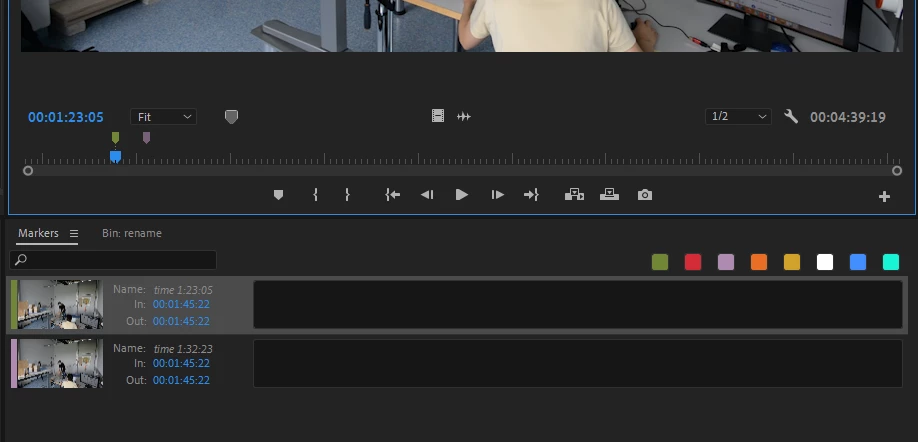
As I was preparing the post for the forum, I ran a system compatibility report and found the following message:
Analyzing project: sandbox-names-markers.prproj
Details in file "SystemCompatibilityReport.ProjectAnalysis.txt"
PROJECT ANALYSIS FOUND ERRORS.
See full log for more contextual details on the errors. Logged errors were:
------------------------------------------------------------
Error 1)
[PROJECTITEM] : P1-4
[CLIPPROJECTITEM] : P1-4
[MASTERCLIP] : P1-4
[MARKERS]
*** ERROR: Related markers that are expected to be identical are not. (see log for details)
However, I never saw this error pop up on screen when I made the markers, and I don't know how to fix the error or if it's even related to the issue I'm seeing.
 AdChoices