
Exit
  • Global community
    • Language:
      • Deutsch
      • English
      • Español
      • Français
      • Português
  • 日本語コミュニティ
  • 한국 커뮤니티
0

Markers inserting at different points for audio and video

New Here ,
Sep 23, 2020 Sep 23, 2020

Working on a project and having issues with markers inserting at different points on the video and audio tracks. I typically put a marker on the linked audio and video selection, and the marker will insert at the same location on the audio and video tracks. In my master project it's working fine - but in this particular subsequence, the markers are a few seconds off. I suspect it has something to do with timecode but I can't figure it out. 


Running Premiere v14.4.0 on a 2017 iMac 4.2GHz Quad-Core Intel Core i7, 16 GB 2400 MHz DDR4 memory. Thanks in advance.
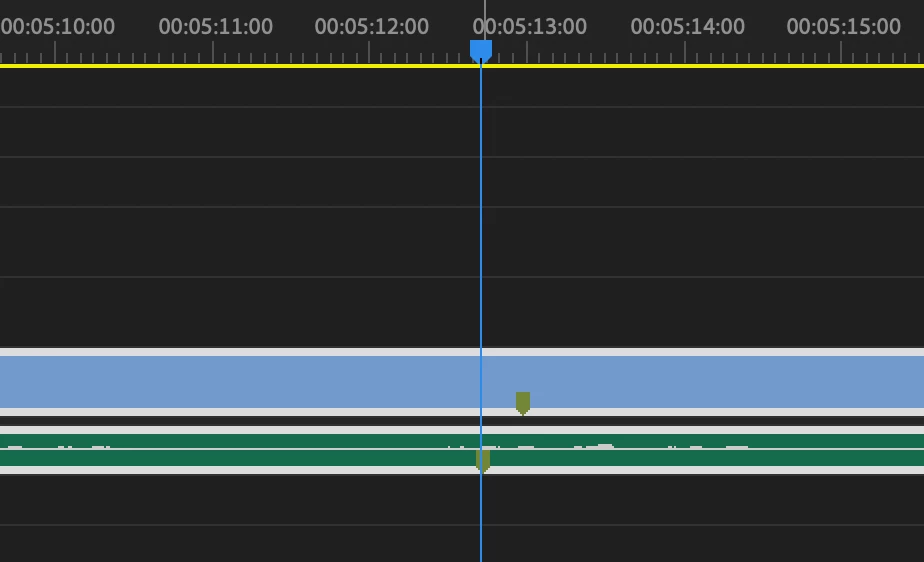
 

Screen Shot 2020-09-23 at 3.41.02 PM.png


TOPICS
Editing , Error or problem
666
Translate
Report
Community guidelines
Be kind and respectful, give credit to the original source of content, and search for duplicates before posting. Learn more
community guidelines
Adobe Employee ,
Sep 25, 2020 Sep 25, 2020

Hi Christian5EE7,

Sorry about this weird experience. Have you checked that the video and audio tracks are not unlinked accidentally and are shifted by a few frames? Also, is this happening to all the clips in that sequence or any specific one?


Thanks,

Sumeet

Translate
Report
Community guidelines
Be kind and respectful, give credit to the original source of content, and search for duplicates before posting. Learn more
community guidelines
Community Beginner ,
Sep 25, 2020 Sep 25, 2020

Hi Sumeet – it's happening to all the clips in the sequence. And unfortunately the tracks are definitely linked and synced still – just double checked. Thank you for the help.

Translate
Report
Community guidelines
Be kind and respectful, give credit to the original source of content, and search for duplicates before posting. Learn more
community guidelines
Community Expert ,
Sep 25, 2020 Sep 25, 2020

embed.jpg

...so we dont have to download unknown files: we help you, you help us. Thanks! 

Translate
Report
Community guidelines
Be kind and respectful, give credit to the original source of content, and search for duplicates before posting. Learn more
community guidelines
Community Beginner ,
Sep 25, 2020 Sep 25, 2020

Here's the photo embedded.Screen Shot 2020-09-25 at 6.27.41 PM.png

Translate
Report
Community guidelines
Be kind and respectful, give credit to the original source of content, and search for duplicates before posting. Learn more
community guidelines
Community Expert ,
Sep 26, 2020 Sep 26, 2020

Turn on Display Out of Sync Indicators for unlinked clips in the Pref/Timeline.

Translate
Report
Community guidelines
Be kind and respectful, give credit to the original source of content, and search for duplicates before posting. Learn more
community guidelines
Community Beginner ,
Sep 26, 2020 Sep 26, 2020

Hi Ann - I turned on the Display Out of Sync Indicators and I'm still encountering the same problem. I don't see any indicators - potentially because I manually synced and linked the audio and video tracks. Thanks so much for the help.

Translate
Report
Community guidelines
Be kind and respectful, give credit to the original source of content, and search for duplicates before posting. Learn more
community guidelines
LEGEND ,
Sep 25, 2020 Sep 25, 2020

How are these "linked" ... ? Did they come that way from a camera, or have you added sound to the video ... or moved the audio track on the timeline somehow?


Neil

Translate
Report
Community guidelines
Be kind and respectful, give credit to the original source of content, and search for duplicates before posting. Learn more
community guidelines
Community Beginner ,
Sep 26, 2020 Sep 26, 2020

Hi Neil, thanks for the help. 


I added the sound to the video - recorded separately - and synced with a slate at the beginning of the take. 

Translate
Report
Community guidelines
Be kind and respectful, give credit to the original source of content, and search for duplicates before posting. Learn more
community guidelines
Community Expert ,
Sep 26, 2020 Sep 26, 2020

That might be the culprite.

Translate
Report
Community guidelines
Be kind and respectful, give credit to the original source of content, and search for duplicates before posting. Learn more
community guidelines
Community Beginner ,
Sep 02, 2023 Sep 02, 2023
LATEST

I'm having this same issue, also with audio that was recorded seperately and synced with timecode - is there a way to solve this? 

Translate
Report
Community guidelines
Be kind and respectful, give credit to the original source of content, and search for duplicates before posting. Learn more
community guidelines