
Liveshots
Inspiring
November 21, 2019
Question

Markers unavailable when media is linked

  • November 21, 2019
  • 2 replies
  • 603 views

I always record my video's audio on an external device, remaster, and replace the camera's audio. In PP I 'Link' the remaster wav to the MP4 video so it wouldn't slip out of sync.

When I do this, any marker points I put on either of the sources (not the timeline) are un-editable. I can plant a marker and it shows up in the marker list and timeline view, but invisible in the source media view which is the only place you can drag them. Even the 'Go to marker' buttons are greyed out.
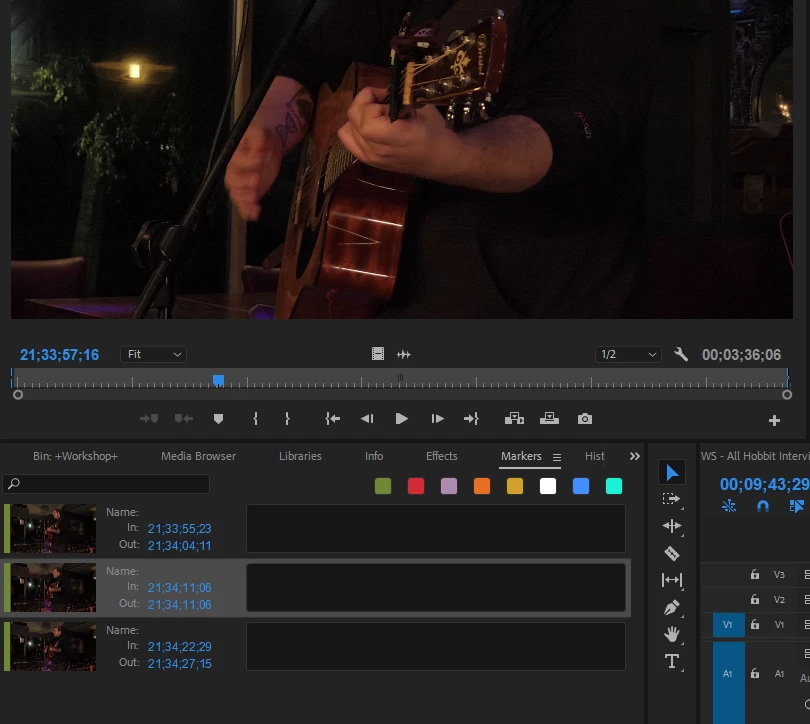
It was only minutes ago I realised that when I unlinked the mp4 from the wav, that the markers were visible and useable again. So now I've got to unlink to fiddle the markers - doing it on on BOTH medias, then relink to keep them in sync. That's pretty poor for a professional software. If the medias are Linked, then the markers should be linked and synced too.

This topic has been closed for replies.

2 replies

R Neil Haugen
Legend
November 21, 2019

I know your project isn't a "multicam", and commented so. But the multicam process in Premiere is it's best process for joining video and audio media files.


And top and tail trims, markers, all the normal editing things work as with a "normal" clip.


Which is why I specifically stated that you could select an entre bin of video and remote audio clips, and Premiere would create specific clips for each one.


No reference to multi-camera multi-track sequences.


Again, simply the best and fastest way to join separate video/audio files.


Neil

Everyone's mileage always varies ...
R Neil Haugen
Legend
November 21, 2019

The multi-cam process handles this well and markers work as expected. It doesn't need multiple cameras and audio files.


In fact you can have a bin of separate clips each with a remote matching audio, select all "create multicam", and it will match each camera with its audio separate from the others.


Neil

Everyone's mileage always varies ...
Liveshots
LiveshotsAuthor
Inspiring
November 21, 2019

This isn't a multi-camera project, it's just got an independently recorded wav file. I came back here to say that 'Grouping' the A/V rather than 'Linking' has solved my problem, but I'm not impressed and there seems to be a lot of bugs out there with markers