juangusta
Participant
January 30, 2025
Question

Masking effects an area outside of the mask, please help

  • January 30, 2025
  • 3 replies
  • 507 views

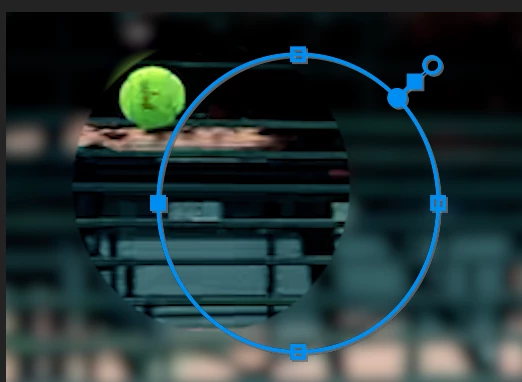
You can see in the photo attached, my mask is effecting to the left of the mask in the same shape as the mask, as opposed to just inside the mask.

3 replies

Ishan Y
Community Manager
Community Manager
January 30, 2025

Hi juangusta,

Could you install the latest version of Premiere Pro (25.1) and let us know if you still see the issue? Please uncheck the option to remove previous versions while installing the app. If you still see the problem, please let me know if it's possible for you to send the project file along with the media file that's masked. That will help me better understand the problem.


Thanks,

Ishan

Please tag me (@) in your replies so that it notifies me and helps me respond promptly.
juangusta
juangustaAuthor
Participant
January 31, 2025

Unfortunetly it's still happening, messaging you the project file with the media in question attached.

Ishan Y
Community Manager
Community Manager
January 31, 2025

I have received your DM. Please allow me some time to look into this issue. 

Ann Bens
Community Expert
Community Expert
January 30, 2025

Post premiere version and build 

juangusta
juangustaAuthor
Participant
January 30, 2025

Adobe Premiere 2024 24.6.4 Build 3 on a MacBook Pro 2023 with an Apple M3 Pro 18 gig memory, plenty of harddrive space, and MacOS Sonoma 14.6.1

Community Expert
January 30, 2025

Do you have your monitor set to a non default scaling?

juangusta
juangustaAuthor
Participant
January 30, 2025

It's set to default, I've also noticed that when I delete and start over, it works fine as I'm setting the key frames and adjusting the mask, but then after I play it back it, the entire effected mask area moves outside of the mask. I've tried rendering it hoping it was just a non rendered glitch but no help. I'd love to not have to export this into another program and just do this simple mask in premeire. Thank you for responding so quickily too : )