
Participant
September 25, 2021
Answered

Masking with 3 Way Color Corrector makes it brighter than the rest of the video (Not masked part)

  • September 25, 2021
  • 1 reply
  • 430 views

When using Lumetri color to remove colors and change some and then mask out parts manually with Three Way Color Correcter, I use it to make it monochromatic for parts that dont get selected. When I do that, the masked part appears brighter than the rest of the image making the line where the mask starts very noticable. I used to have a way to just change the 0 to 1 on Master Output Black Level but that doesnt work on 2021 like it did for me on my old computer using 2018. Sometimes it works and sometimes its brighter than it should be. Usually when there's some colors still there but not when its all gone. If there's any suggestions on how to make the masking less noticable, let me know.  
This topic has been closed for replies.
Correct answer MyerPj

You can use multiple Lumetri layers, but the first you don't even need to apply, so that's pretty easy! Just open the Lumetri Color panel and drag the Saturation level down to zero and you have a black and white image. 🙂


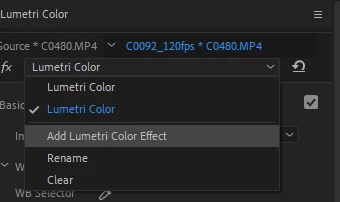
Then right at the top there is a drop-down and you can "Add Lumetri Color Effect" It's easy also! 🙂


1 reply

MyerPj
Community Expert
Community Expert
September 25, 2021

Did you notice the Three-Way Color Corrector is in the "Obsolete" folder? That's a pretty strong sign you should figure out another way. Can't you use another Lumetri layer to get the black and white for you?


Participant
September 25, 2021

I didn't realize that 3 way was in that kind of folder. I used it since it was much easier and faster when trying to make it mono. I guess I can just do that then

MyerPj
Community Expert
MyerPjCommunity ExpertCorrect answer
Community Expert
September 25, 2021

You can use multiple Lumetri layers, but the first you don't even need to apply, so that's pretty easy! Just open the Lumetri Color panel and drag the Saturation level down to zero and you have a black and white image. 🙂


Then right at the top there is a drop-down and you can "Add Lumetri Color Effect" It's easy also! 🙂