

Media Browser displays hidden drives on Windows 10
I logged the following problem with Adobe Support and they suggested I post to Adobe forums so here goes.
***
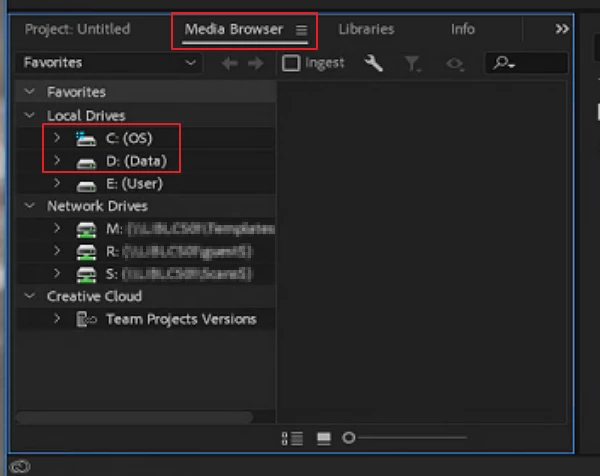
We install a number of Adobe CC 2018 products to Windows 10 computers that have the local hard drive partitions C: and 😧 hidden to users. A registry key edit is used to hide specific drive letters. The built in Media Browser function included with Premiere Pro, Media Encoder & Audition ignores the registry setting and displays the C: and 😧 folder structure and displays files stored there with supported file types for example .xml.
When using Adobe CC Premiere Pro, Media Encoder or Audition File menu to Open or Save the C: and 😧 partitions are hidden - its only Media Browser that ignores the registry setting.
Is it possible for Adobe to fix Media Browser so that it obeys the underlying operating system configuration and not display hidden drive letters to users if so configured?
Details
Windows 10 Enterprise version 1709
Adobe Audition CC 2018 version 11.1.1
Adobe Media Encoder CC 2018 version 12.1.2
Adobe Premiere Pro CC 2018 version 12.1.1
Windows registry keys
HKEY_CURRENT_USER\Software\Microsoft\Windows\CurrentVersion\Policies\Explorer\NoDrives
HKEY_CURRENT_USER\Software\Microsoft\Windows\CurrentVersion\Policies\Explorer\NoViewOnDrive
 AdChoices