

EvanLNorthCoast
Inspiring
May 14, 2019
Question

Mercury Transmit either does not work or chooses the wrong monitor

  • May 14, 2019
  • 16 replies
  • 16930 views

I am having a frustrating issue with my Mercury Transmit function on Premiere Pro (13.1.2) and After Effects (16.1.1). Every time I open either program after my computer has been shut down, Mercury Transmit is no longer working correctly. It usually does not transmit anything, or sometimes but rarely, it is transmitting to a wrong monitor.

Frustratingly, when I go in to Preferences > Playback in Premiere (or Preferences > Video Preview in AE) and I switch the transmit to the correct (4K) monitor, when I hit OK, it either does not transmit, or transmits to an incorrect 1080 monitor. When going in to the preferences after this error, it shows the wrong monitor check box is checked.

Example in Premiere:

I go in to Preferences > Playback and select my 4K monitor as the monitor I want to transmit to:

After hitting OK, nothing is transmitting, so when I go back in to my preferences, the wrong monitor is selected:

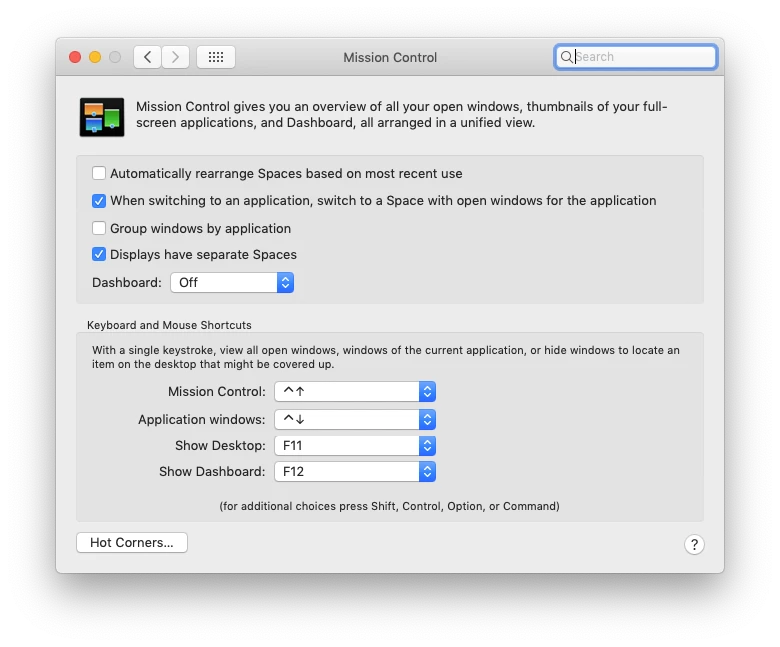
My computer recognizes all of the monitors correctly, and I even took advice from another post where I unchecked 'Automatically rearrange Spaces based on most recent use' in Mission Control. That didn't help.

Workarounds that have worked to solve this issues for me in the past are now not working:

  • Toggling "Enable Mercury Playback" off, closing preferences, opening again and toggling it back on
  • Switching from a Thunderbolt>HDMI to a HDMI>HDMI
  • Resetting all program preferences (which is an unacceptable solution)
  • Restarting my computer

This is a very time-consuming and infuriating problem. Does anyone have any theories why my computer is acting this way and how I can fix it?

This topic has been closed for replies.

16 replies

fabfilm
Inspiring
June 3, 2019

I have solved the issue on my computer (did a long test run with Adobe Support).

What did work was to install the latest nvidia Game Ready Driver 430.86 (whql). It was just published a few days ago from this post. I had previously tried many other drivers (Studio Ready, Content Ready, old drivers) but this seemed to fix it.

Known Participant
June 3, 2019

I'll try tonight!

Thanks for the test ands the info!

fabfilm
Inspiring
June 4, 2019

I'm sorry, but the issue has returned.

Worked like a charm yesterday. Did a reboot and here we go again.

I physically switched the cables on my graphics card. So changing the connections to which the monitors go to and it works again now.

Participating Frequently
May 28, 2019

I've been trying to bring more attention to this bug as I think the length of time it has been unaddressed is completely ridiculous on Adobe's part.  Please vote here so we can finally get this essential feature fixed:  https://adobe-video.uservoice.com/forums/911311-after-effects/suggestions/37282141-mercury-transmit-issue-in-16-1

R Neil Haugen
Legend
May 28, 2019

Yes, it's good to get the data on their system.

However, they acknowledged this one a while ack and like all bugs, they will release the patch when they feel they have this and a number of other bug fixes ready to release.

It's not being ignored at all. Not that any of us would mind a quicker release of the patch.

Neil

Everyone's mileage always varies ...
Known Participant
June 3, 2019

With respect!

Sorry but when Adobe sale a "professionnal" product at this price to professionnal editor or business, they have to react faster then waiting for multiple bugs to release a patch. I have multiple editing room and this problem is really a mess with clients when you can't use multiple display. For me, it's a amateur service!

jake865
Known Participant
May 22, 2019

I've literally been clinging to V - 11.1.2 trying to avoid bugs and for some reason decided now was the time to update. Just like that, there goes mercury transmit.

Participant
May 22, 2019

I have exactly the same issue, but on Windows and using 13.1.2

Annoyingly, if I move the Premiere program to my second monitor (the one I want to mercury transmit to) and select to transmit to my first monitor, it works. However, with testing this using a 3K anamorphic clip, the scaling is completely off and does not resize to the monitor it is outputting to. Both monitors are 3840x2160 but with different size Windows scaling options, though this has never been a problem before.

For the meantime I guess I will have to not use the second monitor for colour correction, which is extremely unhelpful, which is what it is set up for.

Anyone got any fixes?

Cheers

R Neil Haugen
Legend
May 22, 2019

As noted, it's an acknowledged bug and we are waiting for the next bug patch release. Sadly, no way around it for most of us.

Neil

Everyone's mileage always varies ...
Participating Frequently
February 14, 2020

What does Premiere show for that monitor in the Transmit Out options?


It just lists a 1440 monitor and a 1080 monitor (none of which exist), even though it’s a 2160 (which the system confirms). Only the 1080 selection sends anything to the external monitor. Strange.
R Neil Haugen
Legend
May 14, 2019

There is a bug in this version, and yea, it's in both Ae and Pr. So ... we are waiting for the release with the fix for this to be 'dropped' ... and no idea when that might be. I'm hoping for "soon" myself. We'll know when we know, as always.

Neil

Everyone's mileage always varies ...
Participant
December 12, 2019

Pretty annoying bug.. Is there a way to work around?

I just need my preview/comp screen on an fullscreen on my second monitor (After Effects.

Any fixes yet? Searching everywhere and can't find a solution.

kglad
Community Expert
Community Expert
May 14, 2019