
Participating Frequently
September 11, 2012
Question

Metadata writing in progress (n files pending).... error

  • September 11, 2012
  • 11 replies
  • 53931 views

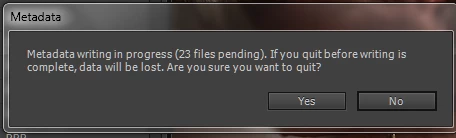
After updating to the latest version of the Premiere Pro last week, everytime I am closing the project I now get a "Metadata. Metadata writing in progress (n files pending). If you quit before writing is complete, data will be lost. Are you sure you want to quit? Yes/No" error window. Please see a screenshoot attached for one of such errors.

What is interesting, is that no matter how much time i give it the process is never complete.
This topic has been closed for replies.

11 replies

RCM_Productions
New Participant
September 9, 2022

I see this has been happening since 2012 (first post, dkitsov). It's still happening.

 Hasn't anyone from Adobe figured this out yet? Why is there no clear answer in this thread? I'd really like to know if there's any potential problems in simply ignoring the message...

Participating Frequently
September 17, 2024

Can't even the programmer in the Adobe structure who wrote that explain what it's for and how to avoid it?

Participating Frequently
September 17, 2024

The most common thing to do is to save your project by another name.

Try that.

thxapproved2
Inspiring
May 19, 2022

This is happening to me as well and just started recently after an update to PPro CC 2022 (22.4.0)
Every time I open Premiere for the first time, and then open a project, not only does it take a while, it is re-writing all the peak files (.pek) files for each video clip. I am working with BRAW files from an Ursa Mini Pro G2, h.264 MOV files from a Panasonic CX350, and AVCHD files from a Sony NX5u. All of these A/V files are creating multiple peak files AND upon exit Premiere is showing the "Metadata Writing in Progress..." notice with the parenthetical total number of files still writing equaling the total amount of A/V files in the project.
Oddly this does not affect WAV files imported into the project. Just video+audio files.
Also, if I send the project to AME to render, AME will re-scan all the files again and create new ancillary files (.pek) files, as it most likely can't find the metadata for the imported files and is trying to re-create them for its purposes.

Any reason that Premiere Pro would not be able to write the metadata it needs?

So, just to clarify, things were functioning normally. Now they're not, with no change on my end. Nothing about my computer setup has changed, other than the updates to the adobe software.


Thanks for any insight. Questions are welcome, obviously. 🙂


Windows 10

32GB RAM

Participating Frequently
March 30, 2019

Guess I can't reply to last post but only the original.  Here it is 2019 and the error is resurfacing again, first recognized in 2012, then 2016 now in 2019.  And question is NOT ANSWERED.  Guess posting in forums doesn't really help much.  Where does Adobe post solutions for existing problems?

louist97179209
New Participant
April 26, 2020

April 2020 and I'm getting the error. Premiere Pro 14.0 Magician.


Adobe is truly horrible. Monthly fee, buggy software. Please God, let Adobe go bankrupt due to coronahoax.

New Participant
August 19, 2020

Middle of August, I get this too now. Fresh install. Meta cache on SSD.

Inspiring
August 8, 2016

Well here it is August of 2016 with CC PPro version 2015.4 (v10.4 (30), Good Buddy) and the problem has resurfaced. For the first time ever, but since upgrading to this version, I'm getting the "Metadata writing in progress (n files pending)..." warning dialog on exiting PPro even when the project file has been saved a few seconds prior. It doesn't appear if the project file is simply closed first. So it happens when there is no active/open project file as well, but not if a file was never opened. Also, upon exit, when I go to restart PPro, it won't run (i.e., the splash screen never appears). I have to go to Task Manager and kill the PPro process first. It appears that a PPro thread remains running in the background on application exit, and blocks any attempt to restart it. Anyone else seeing either of these effects?  My rig is a Windows 10 64 bit machine with 32 GB DRAM.

Inspiring
September 7, 2016

Yes - I have it as well,

I can restart and reopen the project and work in the project., I don;t know what triggers it - but its

If I exit then the 2nd time It doesn't happen, I guess PPro has to be up and running for some time for this to happen.

Can someone from Adobe comment ?

Are there any more "me too"s ?

New Participant
November 13, 2012

All my audio WAV files were destroyed by this error. Does anyobody know how to fix this?

Snemanje poroke
Participating Frequently
November 13, 2012

HI josurf15999.

Your audio FILES are most likely NOT destroyed. Listen them from HDD/SSD using Windows explorer.
But in Premiere AUDIO CACHE get screwed. Maybe waveform is not showing, maybe audio is not playing (al the time, or at all), maybe audio have bits from other tack shatteren randomly...

Very likely solution will be to delete media cache files and let Premiere create new ones. This happens more if Premiere was crashed, or when a lot of external modification is done to already cached files. Find out WHERE Premiere stores them.

How to delete media cache files: Go to EDIT > PREFERENCES > MEDIA and see what folder is set. Close Premiere, go to that folder and delete everything. I have media cache files on a SSD, because they are small and Premiere depend on them a lot when scrubbing. It speeds up audio conforming/indexing/peaking files significantly. Ma first 32GB SSD was bought just for that reason. Do not have everything on System folder. C partition could get filled up, caousing another pile of problems.

Try out and report if it helps.

Regards, MIHAEL

New Participant
November 13, 2012

Unfortunately this did not help. I deleted all the files in that folder and waited for Premiere to reconstruct new files but it did not fix the problem. Any more ideas? At this point I'm willing to try anything.

ECBowen
Inspiring
October 15, 2012

What happens if you select File and then Save as to a new Project file in the same location before you close?

Eric

ADK

New Participant
October 15, 2012

Nothing happens, it works fine. However it gives me these errors on certain projects. I suspect that it has something to do with RED footage since after the update, Premiere started to give me these errors as well as corrupted file errors on some of the RED clips. It is certainly possible that the RED clips do contain write errors and that caused Premiere to lock up and fail to write metadata, furthermore, such files would cause havoc for Premiere if it were trying to read corrupted RED preview files in the media browser.

I spent an entire week converting each RED clip on a particular project into 4444ProRes format to prevent further data degradation. I hope this has stopped the bleeding. It seemed to get worse as the weeks passed by.

But in regards to the metadata error as mentioned in this thread, Premiere gives this error on some files and no error messages on other files. The only suspect would be RED video preview data. Anyone getting errors with RED files here?

VT

ECBowen
Inspiring
October 15, 2012

What happens if you go into your Media Cache Directory and select all to manually delete and then open one of those projects?

Eric

ADK

Charles VW
Inspiring
September 15, 2012

dkitsov wrote:

After updating to the latest version of the Premiere Pro last week, everytime I am closing the project I now get a "Metadata. Metadata writing in progress (n files pending). If you quit before writing is complete, data will be lost. Are you sure you want to quit? Yes/No" error window. Please see a screenshoot attached for one of such errors.

What is interesting, is that no matter how much time i give it the process is never complete.

So the metadata writing in Premiere is fairly involved.

It tries to write metadata in the background asynchronously, but only when the file isn't being touched by something else in the application or by some other application.  What you're experiencing is potentially (I can't say for sure yet) where these 23 background metadata writing tasks never finished, or someone else never let go of the file.  If that someone else is Premiere, it is definitely a bug (which is my current guess).

Are you able to provide which file types these 23 files are, and what sort of drive/volume they're on (e.g. local/external USB/firewire/SSD/etc).

And since a number of other posters are mentioning that this started in 6.0.2 for them, is that the same for you?

dkitsovAuthor
Participating Frequently
September 15, 2012

It has indeed started last week with the intro of 602. I am on windows 7.

I was thinking along the same lines as you about something not letting go of the files do I made sure that all the background tasks and things like antivirus etc are disabled. The files are .mov files of either Cineform or dnxhd flavor.

I am curious how strongly is this connected to a different bug that is not unique to .2 release but affects the 6 version since the launch. Some Clips only showing up in a timeline and not in a project window or clips not having video usage info, yet actually being used.

New Participant
October 8, 2012

I hope another bit of info helps track this, I have recreated this issue three times consistently; here is what leads to it in my case:

Using Win 7 x64 Ultimate, Premiere Pro 6.0.2 (creative cloud subscription)

I am working on an edit using all CineForm HD footage (in Premiere 6.0.2).

I used the "Replace with after effects composition" command on a clip in a sequence. This, of course, then loads After Effects. Often, when I use this dynamic link feature, I find that my After Effects composition becomes complex enough that it won't play smoothly in Premiere in realtime, so I go ahead and render it from After Effects as a video and just imort that into Premiere.

Thus, I render from After Effects to a new CineForm HD encoded file.

I import the new CineForm footage into Premiere, delete the automatically imported After Effects composition and replace the AE comp in my Premiere sequence with the rendered CineForm footage.

When I close Premiere, I now have the "Metadata writing in progress..." dialog box with 1 file pending. I've repeated this process with two other clips and get the exact same result (now I have 3 files pending). I have several other dynamic linked AE comps in my sequences as well.

I'm guessing the issue is only related the CineForm video file rendered from After Effects in my case (and not the use of dynamic link / imported AE compositions), but I wanted to explain who I got it to happen.

As a random side note, my Premiere seems to post-close-crash everytime I close it. The window closes all the way, then about five seconds later, I get a report that PPro has crashed.

Brainiac
September 14, 2012

Try going to Edit>Preferences>Media and uncheck Write XMP ID to Files on Import.

dkitsovAuthor
Participating Frequently
September 14, 2012

As I have asked you earlier, please do not comment on my questions and posts if you have not experienced the problem personally and have not found an actual solution.

lasvideo
Inspiring
September 14, 2012

I think we have another moderator now 

New Participant
September 13, 2012

Seeing it here too. My "system" is really just my college laptop but was definitely excited about 6.0.2 due to GT 650M Mercury support (finally!)

Win 7 64-bit

i7 3610QM

8Gb DDR3 RAM 1333 Mhz

750 Gb hybrid drive (Seagate Momentus XT)

nVidia GT 650M Kepler as mentioned

Is it problematic to close the file anyway? I gave it maybe 2 hours and still no change.

josephs51576386
Participating Frequently
September 14, 2012

From what I can tell it doesn't actually cause any issues, it has popped up for me about 10 times in the last 3-4 days. At first it worried me but I've closed several times even though it said "progress will be lost" and I haven't ever suffered any consequences.

I reported it as a bug today, I'd suggest everyone else do so as well so hopefully it can be fixed, the problem is though I can't reproduce it consistently. It seems to happen randomly.

https://www.adobe.com/cfusion/mmform/index.cfm?name=wishform

dkitsovAuthor
Participating Frequently
September 14, 2012

That what I thought but there seem to be an issue if you try to export an XML. Although it might be just a coincidence but I have a project now that reports an 11 files having their metadata being written and when I try to conform an XML of a project in DaVinci resolve I get an error mentioning 11 files having the timecode extents issues.

Not sure if it is connected or just a coincidence.

New Participant
September 12, 2012

Additionally, I receive errors in my Events log concerning files that were working correctly before the 6.0.2 update.


josephs51576386
Participating Frequently
September 12, 2012

I have also been having this error non-stop during the last couple of days, it started happening almost right after my 6.0.2 update. I'll post screenies of it tommorow. I wasn't really sure if it's a bug or something else wierd going although I'm starting to believe it's most likely a a bug. My system is also Windows 7 64-bit here are the specs of my work system where I've been having the issue.

Intel 2500k

16Gb DDR3 RAM 1600Mhz

240Gb SSD OS drive

Nvidia GTX 570 GPU (MSI)


Then I have several other HDD's one that is a RAID-5 but that info shouldn't really be causing any issues. (At least I think)

Honestly though in my experince the bug hasn't really caused any actual problems for me, although I am curious as to why it happens. It's really just more annoying than anything.

josephs51576386
Participating Frequently
October 8, 2012

Here is the picture I said I would post awhile back, I hadn't seen the error occur in a couple weeks until today. Anyways here it is.