
Participant
January 28, 2020
Question

Missing glyphs in custom-made font for Adobe Premiere Pro 2020.

  • January 28, 2020
  • 3 replies
  • 1352 views

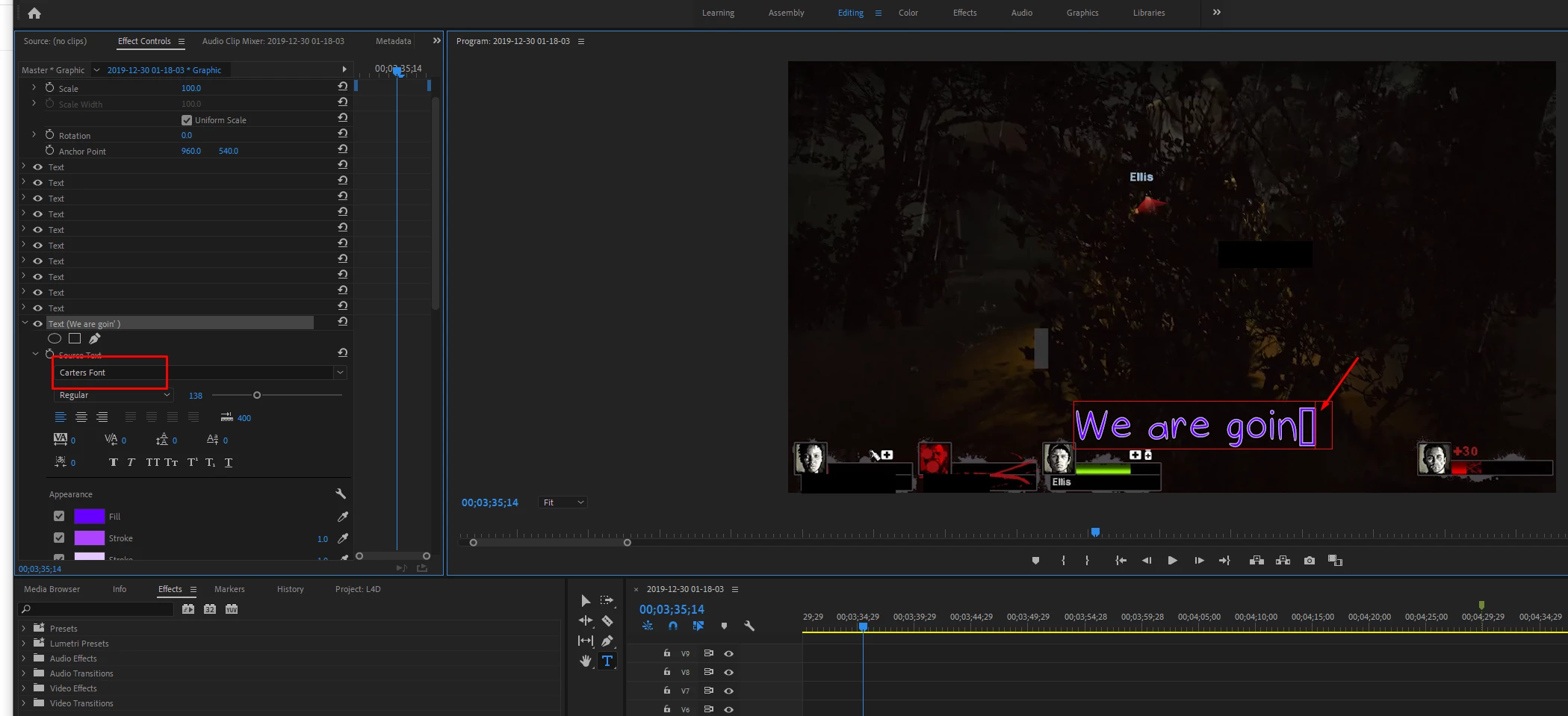
I'm having problems with using certain characters like ' and " on my projects in Adobe Premiere Pro. I have uploaded my own font to my computer to use in comics/videos I create. Letters and numbers work fine in this software, but when using ' or ", I get this rectangular box indicating that those are missing. 

Anyone know how to fix this? This also happens in Photoshop 2020. 
 

This topic has been closed for replies.

3 replies

Community Expert
February 16, 2020

Can you copy and paste from Word? 

Participating Frequently
February 16, 2020
Good suggestion. I tried but it didn't work, either. Obviously, what I saw
in word had the double and single-quotes showing up correctly and I copied
it and pasted it into a Text Layer and got the blocks that signify that it
doesn't have the character.

The font I'm trying to use is called Garfield Sans and is accessible here:

https://www.dr-lex.be/software/fonts.html

This is on a Windows 10 machine.


Christian
Participating Frequently
February 16, 2020

Here's what I see in MS Word...


And here's what I see in the Program Monitor when I paste the same text into a Text Layer


Ann Bens
Community Expert
Community Expert
February 16, 2020

Not all fonts support all characters.

Participating Frequently
February 16, 2020

If I see a character show up correctly in another app, like MS Word, why wouldn't it also work in Adobe Premiere? Clearly the intention of the person who created the font was to support that character. We're talking about common punctuation characters, like single and double-quotes.

Participating Frequently
February 16, 2020

I'm having the same problem with a TrueType Font I'm using. Same problem with single and double-quotes. It's happening with multiple fonts, and I know that the characters are there because they show up in MS Word. The only way around this is that I select the missing character and use a different font that's close to it. Not great, but the only temporary work around I could find.