Inspiring
May 14, 2017
Answered

missing tools in tools panel

  • May 14, 2017
  • 7 replies
  • 25207 views

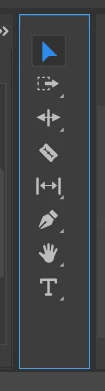
Suddenly I am missing some tools in my Tools panel. Regardless the choosen workspace. See picture. Where can I find the missing ones?

This topic has been closed for replies.
Correct answer Meg The Dog

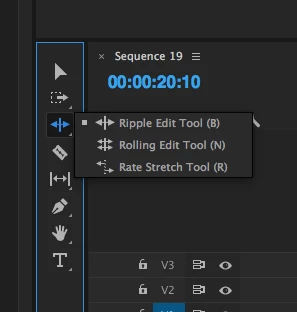
If the tool has a small triangle at the lower right, then click on the tool and hold down to reveal more tools:
MtD

7 replies

Participant
November 13, 2021

I've had same problem. 

One solution I've found is reset workspace to 'editing' ; i.e window/workspaces/editing. 

Good luck


Participant
November 9, 2021

Try opening premiere in full screen, then all the tools re appear

Known Participant
October 11, 2021

Has it been resolved? That tools also dissapeared for me and I cannot find it. I need to use razor tool but it just dissapeared. Is there a window that I can check to see them again or how can I get them

Known Participant
October 11, 2021

Nevermind I confused premiere pro with after effect lol

lambiloon
Community Expert
Community Expert
October 25, 2018

Only editing option you have choose that then all will be good...thanks

Ali Sajjad / Graphic Design Trainer / Freelancer / Adobe Certified Professional
Becky89
Participant
October 25, 2018

Mate, you misunderstood. I am able to find effects panel. But in effects panel there is no transform option, Crop option, Track matte option. Am I explained it clear? So, I see effects panel, all good. But cannot find lots of effects. They are gone.

lambiloon
Community Expert
Community Expert
October 25, 2018

then try to uninstall it using creative cloud remove tool and install fresh one its all ok at my side i checked...thanks

Ali Sajjad / Graphic Design Trainer / Freelancer / Adobe Certified Professional
Becky89
Participant
October 25, 2018

Hey guys, pls help. I don't have default tools in my premiere? for instance, Crop tool, transform, track matte key, dissolve types etc. I am exploring internet already a week but did not find an answer. I tried to clear cache, to unchecking boxes etc.

lambiloon
Community Expert
Community Expert
October 25, 2018

Hi in windows then workspace choose default editing then all tools will be there...thanks

Ali Sajjad / Graphic Design Trainer / Freelancer / Adobe Certified Professional
Becky89
Participant
October 25, 2018

I dont have default editing option in windows -> workspaces. Adobe Premiere Pro CC 2018. I even installed and uninstalled already 3 version of Premiere

Participant
July 23, 2017

THANKS. do you know of a way to stop this bloody gpu render issue!?!?!?!?!? its been over a year and adobe are NOT addressing the issue. for some of us this is our livelihood........and why does playback keep blacking out too

Known Participant
February 2, 2018

Thanks guys but I hink I mis-expressed it. The entire panel keeps disappearing  with all the tools in in one go. I'm about to eat my underwear out of frustration!

Ann Bens
Community Expert
Community Expert
February 2, 2018

Go to window/workspace/reset to saved layout a couple of times.

Meg The DogCorrect answer
Inspiring
May 14, 2017

If the tool has a small triangle at the lower right, then click on the tool and hold down to reveal more tools:

MtD

Participant
July 23, 2017

so where is zoom? why arnt the tools laid out like in every other video.....i thought updates was meant to make life easier.......cc is a ball ache not to mention the render issues that still havent been sorted a year on

Ann Bens
Community Expert
Community Expert
July 23, 2017

Zoom is behind the Hand tool.