
Participant
February 4, 2020
Answered

Missing waveforms on toggled proxies in timeline

  • February 4, 2020
  • 1 reply
  • 1436 views

Hello,


I'm working out the kinks in 4k proxy workflow from multiple types of sources. As of right now I have proxies that play correctly. However I cannot see or get premiere to show me the waveform of the proxies. All known ways to turn them on are on. I have to turn proxies off to see the waveform of the original and get frame specific then I turn proxies back on to continue...but I'd like to not have to do that for every edit. 
This topic has been closed for replies.
Correct answer MyerPj

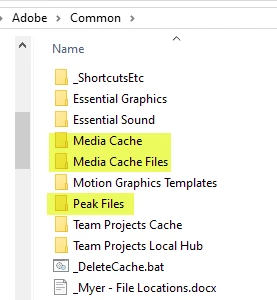
That's not normal. You might need to delete your cache and peak files, and try again. When I do it, I delete the actual folders via File Manager. Like so many posts you didn't drop even a clue about your hardware or even, your PP version # and Win or Mac. I'm only a PC guy, if you are a mac guy perhaps you can find the folder using the PC folder for reference, if on Win, you can go directly there with: 


%UserName%\AppData\Roaming\Adobe\Common


Delete the highlighted folders and restart PP

1 reply

MyerPj
Community Expert
MyerPjCommunity ExpertCorrect answer
Community Expert
February 4, 2020

That's not normal. You might need to delete your cache and peak files, and try again. When I do it, I delete the actual folders via File Manager. Like so many posts you didn't drop even a clue about your hardware or even, your PP version # and Win or Mac. I'm only a PC guy, if you are a mac guy perhaps you can find the folder using the PC folder for reference, if on Win, you can go directly there with: 


%UserName%\AppData\Roaming\Adobe\Common


Delete the highlighted folders and restart PP

Participating Frequently
January 23, 2021

Excellent! This actually worked. I'm on a Mac, and once I deleted the folder with the Media Cache Files in it (which I always put on an external drive because all the extra space it takes up) and completely deleted the folder so that the Media Cache, Media Cache Files and Peak Files were thrown out. I didn't have anything else that was important in that folder so I trashed it.


Then I created a brand new folder and set the Media Cache Files destination to that new folder. When I opened up my Premiere Pro sequence again, it rendered the peak files for the proxies as well as the regular files.


I was getting disappointed with proxy file use because of not being able to edit with audio waveforms. Now it's working great. I figure if this happens again, I'll do the same process of deleting the entire Media Cache destination folder again. 


Thanks,


Lane Wyrick