Participating Frequently
October 31, 2017
Answered

MOGRT - Premiere Pro error message

  • October 31, 2017
  • 7 replies
  • 14284 views

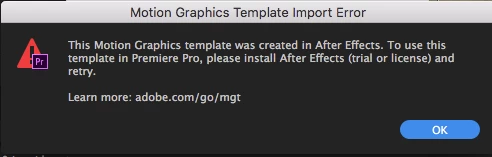
Hi, I have a question about using a motion graphics template. I have installed a mogrt file, and it shows up in the Essential Graphics Panel. However, when I drag and drop the template onto the timeline, the following error message comes up saying that I need to install After Effects. The problem is that I already have AE installed and it's updated. Help? I've attached a screencap of the error message. Also, I'm also new to Premiere so won't be surprised if it's a simple fix. Thanks!

This topic has been closed for replies.
Correct answer DaciaSaenz

Hi jstrawn,

I wanted to write with an update. I updated to Premiere 2018, 12.0 x 224. I haven't updated the AE, however. Unfortunately, it is still giving me that error message. Any tips on how I can fix this? Thank you!

Best,

Raghu


HI raghuramv25821507 ,

If the AE Mogrt you are trying to load was created in a version of AE earlier than 14.2.1, then you will still need to install the version of AE that is Dynamic-Link-Compatible with Premiere 2018, 12x244 (Upgrade to AE 2018, 15.0 x 180).

This is because Mogrts created and exported from earlier versions of AE rely on a dynamic link connection to AE in order to be rendered and modified.

New mogrts created in AE 15.0 (with some limitations and conditions in place) can be used on a system that only has 12.0 Premiere installed because we put a sort of "AE engine" inside of PR, but this is a nascent engine and it does not support all effects or renderers in this iteration.

Install the most recent version of AE and let us know if that solves the dilemma for you. Otherwise, we will continue troubleshooting with you till we get you rocking and rolling again.

Thanks,
Dacia

7 replies

Participant
December 25, 2021
Can you help me with this problem too ?
I was using it before the update but now I'm getting this error.


R Neil Haugen
Legend
December 25, 2021

We'd need to know a LOT more ... what's the mogrt, what sort of things does it do, how acquired/where, and probably a look at it's control settings.


Neil

Everyone's mileage always varies ...
R Neil Haugen
Legend
March 26, 2020

Which number-dot-number versions of Premiere and AfterEffects are you using?


Current ones are Premiere 14.0.4, and AfterEffects 17.0.5.


Neil


Everyone's mileage always varies ...
Participant
March 25, 2020

answer from adobe support:

Please close both your applications and then go to
System preferences>security and privacy>Privacy 
and give full disk access to both premiere pro and after effects and then check.

Participant
March 26, 2020

Is it worked for you? I tried and didnt work. =( 

Participant
May 23, 2019

I'm having this issue too but on the most recent update of premiere pro is there any other fixes I can use?

MyerPj
Community Expert
Community Expert
May 24, 2019

PP and AE must be matching versions (though confusingly they use independent version numbers), ie: Update one, update the other.

What is your 'most recent' version number from Help/About. It's removes all confusion if you'd just post that small detail.

paulisphotoman
Participant
January 31, 2019

Hello, I have Premiere Pro 2019, was sent mogrts files. I checked the Essential Graphics panel, but cannot seem to get the files uploaded???....can anyone help????

my email, paulbrenno@gmail.com

R Neil Haugen
Legend
January 31, 2019

How were you "sent" the files?

Neil

Everyone's mileage always varies ...
paulisphotoman
Participant
January 31, 2019

via google drive

On Thu, Jan 31, 2019 at 3:56 PM R Neil Haugen <forums_noreply@adobe.com>

Kevin-Monahan
Community Manager
Community Manager
October 31, 2017

Hi RaghuramV,

Which version of Premiere Pro is this? Which version of After Effects? FAQ: How to find the exact version of Premiere Pro you're using?

Thanks,
Kevin

Kevin Monahan - Sr. Community and Engagement Strategist – Adobe Pro Video and Audio
R Neil Haugen
Legend
October 31, 2017

With PrPro open, go to a clip on a sequence and right-click, "Replace with AfterEffects Composition" and see if it launches Ae. If so, cool ... delete that comp, and with Ae still open see if you can use that mogrt.

If doing the 'replace with Ae' bit doesn't activate Ae, sign out of your CC Desktop app, reboot the computer, and sign back in ... that sometimes shakes up the connections so they see each other.

Neil

Everyone's mileage always varies ...
Participating Frequently
October 31, 2017

Thanks Neil. I tried those two measures you suggested, but it's still giving me the same error message. So strange. Any other ideas? Thanks again for taking the time to reply. Best, Raghu

R Neil Haugen
Legend
October 31, 2017

Darn ... there was another thread on this recently where someone used a different "fix" and it worked for this, and my brain just isn't recalling it.

Might search back through the forum for similar questions, it's been in the last week or so.

Neil

Everyone's mileage always varies ...