
Known Participant
December 22, 2019
Answered

Mov files importing with no video

  • December 22, 2019
  • 5 replies
  • 989 views

Hi All

That my first post 

I've just imported movie thta I record and all files are with mov extension . 

When I'm trying to add them, to sequence in Adobe Pro (14) I can see only audio track .

Hoever when I create sequence marking all files and asking to create new sequence from clip I'm getting video as well .

what is interesting each file has 4 audio trak ....

Any tip how to solve problem ?

Cheers#R
This topic has been closed for replies.
Correct answer R Neil Haugen

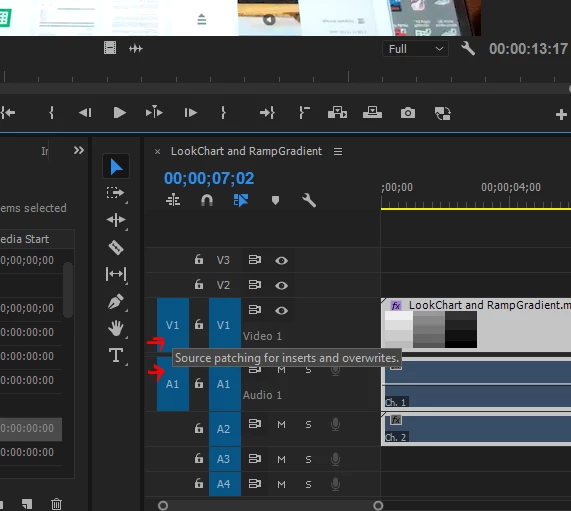
You need to have both Source and Track targets set to work properly on a sequence. Source targeting sets where (and what!) will be added to the sequence from a bin or the Source monitor. Track targeting sets how things move or are utilized within the sequence. Blue is of course selected ...


Neil


5 replies

R Neil Haugen
Legend
December 27, 2019

It takes a bit of working with it to really "get" Premiere's behavior between various means of adding assets to a sequence and  targeting settings. Once you understand them and perhaps set keyboard shortcuts and presets and such, it can really speed things along. Until then, it can be a puzzler.


But reading up on the targeting things, on Insert and Overwrite actions, that sort of thing is really necessary to get past the "why did it do THAT this time?" stage. Unfortunately, the 'help' material isn't as extensive as it should be.


Neil

Everyone's mileage always varies ...
R Neil Haugen
Legend
December 24, 2019

You don't have a video track Source target set. Click the far left box above the A1 so you have a blue Source target for V1.


Then try and add the clip.


Neil

Everyone's mileage always varies ...
RandomAccessRazz
Participant
December 26, 2019

Hi Neil,

I just wanted to thank you for your help with this.

Everywhere I searched people pointed towards codec issues, yet it turns out I was simply miss-using the UI.

Thanks again.

R Neil Haugen
Legend
December 24, 2019

Make a screen-grab of your sequence/Timeline panel, including the header control block on the left ... use the reply box's picture icon to add that image directly into your reply like mine was. I would need to see everything there ...


Neil

Everyone's mileage always varies ...
asknetAuthor
Known Participant
December 24, 2019

I hope this is a screen that you are looking for ...

two files different aperance on the same sequence 😞

and TA for help - Marry Christams 🙂

R Neil Haugen
Legend
December 23, 2019

Source and Track targets don't "see" file types. So mov/mp4/r3d is all the same. If you don't have Source target set and you try and insert/overwrite media from project panel/bin onto a current sequence, it will take ONLY the part of the media for which a Source target is set.


Creating a new sequence from media is a different process. It's AFTER the sequence is set, for any additional material, that Source and Track targeting become important.


Neil

Everyone's mileage always varies ...
asknetAuthor
Known Participant
December 24, 2019

That make sense 

 Now I make fallowing exercise .

I create a sequence base on file . Both video and audio presents . I added other video ..... only audio visible . I remove both . Add first video , this one which I used to create sequence ....only audio visible . When I'm doing this with mp4 container work imtependly on the way how is created when I m doing this for mov one  nothing works how I expect .

any idea how workflow should look like so do not have to spend my time on work not fixing such behavior?:)

Radek

R Neil Haugen
R Neil HaugenCorrect answer
Legend
December 22, 2019

You need to have both Source and Track targets set to work properly on a sequence. Source targeting sets where (and what!) will be added to the sequence from a bin or the Source monitor. Track targeting sets how things move or are utilized within the sequence. Blue is of course selected ...


Neil


Everyone's mileage always varies ...
asknetAuthor
Known Participant
December 23, 2019

TA for answer .

Hoever when I'm working with mp4 files all work coorectly only issue  is when I'm trying to add mov files to project .

not sure if that what you describe in you responce fit to that scenario ?