
Participant
July 2, 2019
Answered

Movement between two keyframes in Premiere Pro CC 2019

  • July 2, 2019
  • 2 replies
  • 4900 views

Unexplained movement between two keyframes.

Hey everyone. I was wondering if anyone has experienced this problem in Premiere Pro before? And if you have, did you resolved it or have you lost your mind like I have?

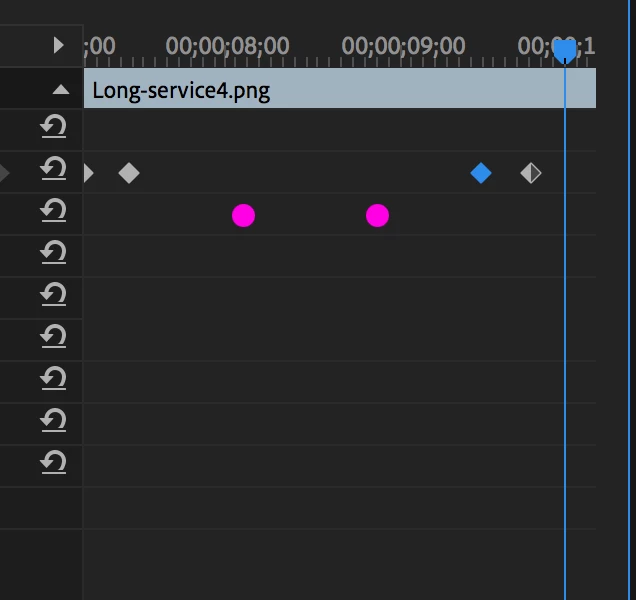
There's a slight movement between two keyframes and I don't know why it's doing it. I want a title (a png graphic made in illustrator) to move upwards then slow down for a second (so it's legible) then shoot upwards off the canvas. Nothing too fancy, pretty simple. During the two keyframes where it slow's down it moves up, down then back up again.

  • So it's reaches it's original position quarter of the way to the next keyframe
  • Back to it's previous position about three quarters towards the second keyframe
  • Then back it hit it's correct position when it finally hits the second key frame

I hope that makes sense. I've provided a diagram to explain this if it helps. Pink dots represent movements that I can't explain.

Anyone had this problem before? If so does anyone have a solution for this? I would be grateful if anyone has any suggestions.

Thanks
    This topic has been closed for replies.
    Correct answer Ann Bens

    Your scale keyframes are set to auto bezier: hence the slight unwanted movement.

    Set the keyframes  to linear.

    If you want to use the auto bezier nest in between setting the motion keyframes and scale keyframes.

    2 replies

    Community Expert
    July 2, 2019

    if you still want to preserve ease in and ease out, you can keyframe from Motion, the position

    of your title without letting it start and end off screen, just that slight slow movement upwards,

    then apply a Transform effect and keyframe the quick start and end off screen positions, you can

    also add ease in and out to those, or manually adjust them from the position graph editor in the

    Effect Controls. This way you will preserve that slight movement in between the in/out of your title,

    and preserve the ease in/out of your position keyframes... that if you want a more advanced looking motion.

    Ann Bens
    Community Expert
    Ann BensCommunity ExpertCorrect answer
    Community Expert
    July 2, 2019

    Your scale keyframes are set to auto bezier: hence the slight unwanted movement.

    Set the keyframes  to linear.

    If you want to use the auto bezier nest in between setting the motion keyframes and scale keyframes.

    Participant
    July 2, 2019

    Ann! You are my hero! What do you want for Christmas, my treat! No, seriously thank you, that's fixed it. Thanks for replying