

dwrichy
Participant
October 4, 2019
Question

MP3 Audio file contains no sound after import

  • October 4, 2019
  • 7 replies
  • 35289 views

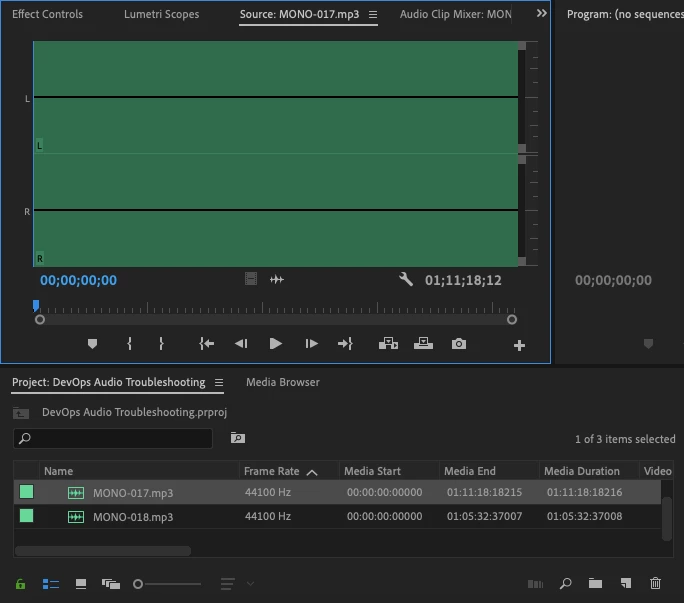
Hello! I have two rather large MP3 audio files that I tried to import into a project. One imports just fine. The other is completely empty. There is no waveform, no sound, nothing. Both files are about an hour long and about 85MB in size. They were recorded on the same device on the same day. How can I troubleshoot this? Screen shot below. 


Dale R.
 

This topic has been closed for replies.

7 replies

Participant
April 15, 2024

None of what was wrriten here helped me with this matter so I went on to a work-around that seems to solve many issues in Adobe's products.


Just open a new (empty) project, import your project in (as any other file)  and thats it. works like a charm... (as much as an Adobe platform can anyway... ) 


hope that works for you 

I


Participant
April 3, 2024

I managed to fix this in my edit by deleting the media cache.   Open Edit>>Preferences>>Media Cache and press the delete button.  


Close the preference and the audio waveform will reappear along with the audio.

Participant
April 3, 2024

I can't seem to find a way to edit these posts, but I thought I'd just mention - at first it appeared as if nothing had happened, but the audio reappeared after a couple of seconds.   This is possibly because I was working off a slow drive however.

Participant
February 27, 2023

This is really bad. I have a 1.5 hour video that in 30s just stopped reading a perfectly fine mp3 file. It plays fine in any other player, just wont load in premier. You can't convert it because it somehow throws off the timing and when you relink a new convered wav version the time is off and the clip doesn't match. 

Warren Heaton
Community Expert
Community Expert
February 27, 2023

@John268618950mpj 


When converting the mp3 to AIF or WAV, make sure to maintain the sample rate, bit rate and channel type.  The resulting AIF or WAV should sync with the original MP3; however, if it does not that is an issue with having used MP3 in the first place.  Restoring sync may require manually adding edits to the AIF or WAV once imported and overwritten with the corresponding picture, usually adding an edit every so often (may be often as very minute or as often as often as it's needed) and then slipping the segements in the Timeline.  It requires patience for sure.  Know that syncing audio with picture works best with mezzanine formats at standard frame rates (ProRes or DNx at 23.976, 24, 25, 29.97) and mezzanine audio formats at standard sample rates (linear PCM at 48kHz, 32kHz).


Participant
February 28, 2023

Like Premiere Pro, AME might not always like mp3 files.


It's werid because I built this whole project for the client using this file. Then today it stopped working. Could be corrupt I guess, but I prefer blaiming premier cause it's always been quarky this way. 

Legend
October 7, 2019

why not use adobe media encoder?  Comes with PremiereCC.   And if you're editing this audio with video, I'd suggest you resample to 48k which is the video standard.  May be having a senior moment, but seems to me I've seen problems working with 44.1k audio which didn't appear til I exported a sequence.  

Warren Heaton
Community Expert
Community Expert
October 7, 2019

While it’s worth giving AME a try, there is a good chance that whatever is preventing Premier Pro from playing the audio as expended may also prevent the other Adobe applications from playing it as well.


 Although, I have converted video in After Effects for Premiere Pro in the past. 

Ann Bens
Community Expert
Community Expert
October 5, 2019

When importing audio always wait until it is completly conformed (blue bar bottom right) before doing anything!!!!


Participating Frequently
February 9, 2023

This peak file generator seems to be the root of the issue.  However, I swear premiere used to continue generating peak files in the background while clicking around and opening other files, timelines, etc.  This feels like a really debilitating bug that needs to be addressed ASAP!   I have encountered this bug 3 times this week (three separate projects, three separate .mp3 files downloaded from ArtList

Participating Frequently
February 9, 2023

It seems that "offlining" and simply reconnecting the original file does not fix this. Even after deleting all Caches + Preview files. The quickest workaround I found, as stated above, is re-conforming or redownloading a .wav version and reconnecting to the .wav.   Further, I also disabled "automatically generate waveforms", though I'm not sure that setting affected the outcome.

Peru Bob
Community Expert
Community Expert
October 4, 2019

" I guess I'll need to get some other tool that can convert to AIF or WAV"

Use  Adobe Audition if you have the CC All Apps plan.  If not, Audacity will convert to wav.

Warren Heaton
Community Expert
Community Expert
October 4, 2019

The mp3 files play as expected outside of Premiere Pro, correct?


I would try converting the file to AIF or WAV and then importing that.  Of course, 44.1 kHz Stereo 16-bit without comrpession will come in at about 10MB per minute. 

dwrichy
dwrichyAuthor
Participant
October 4, 2019
Yes, both files play correctly outside of Premiere Pro. I guess I'll need to get some other tool that can convert to AIF or WAV. Normally, I'd use Premiere Pro for that, but that's not an option! 🙂