
Participating Frequently
February 26, 2024
Question

Mp3 export with empty tail issue

  • February 26, 2024
  • 1 reply
  • 299 views

Hi there,


I don't often export .mp3 from Premiere, in fact I do it so rarely that I've never noticed this until now. But I've had a client asking for their videos to also be exported in mp3, and I noticed that for a 20min video, the mp3 came out with about 30s of empty tail, and a 30s ad with about 2s of empty tail.

Yes, I have marked in and out and select that option in the export window. The .mp4 file and the .wav come out in the right length, no tail:
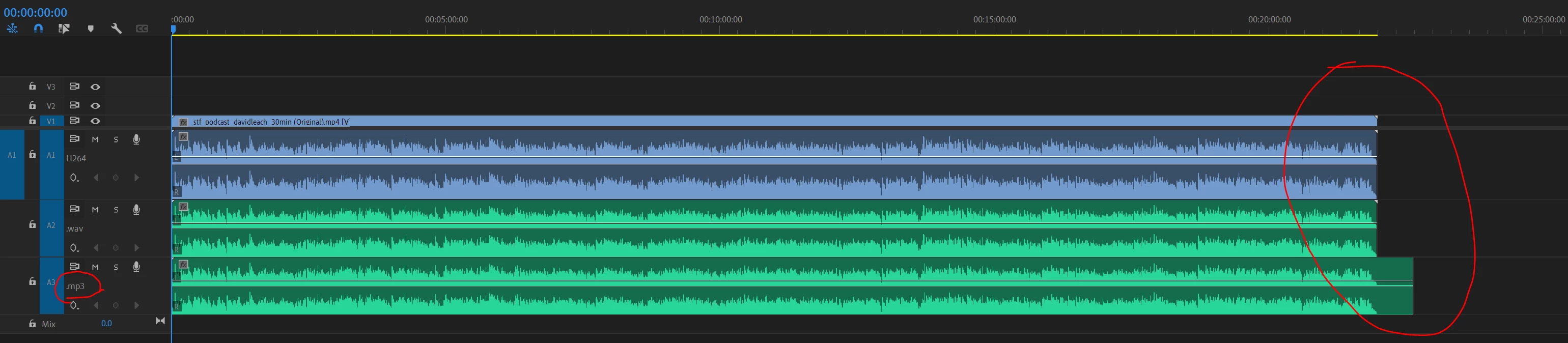
Are there any settings or anything else I'm missing here? At the moment I'm exporting them all as .wav, bringing into Audition and exporting it again as .mp3. That works fine, no tail.


I appreciate any help 🙂


This topic has been closed for replies.

1 reply

Kartika Rawat
Community Manager
Community Manager
March 6, 2024

Hi juliepmachado!

Sorry to see that. Which version of Premiere Pro are you using? Can you share the screenshot of the export settings? What's the source of the media files?


Let us know. Happy to help.

Thanks,

KR

Participating Frequently
March 7, 2024

Hi Kartika


I'm using PP 24.0.1.

This is my export settings:

This is my timeline and some settings:

In this project most of the audio was 48000 Hz - 16-bit - Stereo recorded with a ZOOM, and there was one Zoom meeting recorded as 32000 Hz - Compressed - Mono.

I remembered I had edited another podcast on Premiere last year that I exported mp3 as well, I went back to check and the same issue happened, I just never noticed as I'm not the one that does the export checks. I believe that one was recorded on a H4n, settings 48000 Hz - 24-bit - Stereo.


Let me know if there's any other info you need, thanks!