Participating Frequently
June 17, 2018
Answered

mp4, mp3, WAV files can't import at all (We were unable to open the file on disk)

  • June 17, 2018
  • 7 replies
  • 12414 views

WAV files aren't showing up on the importer browser, as if it's an unsupported file.

mp4 files only show this error when trying to import:
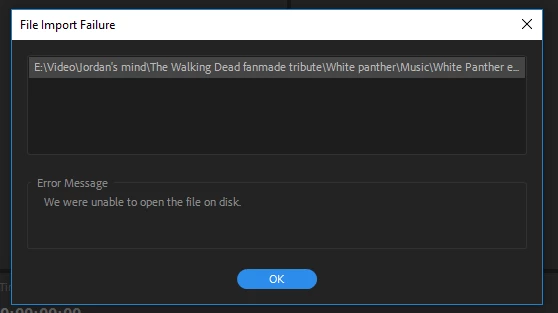
I have no idea what is happening. looking through the forums, none of it actually relates to my issue since this occurs with an mp4 file that is downloaded from YouTube. And also an MP4 file that was rendered out of after effects, and out of premiere. None of them worked.

Also I've tried moving the file to a different disk, both external and internal. Nope

There was a mentioned problem with WMVCore but I have reinstalled all of Premiere, and installed WMVCore twice without that changing the ultimate result. Windows was installed first on this device last thursday, and premiere was last installed today.

Help
This topic has been closed for replies.
Correct answer Stan Jones

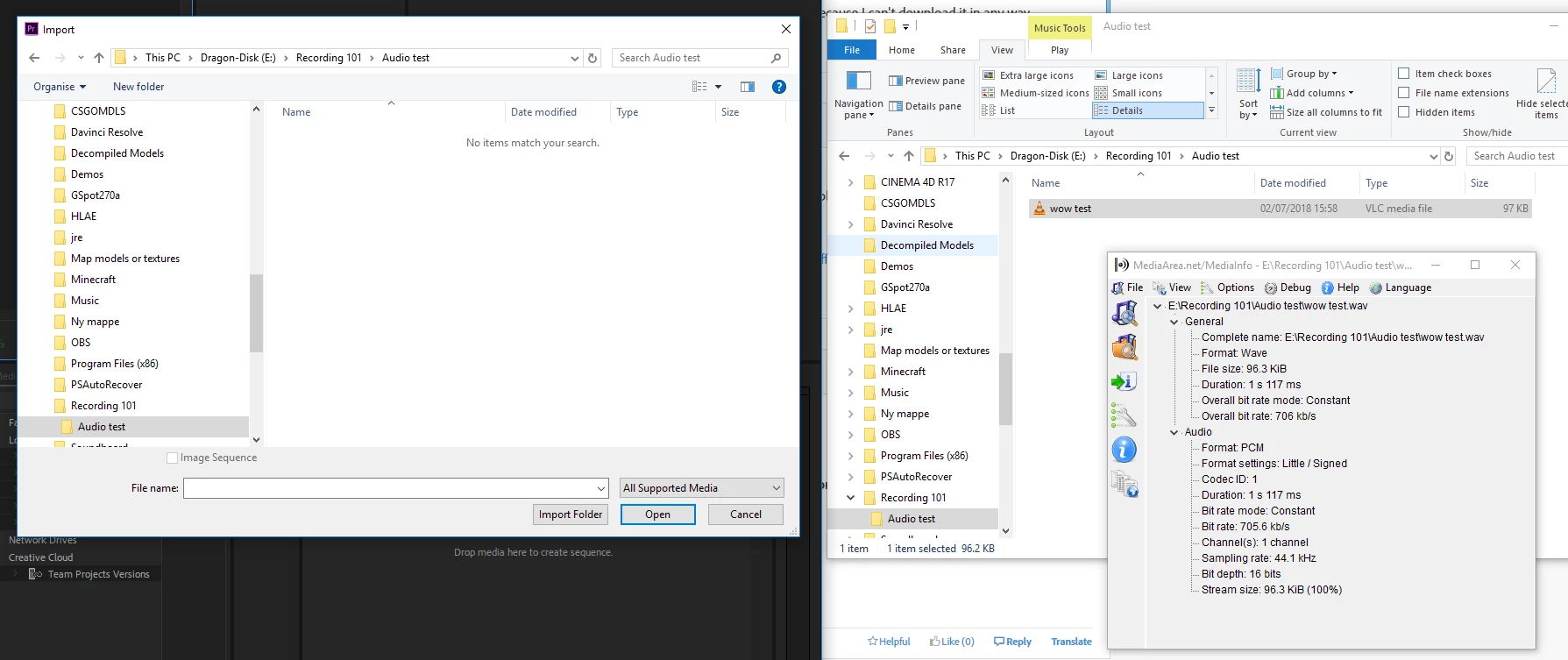
Here you can see.

Wow test. In the same folder as open in the import.

is a Wave file

doesn't show up.


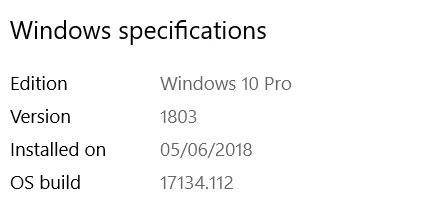
Sorry if I missed this. m0sifer, I don't think we actually know what version of windows you have. The "latest" can mean multiple things.

Like this: Settings -> System -> About. Scroll down to Windows Specifications. Don't include the serial number.

And thanks for responding to all the requests you've gotten here!

7 replies

Legend
July 2, 2018

I think I saw some video pack available for people with N version...which installs media player...don't know for sure, but might be worth checking ( google it ) and see if your dad's registration thing allows you to download etc. ????

m0siferAuthor
Participating Frequently
July 2, 2018

Yeah my dad found the proper version for me and sent it.

Legend
July 2, 2018

Good luck. I had no idea that existed either … pretty screwed up in my opinion.

I learned a lot, so thank you.

I never knew mp41 existed, nor did I ever see a sound channel with LF and LR on it before.  I'm old so you have to forgive me.

But your mp4 video looks really nice. Keep doing stuff and I'm sure you'll be happy doing it.

: )

Legend
July 2, 2018

whoops.. I meant Front left and Front right (sound)

Legend
July 2, 2018

I would suggest you give Stan the credit for 'correct answer' if you find a different version of win 10 solves your problem.

: )

He's the one who asked you to post that.

Legend
July 2, 2018

???

m0siferAuthor
Participating Frequently
July 2, 2018

lool. Wow why does that even exist.

I got the key from my dad who didn't know. Neither did I which is super weird that it's even a thing.

I'll go looking for one that doesnt' have the N and see if that helps it.

Legend
July 1, 2018

after you try what juanmario suggests, please let us know what happened.

It sounds to me like maybe windows 10 is not quite working properly re: media player.

In past I recommended you type 'update" in search bar of task manager, and click on windows update and force it to check manually by IGNORING it if you see it is up to date.  This is what I meant....

If you have never done this before manually you may want more instructions cause it can be quirky and it could literally take HOURS for it to complete ( including YOU having to restart computer when prompted). Do not use ANY programs ( close all ) while doing this.  When updates are done they disappear from list you may see.

If you manually force it to check for updates and there are NONE then you are up to date on updates.

Let us know what happens

: )

Legend
July 1, 2018

Do you have this on your system ???

If so, open the exe file, see what happens.

Legend
July 1, 2018

One final note:

If you have WMP and it won't open normally, try right clicking file name and 'run as administrator'....see if that works.

Legend
June 30, 2018

Thanks ! That info will help everyone help you.

I sorta suggested you ignore that window update mssg, and do it manually, but it looks like that is not a big deal at this point. Looking at your tree view I'm reminded of codec packs that got installed by users ( like FFMPEG) that could be problematic. But I don't know current technology like most of the people here who can help you.

It looks like front left and front right ( 2 channels ) audio is sorta like dolby thing ?

mp41-a and so on looks weird to me, but like I said, others will know more.

Good luck ! And thanks for sharing !

juanmario
Participating Frequently
June 30, 2018

According to your comment, strange problem by the way, I can only think of 2 things:

Your version of Windows does not meet the installation requirements:

https://helpx.adobe.com/premiere-pro/system-requirements.html

The Windows security center, which can also be an antivirus, is blocking the program.

Deactivate the antivirus, if it has one, and run the installation as administrator, right click on the Installer as administrator.

m0siferAuthor
Participating Frequently
June 30, 2018

It's a beefy PC, using the latest version of windows. So that is unlikely the issue.

As for the windows security center. I disabled everything and ran as administrator.

But it made functionally no difference to the import.

Stan Jones
Community Expert
Community Expert
June 30, 2018

Okay. Can you post mediainfo screenshots in tree view of a couple files that won't import - mp4, wav, mp3?

m0siferAuthor
Participating Frequently
June 30, 2018

like not even a suggestion on what could be wrong? Do I just try to restart my entire PC?

Stan Jones
Community Expert
Community Expert
June 30, 2018

What version of Premiere Pro?

Can you import anything?

m0siferAuthor
Participating Frequently
June 30, 2018

I'm running CC 2018. I tried earlier versions however that didn't change anything. I can import certain other files. Image files, avi files, and some others. However since it seems like the same issue is stopping any form of conversion from mp4 to .avi as well. I need the mp4 import to work.