
MP4s from Compressor that allow export segmentation import with imprecise FPS
I have found that MP4 files exported from Apple Compressor (both 4.8 and 4.9) with "Allow export segmentation" checked ON are imported into Premiere Pro at 23.98 or 23.97 fps instead of 23.976 fps. This leads to duplicate and/or dropped frames within the Source Monitor and on the Program timeline.
I tried to modify > interpret footage > assume 23.967 fps – however duplicate and dropped frames persist.
This occurred in both...
- Adobe Premiere Pro version 24.6.3 (Build 4) and 25.0.0 (Build 61)
- macOS Sequoia 15.1 and 15.1.1
- Internal MacBook Pro Apple M2 Max (16-inch, 2023), 96 GB RAM, 2 TB SSD
- External Samsung Portable SSD T9, 2 TB connected via USB 3 cable
I found this issue by comparing MP4 exports that have timecode burn-in side-by-side against their source files.
Source files are video only (no audio) Apple ProRes 422 QuickTime files with running times ranging from 3 minutes to 1 hr 47 min.
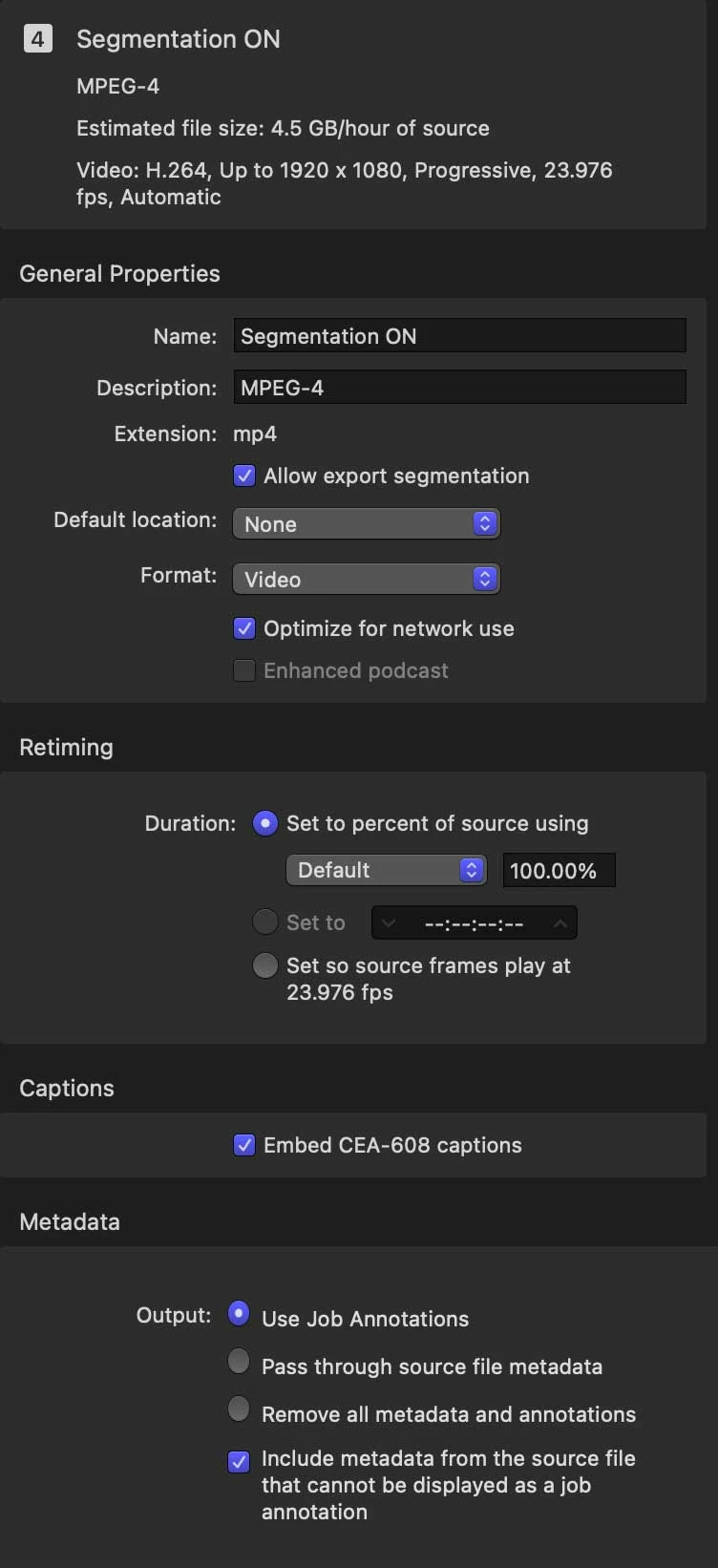
NOTE: MP4 files exported from Apple Compressor with "Allow export segmentation" checked OFF imported into Premiere Pro at 23.976 fps as expected.
Imported MP4 file (exported with "Allow export segmentation" checked ON) details:
Format : MPEG-4
Format profile : Base Media / Version 2
Codec ID : mp42 (isom/mp41/mp42)
File size : 5.25 GiB
Duration : 1 h 15 min
Overall bit rate : 9 997 kb/s
Frame rate : 23.976 FPS
Video
ID : 1
Format : AVC
Format/Info : Advanced Video Codec
Format profile : Main@L4
Format settings : 4 Ref Frames
Format settings, CABAC : No
Format settings, Reference frames : 4 frames
Format settings, GOP : M=2, N=15
Codec ID : avc1
Codec ID/Info : Advanced Video Coding
Duration : 1 h 15 min
Source duration : 1 h 15 min
Bit rate : 9 995 kb/s
Width : 1 920 pixels
Height : 1 080 pixels
Display aspect ratio : 16:9
Frame rate mode : Variable
Frame rate : 23.976 (23976/1000) FPS
Minimum frame rate : 7.992 FPS
Maximum frame rate : 23.976 FPS
Color space : YUV
Chroma subsampling : 4:2:0
Bit depth : 8 bits
Scan type : Progressive
Bits/(Pixel*Frame) : 0.201
Stream size : 5.25 GiB (100%)
Source stream size : 5.25 GiB (100%)
Title : Core Media Video
Color range : Limited
Color primaries : BT.709
Transfer characteristics : BT.709
Matrix coefficients : BT.709
Codec configuration box : avcC
Imported MP4 file (exported with "Allow export segmentation" checked OFF) details:
Format : MPEG-4
Format profile : Base Media / Version 2
Codec ID : mp42 (isom/mp41/mp42)
File size : 5.25 GiB
Duration : 1 h 15 min
Overall bit rate : 9 999 kb/s
Frame rate : 23.976 FPS
Video
ID : 1
Format : AVC
Format/Info : Advanced Video Codec
Format profile : Main@L4
Format settings : 4 Ref Frames
Format settings, CABAC : No
Format settings, Reference frames : 4 frames
Format settings, GOP : M=2, N=15
Codec ID : avc1
Codec ID/Info : Advanced Video Coding
Duration : 1 h 15 min
Bit rate : 9 997 kb/s
Width : 1 920 pixels
Height : 1 080 pixels
Display aspect ratio : 16:9
Frame rate mode : Constant
Frame rate : 23.976 (24000/1001) FPS
Color space : YUV
Chroma subsampling : 4:2:0
Bit depth : 8 bits
Scan type : Progressive
Bits/(Pixel*Frame) : 0.201
Stream size : 5.25 GiB (100%)
Title : Core Media Video
Color range : Limited
Color primaries : BT.709
Transfer characteristics : BT.709
Matrix coefficients : BT.709
Codec configuration box : avcC
Steps to reproduce:
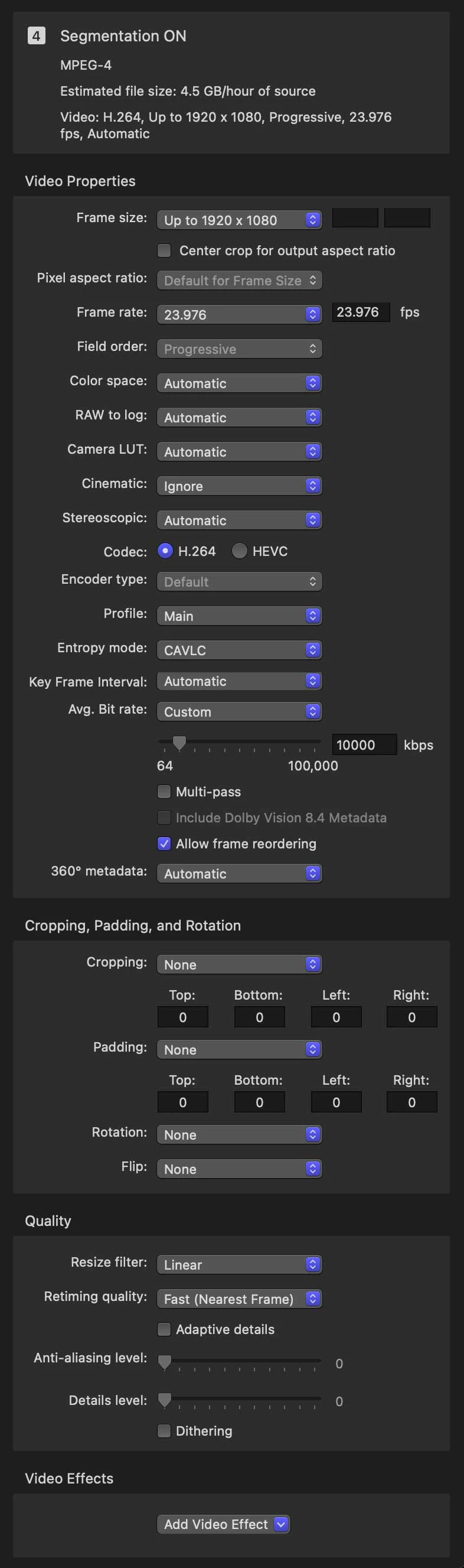
- Export MP4 from Apple Compressor with settings...
- Import into Premiere Pro
Expected Result: Frame Rate to be 23.976 fps
Actual Result: Frame Rate is 23.98 fps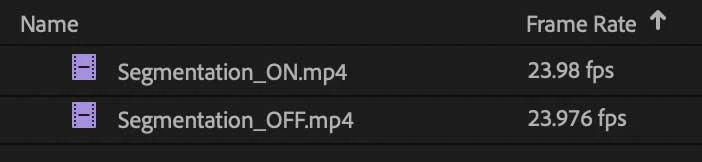
 AdChoices