
Inspiring
May 12, 2021
Answered

Multi-Cam not switching cameras.

  • May 12, 2021
  • 10 replies
  • 21748 views

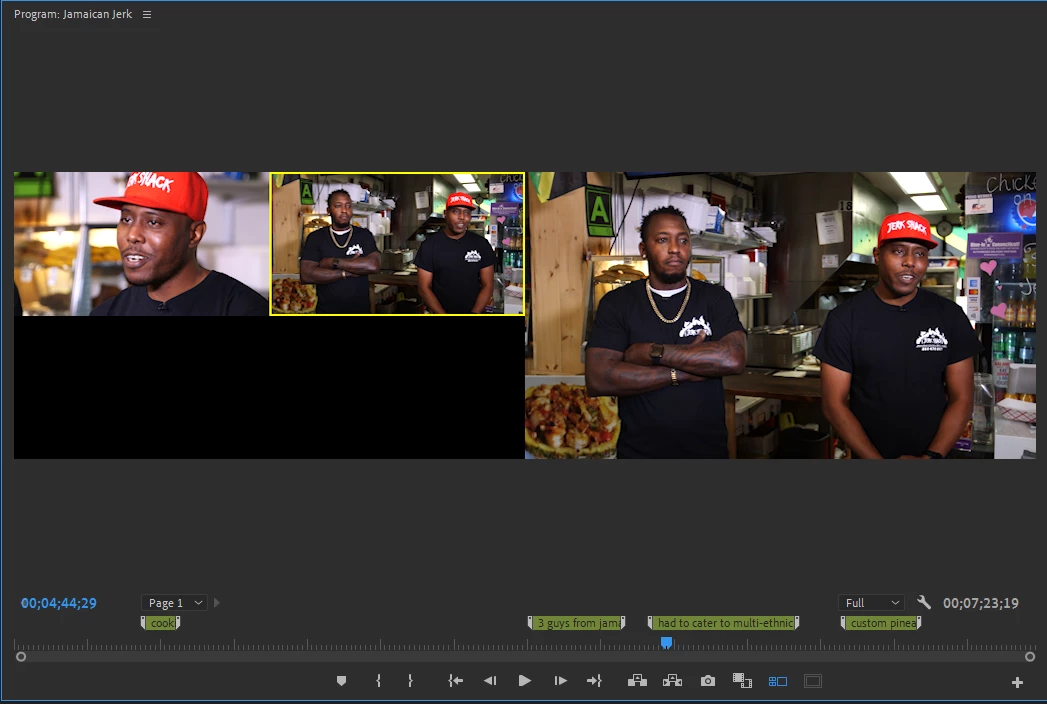
So I've used multi-cam a million times before. This is my first time on newest update. For whatever reason, The cameras will not switch. Normally if I click on the camera view that I want (while in the multi-cam viewer), It will switch the camera for me. Whether I am playing or paused, this always worked. Now, The yellow outline will not switch or select new cameras for me at all. What has changed and What went wrong?


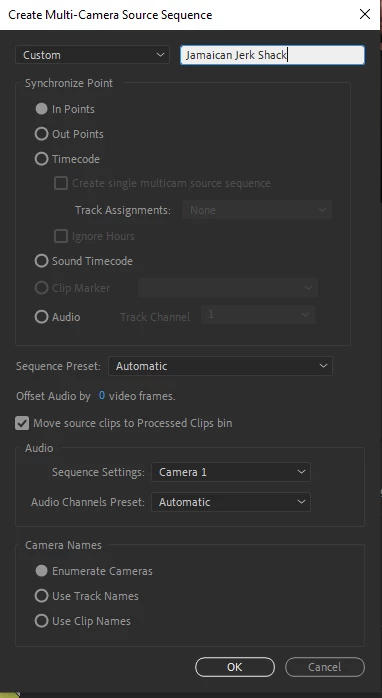
Attached is a screen shot of how I synched the clips.
Correct answer Thomas390376617d2t

I made this quick 40-second video demonstrating how I fixed it. DEFIJOHNNY is correct, at least in my case. The track targeting was the problem.

10 replies

Participant
May 28, 2025

In case this helps anybody else: I've had this problem on and off for a few years and always ended up just closing and reopening Premiere to fix it.... then I figured out that sometimes if my cursor is left in Type Tool mode, the multicam recorder buttons wont work (but only sometimes!), meaning that switching back to the normal Selection Tool before doing the multicam fixes it. It's so simple and stupid I could cry. 

Participant
April 11, 2025

Still same SHHH...T!!!  Awful multicam is a pian in the.....rear end!  04/11/2025 !!  V25.2.1

Thomas390376617d2tCorrect answer
Participant
August 7, 2024

I made this quick 40-second video demonstrating how I fixed it. DEFIJOHNNY is correct, at least in my case. The track targeting was the problem.

Participant
August 9, 2024

nice. This was annoying and on the other side its so simple hahaha

Participant
March 6, 2024

Hey all,

Very late but this was the first thread that came up for me and i didnt find the right answer so im back here to give my solution.


Target the right track. Track 1 by default. 


If you have multicam view on, and the multi program is showing identical feeds right and left and not the selector you want, your target is probably set to a different track. the multicam view will look for the multicam sequence on the targeted track.

johnr48685593
Participating Frequently
June 7, 2024

What do you mean by targeting a track? Sometimes multicam works, and sometimes it doesn't. It's a fickle beast. And sometimes we'll cut up the track having some clips on camera 1 and others on camper 2, then we'll set the next clip to camera 2, even though only one clip is selected, and ALL the clips revert to camera 2. Very annoying.

Participant
August 9, 2024

Hey someone below posted the video showing, but targeting is the inner blue block over the track (v1 v2 v3) it does random stuff, like target your pasting, among other things. so if you set target to v3 the paste will land there not v1 etc. It also controls what MC selector. 

The second problem you described im not sure i fully get. However if its what i think youre saying, any time you live swap the cameras its gonna take over whats infront of it. For adjustmetns, i tend to go back to the track, use the cut tool to find the fram i want to change the cam at, then i change that clips cam manually while paused.  The live feautre dosent whipe out all of whats in front but anything it passes. So i generally only use the live function at the front of the production never when going back for revision.

Hope any of this helps. PP can be so complex, sometimes ill think "this is some mystical artifact of the system" and then you learn some function and suddenly its demystified.

Happy Hunting 🎥

Participant
November 13, 2023

I just discovered this soluition for myself and wanted to share: try dragging the multicam clip into the same video track / layer that you originally enabled multicam in. I had my clip in "V3", and it didn't start working until I shifted the clip down to "V1", and then I was able to see both angles of my multicam. 

Known Participant
May 24, 2023

It's because Adobe ruined multi cam editing.  They made it more difficult and complicated to use.  They took away our multi cam monitor window and decided it would be a good idea to move it to our program screen, and we lose half of our program screen now.  So the only way to just click on a camera window and change the camera in the edit is to have the video playing while you select the camera. Not really useful at all if you have more than three cameras.  How can you make a selection out of all those cameras and and smaller window now because they took away half of my screen?  You can select a camera while the video is paused but you now have to hold down the control button to do it another thing they made more difficult.  They should just bring back the multi cam monitor window and let us select the cameras while it's paused without having to hold down any extra buttons.  I don't know who in their company thought it was a good idea to make it more difficult and complicated AND to take away half of my program screen.  Give us the multi cam monitor window back as a separate window we can dock anywhere we want.

Participant
January 27, 2023

Just came to offer another possible solution to any passersby. I was having this issue where I simply could not get the cameras to switch. I had the correct track targeted, multicam was appearing properly in program monitor. Then I realized that I had track targeting turned on for another layer as well that happened to be locked. Even though it was just a corner bug graphic layer, because it was locked it was unable to "change camera" with my multicam layer.


TL;DR make sure none of your targeted tracks are locked, or better yet, only target the multicam track in the first place.

CLWill
Inspiring
August 12, 2024

Oh my gosh, this is it. Struggled to understrand this for months. I had another track, a background that was locked and targeted. Turn off the targeting, and poof, multi-camera works. Sheesh...

Participating Frequently
November 17, 2022

I now have the same issue. It is regarding 2023 update. Multicamera switching does not work. I have to restart application for it to work everytime until a few minutes it stops again.

jcalverley1
Participant
December 5, 2022

Same here. Hey Adobe, Premiere mutlicam bug is super annoying! I have to keep restarting to get it to work. It's really pushing me to go to DaVinci like everyone else is suggesting. Please fix this soon. I'm on mac 12.6 Studio Ultra

yonim64145623
Participant
December 6, 2022

Hi I had the same ״problem״. This is not a problem!
You need to make sure you are in the program window. and not in the source window.
It works for me

Participating Frequently
January 5, 2022

I had this issue and just figure it out. Right click on the clip, hover over multi-camera and you'll notice that it is not enabled. Enable multi-cam on the clip and switching will work. On previous versions it was always enabled by default so I'm not sure what changed this version or if it's just a select few of us.

lehestro
Inspiring
November 2, 2022

For me, multicam is enabled, yet the problem persists. What's weird (and I think happened to the OP) is everything was working just fine a little while ago. I can also load the multicam sequence/clip into the source window and select the camera angle I want there. Just not in the multicam viewer in the program window. Having to utilize the extra step, well it just ain't right!


I will restart and see if that fixes anything. 

Vishu_Aggarwal
Participating Frequently
May 12, 2021

Maybe the track is locked in the timeline. The switching of cameras does not work when the track is locked. Just make sure the track of the Multicam is not locked. If the track is not locked ....Please share the screenshot with the timeline or Screen record the issue. 


Also, check if you're able to change the camera using the right-click on the clip in timeline > Multi-Camera > Camera 1 or Camera 2. 


Vishu AggarwalAdobe Certified Instructor, Professional and Expert
EveePeasyAuthor
Inspiring
May 12, 2021

So,


I hit that point where I didn't know what else to do, and I restarted the PC. And magically, everything worked as it was supposed to.


So, some bugs I think in the newer updates. Not quite sure. 

Participant
May 13, 2022

Happened to me too, restarting it didn't work but making a new sequence then copy and pasting everything over seemed to work!