
Participant
January 23, 2015
Answered

Multi-Cam sequence ONLY PLAYS AUDIO FROM LEFT CHANNEL, Adobe Premiere Pro CC.

  • January 23, 2015
  • 13 replies
  • 40615 views

Hi All,

I was wondering if anyone could help me out here. I have several hours of short (1-3 min) clips from a 3 day event that I'm trying to organize and prep for editing.  I wasn't on the shoot, but the cameras recorded the external mic (main audio) to one channel, and the internal mic (reference audio) to another channel; however it varies on which channel they recored main vs reference.  For the clips where someone is talking directly to the camera and I know I won't need the reference audio, I've gone in and done "modify audio" and mixed the "stereo" down to "mono", and then selected the channel with the "main audio" to be source channel.   That works great- now when the person talks it comes in evenly through both left and right speakers instead of being lopsided.

However, when I then try to take 2 of those clips that have been mixed down to "mono" and create a new multi-cam sequence, the new sequence consistently plays audio only from the left channel.  I have tried numerous configurations whence making the multi-cam sequence (automatic, mono, stereo, adaptive). Nothing works- it ONLY plays from the left side.  I have also tried modifying the audio channels after I make the new sequence, and put "Channel 1" in both the left and right tracks.  Nothing, it still only plays from the left side.

Any idea in how to get my mono source channel to play evenly in both left and right channels instead of only being in the left?  By the way, if I try to Pan to the right in the effects window, it just gets quieter, not balanced.

Thanks for the help!
Correct answer mgfusco111

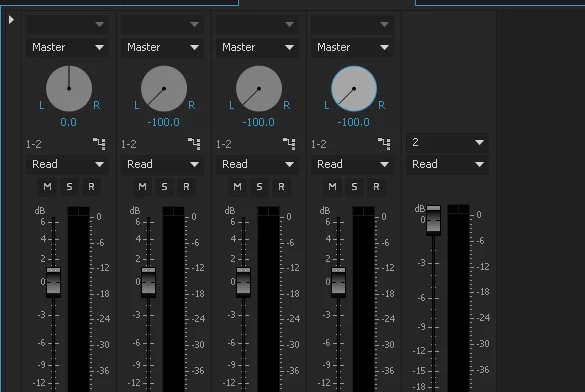
I found all but A1 balanced to the left in the track mixer. Balancing them back to zero fixed the problem. I had been messing around for a while, so I don't know if I did something in addition to fix it.

13 replies

SimonAOM
Participant
June 19, 2015

Found a solution here Multi-Camera Source Sequence Audio from 1 Speaker instead of both??? HELP PLEASE!!!

Ctrl + N or Command + N for a new sequence, select your preset (in my case DVProHD > 1080i) and check that the audio channels are all mono. Then copy and paste all of your clips into the new blank sequence.

When I upgraded from Premiere Pro CC 2014 to 2015, all my multicamera sequences started playing mono audio through the left speaker only. Whether I had just created a new multi camera sequence, or if I opened one I had created in 2014.

Inspiring
December 3, 2015

Has anyone found a fix for this or a work around?  I'm facing the same issue.

SimonAOM
Participant
December 3, 2015

You just need to do as my previous post. Move your clips into a new blank sequence. Don't right-click the multicam sequence and nest it that way. That's where the issue arises. Not sure if this new Premiere update has a fix for it, but I know the above works.

FreeFire1Author
Participant
January 23, 2015

Thanks Dummer.

I figured something out, but I'll leave this up in case someone else runs into the same problem.  If I go back to the original clip that was originally stereo (main and reference audio inputs), instead of mixing down to "mono" and selecting the main audio channel as my source, I am now going to "modify audio" and keeping it "stereo", but simply assigning both source channels to either LEFT or RIGHT, depending on which one the main audio was coming in on for that particular clip.  This has the effect of basically being mono, but also plays balanced left and right if I make a multi-cam (stereo).

dummergold
Inspiring
January 23, 2015

Try makin a new sequence and option one audio track as adaptive. Make your new sequence the same as the sequence you have except tab over to the 'tracks' for the audio option. Copy ams paste your first sequence into the second sequence, then move your mono onto your adaptive track (or copy and paste). With that adaptive audio track, use the audio track mapping and map channel 1 to output 1 and channel 2 to output 2.

Hope oped that gets you there.