
Multi-Camera Source Sequence setting questions
I am pretty new at using Premiere Pro but have learned rather slowly the "Multi-Camera Sequence" but can't come up with a few answers to questions.
I have a classic rock band and recorded 2 live camera angles of the song. One camera angle is labeled:
Reelin-In-The-Years-Cam-1 and the other is
Reelin-In-The-Years-Cam-2 (the closeups)
As you can see on the pic I uploaded. When I choose "Create Multi-Camera Source Sequence a new window appears labeled as such
For sound source I am choosing Audio where I guess it matches up the sound from both videos
Lower under and checked box entitled Move Source clips to Processed Clips bin.
Under that is a section called Audio and in that box is the setting: Sequence Settings with a drop down menu and Camera 1 is in the box with the other options: All Cameras and Switch Audio.
Which of my two files is considered Camera 1? I want the audio taken from the file listed as "Reelin-In-The-Years-Cam-1" How do I do this?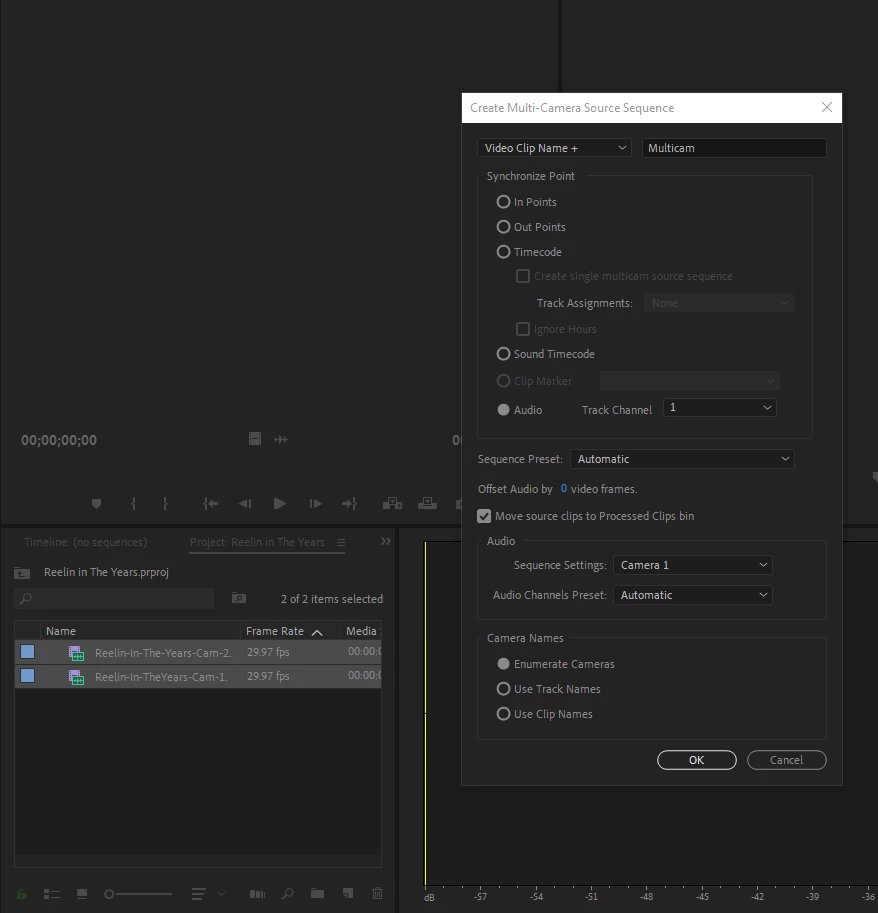
 AdChoices