

MXF video "disappearing" from Premiere - only show as black.
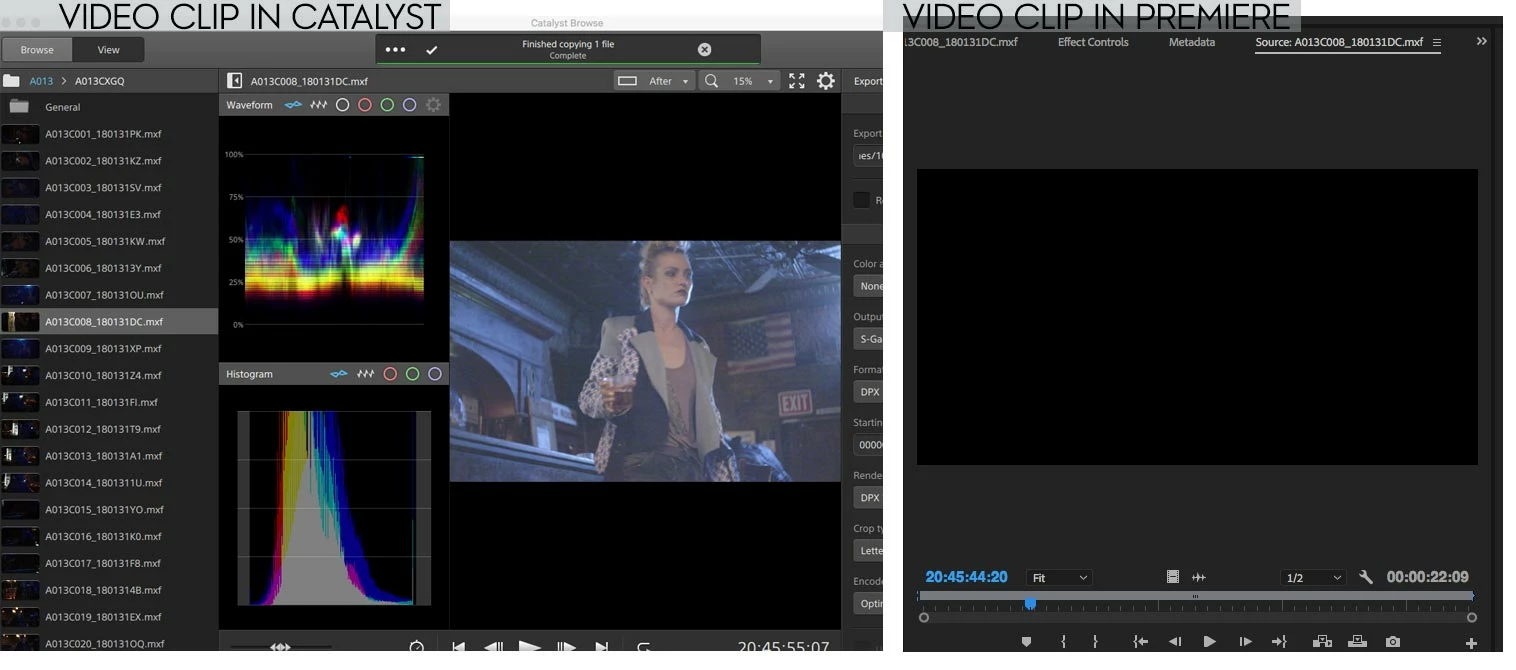
I have some MXF video clips shot on my Sony PMW-F5 (Raw from the AXS-R5 recorder) that are "disappearing" from Premiere. They still work in Sony Catalyst and Sony RAW Viewer but when loaded into Premiere the image is just black. The audio still plays, but the image is missing. It's only happened to seven clips so far (out of hundreds) but they're ones that are currently used in the edit sequence (as opposed to being on the proverbial cutting room floor).
I've tried replacing the file with the originals from the backup drive and exporting new ones using Sony Catalyst, but, the only thing that's worked so far is to transcode the footage. Unfortunately Catalyst & RAW Viewer only transcode to inferior formats/codecs. And, of course, I've tried removing any filters or other "alterations" that may have been an issue. Even tried reloading into new projects in Premiere but still have the same issue.
I've never had this problem before in all my years using MXF files from this camera system with Premiere so am at a loss for why this is happening. The only thing I can think of is this is the first project I've done with this volume of footage (26 TB of footage total) and all the files that have "disappeared" are from one drive. The drive is not having any issues, and like I said above, I've tried reloading the footage from separate backup drives to no avail.
Thanks so much for your help with this and if there's any more info I can provide that would be helpful let me know. Any ideas or suggestions would be greatly appreciated.
Premiere CC 2018 v12.1
OSX 10.11.6
NVIDIA GeForce GTX 980 4096 MB
 AdChoices