
Participant
September 29, 2020
Question

My Image Quality in Premiere pro is very bad

  • September 29, 2020
  • 4 replies
  • 5716 views

Hello, I am trying to import some images in my premiere pro but when I import them the quality is getting worst can you please help me? I have attached both the original image as well as the result I am getting.

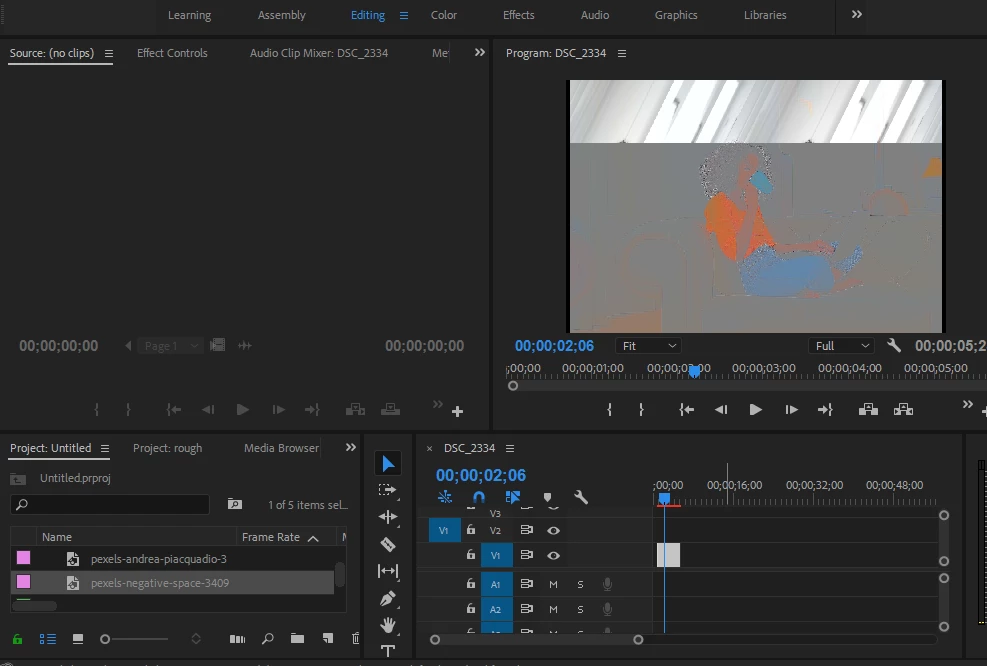
 

[Moderator note: I fixed the attached image situation. As noted below, in the future please drag/drop your image directly onto your reply box so we see it without having to download it.]

This topic has been closed for replies.

4 replies

Warren Heaton
Community Expert
Community Expert
September 29, 2020

Is this a Camera RAW file or a JPEG?  Assuming it's Camera RAW, it looks like the Camera RAW plug-in isn't processing it correctly.


What application are you using to show that image as it's expected to appear in your screenshot?  Will that let you convert to PNG?  Or, are you able to open the image as expected in Photoshop where you can save it as a PNG?


I'd try converting to a different file format and then importing that.  RGB color mode PNG, TIFF, or PSD should work fine.  

Inspiring
September 29, 2020

File > Project Settings > General will take you to a dialog where you can check this option. See the attached screenshot.


Ann Bens
Community Expert
Community Expert
September 29, 2020

Participant
September 29, 2020

I apologize for this as I am new and just made an account

Inspiring
September 29, 2020

Can you update your GPU driver? Before you do this, as a test, try disabling GPU-acceleration from your Project Settings: https://www.redgiant.com/user-guide/magic-bullet-looks/using-mercury-playback-in-premiere-pro/


If your image looks correct after switching to Software Only, then re-enable GPU-acceleration, quit Premiere, and update your GPU driver.

Participant
September 29, 2020

Thank you for replying but i don't have any renderer option in my premiere pro is it because of my 3D card or something else?