
Participating Frequently
January 13, 2022
Question

MY PREMIERE CC 2022 IS LOCKING THE VIDEO DRIVE.

  • January 13, 2022
  • 2 replies
  • 722 views

[ in English ]
Hello everyone.
Would anyone else be experiencing this problem?
My Premiere is crashing a lot during the workflow.
at some point during my job it just crashes the whole computer and then the screen is all black (as if restarting the video drive) and when it comes back it doesn't recognize the video card. ie the sound of the timeline plays but the preview of the video is black. To solve it I have to turn Premier off and on again.
does anyone know how to solve?

[em português]
Olá todos.
Mais alguém estaria passando por esse problema?
Meu Premiere está travando bastante durante o fluxo de trabalho.
em algum momento durante e meu job ele simplesmente trava todo o Computador e em seguida a tela fica toda preta ( como se reiniciasse o drive de video) e quando volta ele não reconhece a placa de video. ou seja o som da timeline reproduz mas o previw do video fica preto. pra resolver tenho que desligar e ligar de novo o premiere.
alguém sabe como resolver?

tenho uma G FORCE RTX  3060 12Gb
32 ram
SSD 1Tb
e mesmo assim tenho esses travamentos apenas no premiere.
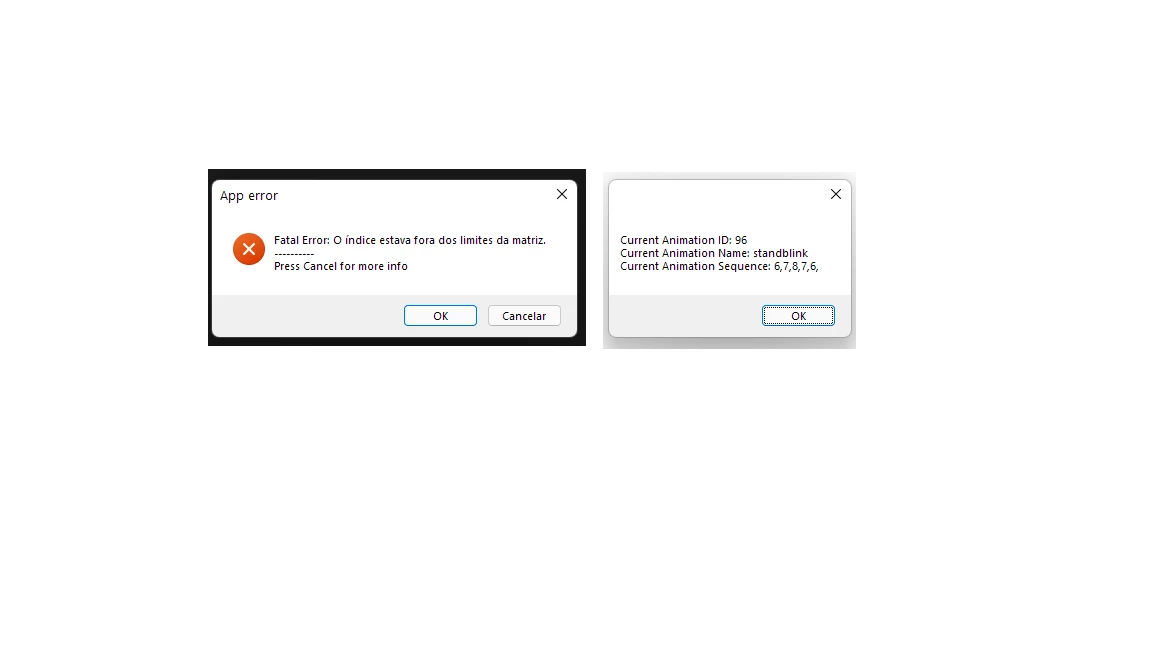
a baixo segue os erros: 


This topic has been closed for replies.

2 replies

Peru Bob
Community Expert
Community Expert
January 13, 2022

Delete the Media Cache and Media Cache files:
https://community.adobe.com/t5/premiere-pro/faq-how-to-clear-your-media-cache-in-30-seconds-in-premiere-pro-2020/m-p/11017257/thread-id/260446?page=1

If that doesn't work, try resetting the preferences:
https://community.adobe.com/t5/premiere-pro/faq-how-to-reset-trash-preferences-in-premiere-pro/td-p/8236158?page=1

If that doesn't work, try resetting the Workspaces:
Reset a workspace
Reset the current workspace to return to its original, saved layout of panels.
1. Do one of the following:
• Click the Workspace menu icon and select Reset to Saved Layout.
• Choose Window > Workspace > Reset to Saved Layout.
from here:
https://helpx.adobe.com/premiere-pro/using/workspaces.html

If that doesn't work, try Preferences > Audio Hardware and set Input to None.

If that doesn’t work, try updating or rolling back your graphics driver directly from the video card manufacturer’s site. If NVIDIA, do a clean installation of the latest Studio Driver (NOT the Game Driver)

If that doesn't work, try creating a new project and import the old one into it.

Participating Frequently
January 26, 2022

Hi,
All right !?
I sincerely appreciate your help.
it was nice to actually have an answer.

of the steps mentioned, only one of them I had not done yet.
but all the others I already tried.

The fact is that even windows I have already formatted and reinstalled to try to solve the problem.
all Nvidea drivers, everything.
and this started after some adobe updates and searching I've found other people
also having difficulty in relation to the NVIDIA GeForce RTX 3060 card with premiere pro.

Unfortunately I will have to wait for a new update to try to fix this problem.

but thanks for trying to help.

Participating Frequently
January 13, 2022

Olá todos.
Mais alguém estaria passando por esse problema?
Meu Premiere está travando bastante durante o fluxo de trabalho.
em algum momento durante e meu job ele simplesmente trava todo o Computador e em seguida a tela fica toda preta ( como se reiniciasse o drive de video) e quando volta ele não reconhece a placa de video. ou seja o som da timeline reproduz mas o previw do video fica preto. pra resolver tenho que desligar e ligar de novo o premiere.
alguém sabe como resolver?

tenho uma G FORCE RTX  3060 12Gb
32 ram
SSD 1Tb
e mesmo assim tenho esses travamentos apenas no premiere.
a baixo segue os erros: