
Participant
January 3, 2025
Question

My transcription doesn't follow default language

  • January 3, 2025
  • 2 replies
  • 267 views

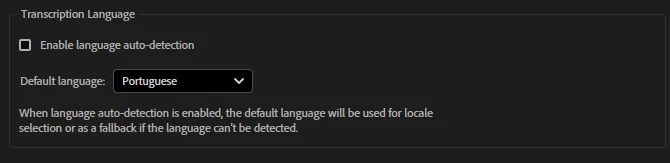
I have my default language set to portuguese, cause that's what i use for most of my videos. However, almost 100% of the time, it will transcribe it in english, so i have to manually go and re-transcribe in portuguese.

could this be a bug or am I doing something wrong?


2 replies

Kartika Rawat
Community Manager
Community Manager
January 3, 2025

Hi victoragfr!

Sorry about the issue. Which version of Premiere Pro are you using? Could you check the Project Settings? For each new project, make sure that the language is set to Portuguese before you begin transcription. You can set this in the New Project dialog box when creating a new project. Also, please try resetting preferences and deleting cache files


Let us know.

Thanks, 

^KR

Participant
January 7, 2025

Hello Kartika!


Turns out this only occurs when i click on "create captions from transcript" first, if i don't have any transcription yet, it automatically uses english to do so.


However if i click on "transcribe" first, then it does use my default language. So yeah, kinda solved haha


Ann Bens
Community Expert
Community Expert
January 3, 2025

I am guessing you have downloaded the Portuguese language pack from the CC desktop app?

Participant
January 7, 2025

Yes I do! Turns out this only occurs when i click on "create captions from transcript", if i don't have any transcription yet, it automatically uses english to do so.


However if i click on "transcribe" first, then it does use my default language. So yeah, kinda solved haha