Participant
June 12, 2018
Answered

My video is cropped- and more so when exported?

  • June 12, 2018
  • 1 reply
  • 4361 views

I'm not sure how to describe this but my whole screen seems to be compressed. It even looks worse once I try to export.
Any suggestions?

    This topic has been closed for replies.
    Correct answer SAFEHARBOR11

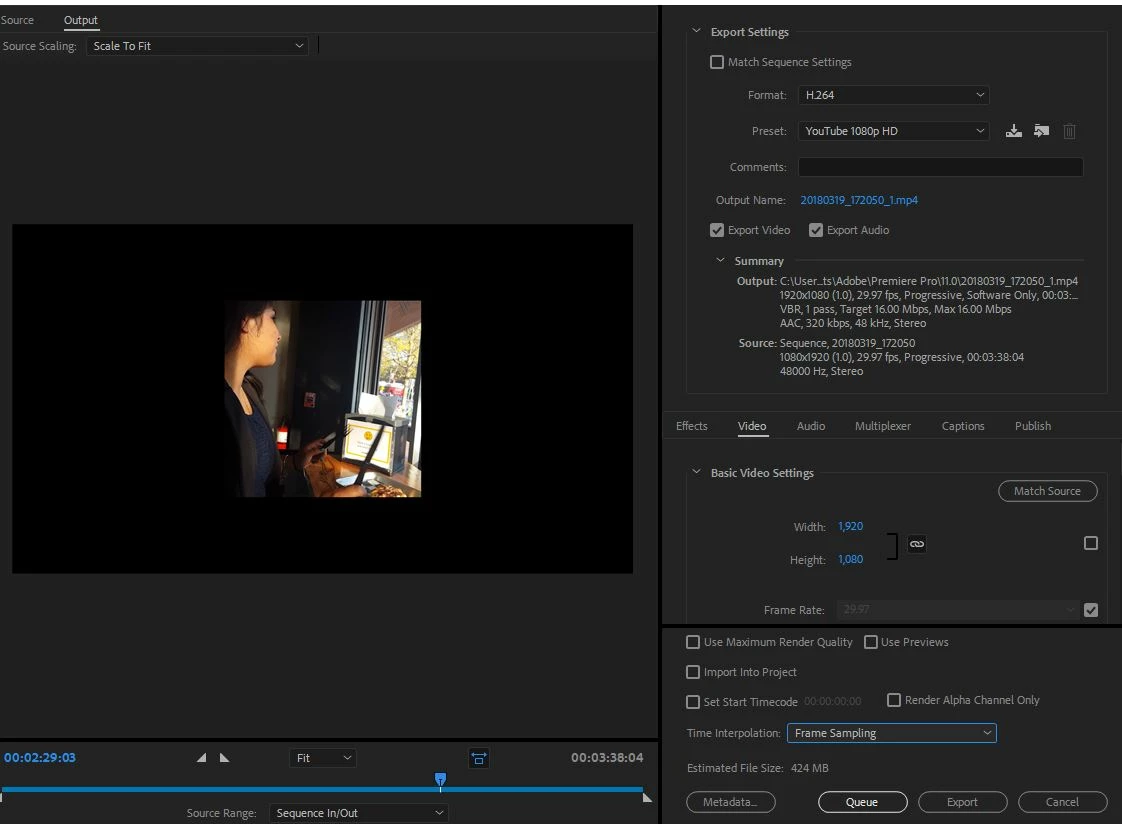
    Your Sequence is 1080x1920, which is vertical video like that from a cell phone, while the Output is 1920x1080 which is standard horizontal 16:9 widescreen video.

    What is the SOURCE video? How do you wish to deliver? Need to make some workflow decisions.

    Thanks

    Jeff

    1 reply

    SAFEHARBOR11Correct answer
    Participating Frequently
    June 12, 2018

    Your Sequence is 1080x1920, which is vertical video like that from a cell phone, while the Output is 1920x1080 which is standard horizontal 16:9 widescreen video.

    What is the SOURCE video? How do you wish to deliver? Need to make some workflow decisions.

    Thanks

    Jeff

    Participating Frequently
    June 12, 2018

    Think of the Sequence in Premiere as the foundation of something you are building, like a house. If the size or shape of the foundation doesn't match the floor plan of the house you want to put on top of it, bad things will happen.

    Absolutely imperative to begin your project with a correct Sequence Setting or everything will turn bad from there.

    One thing that often works well in a new project is to drag a video clip to an empty timeline sequence, and Premiere will tell you if the video doesn't match the sequence and will offer to correct that. Or you can right-click a video clip in the Project Bin and select New Sequence from Clip.

    In either case, important that you are using the most common type/size of video clip in the project. Don't start the sequence with some random still image that you downloaded somewhere, or the sequence will be sized to some oddball setting that matches the still image which could be far different than "video" should be.

    If you video source is vertically-oriented cell phone video, and you wish to deliver as wide-screen video, then choose a 1920x1080 sequence with appropriate frame rate, and you may need to scale and rotate the video source to fit that window, then export as 1920x1080.

    Thanks

    Jeff

    nicksucioAuthor
    Participant
    June 13, 2018

    I understand now it's different but is there a way to change it without restarting the project?
    My footage was shot on a cell-phone but shot horizontally.
