Participating Frequently
January 25, 2021
Question

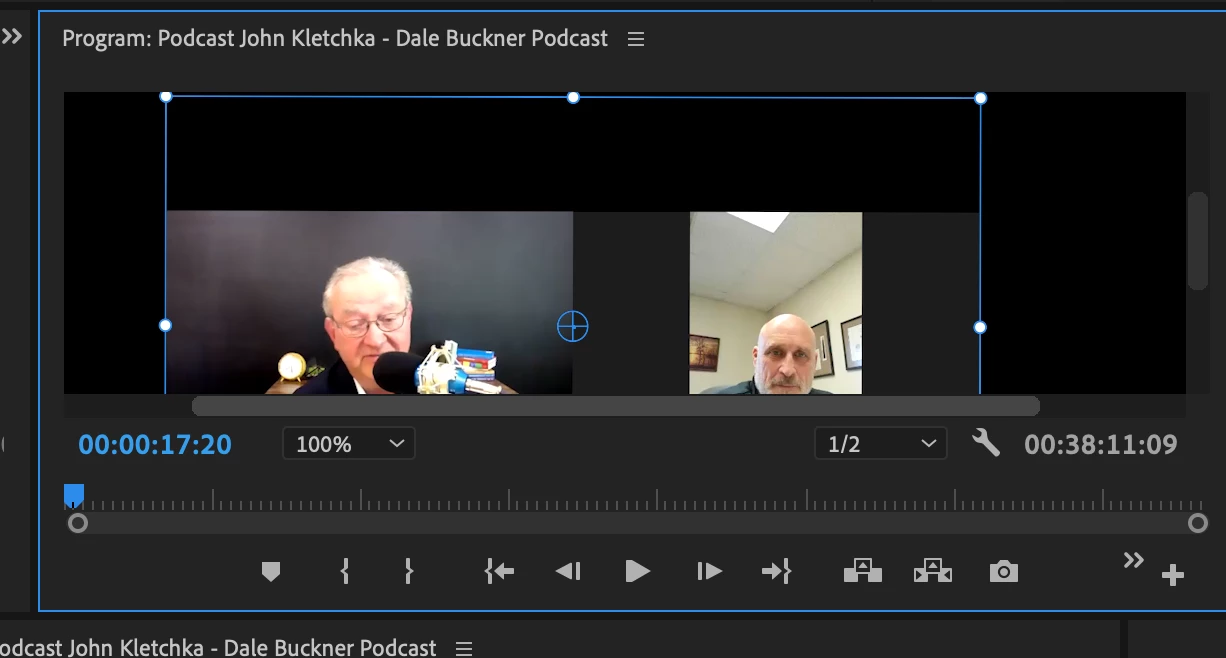
My video will not stay centered.
  • January 25, 2021
  • 2 replies
  • 1708 views


How do I get my video to stay centered? When I try to move it to the center, it continues to move. Please help!

This topic has been closed for replies.

2 replies

R Neil Haugen
Legend
January 26, 2021

It may be that you're moving the anchor point ... which can get bizarre behavior. Leave it be.


Move by the X/Y coordinates of the Position options in the Motion effect at the top of the Effects Control Panel.


Neil

Everyone's mileage always varies ...
Participating Frequently
January 26, 2021

I'm in the effects control panel but I don't see that option. What am I missing?

Nibroc99Productions
Known Participant
January 27, 2021

When you say that it moves around, do you mean that is moves around over time, as though there are keyframes telling it to move around?  Or does it just snap to a weird point and stay there?  Are you sure that it's not the original video clip that has movement in it?


Nevermind - see my comment in your other thread.  For anybody having a similar issue, here's the other thread I'm referring to: 

https://community.adobe.com/t5/premiere-pro/my-video-will-not-stay-centered-even-when-setting-the-anchor-point/m-p/11785470?page=1#M326111

Mike Dziennik
Community Expert
Community Expert
January 26, 2021

Not sure exactly what you mean but you probably want to change your viewer zoom level from 100% to 'Fit'.

Participating Frequently
January 26, 2021


For example, even when I set the frame to "fit" and try to center the video, it resets it and puts the video back to the top of the frame instead of the middle where I need it to be. Does that make sense?