

RonaldCz
Inspiring
December 23, 2020
Question

Name of video clip in overlay source window

  • December 23, 2020
  • 1 reply
  • 1101 views

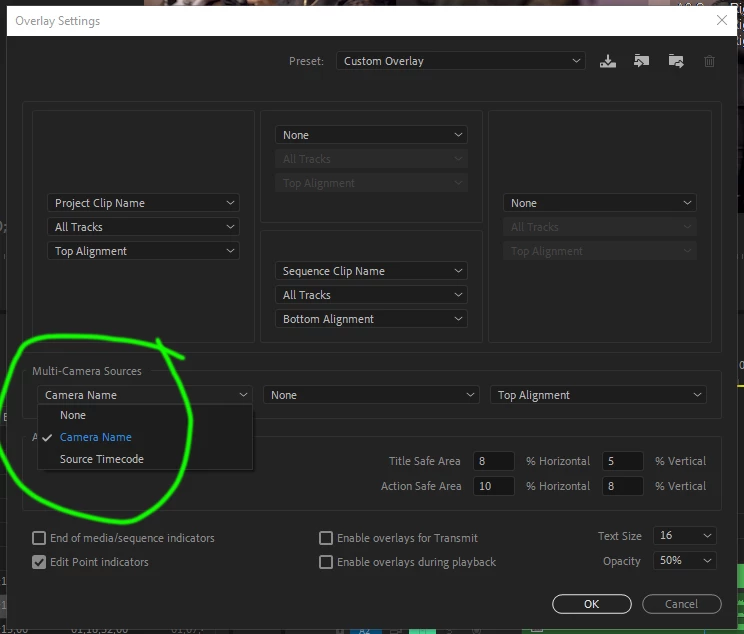
I am doing a multi cam edit with combine clips in the project window. I understand you can show clip names in overlay for the timeline but I would like to show video clip names in the multi view camera window. All I can get right now is Cam 1, Cam 2, Cam 3, and Cam 4 but not the name of the video file used to compose the multi video in V1. 
 

This topic has been closed for replies.

1 reply

Mike Dziennik
Community Expert
Community Expert
December 23, 2020

Did you use this setting when creating the multicam clip? I'm not sure if/how you can change it after creating the clip.

RonaldCz
RonaldCzAuthor
Inspiring
December 23, 2020

No I used Enumerate Cameras. So I guess this is camera 1 as a name.

Well I can start doing that in the future but it's hard to know that in researching the problem, perhaps there should be a warning and instructions in the overlay so it's easier to understand. Maybe create an option to change the name in "Edit Cameras".

Windows 10 64-bitGigabyte Z490 AORUS Ultra IntelLGA 1200 ATX MotherboardIntel I9-10900K CPU@3.70GHzRAM 16GBNVIDIA GeForce RTX 2070 Super& NVIDIA GeForce GTX 1650