Sextonartsm423
Participant
February 19, 2017
Answered

New Adjustment Layer makes Video Black

  • February 19, 2017
  • 5 replies
  • 23777 views

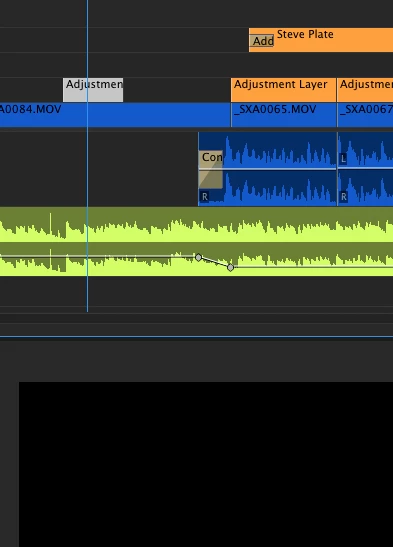
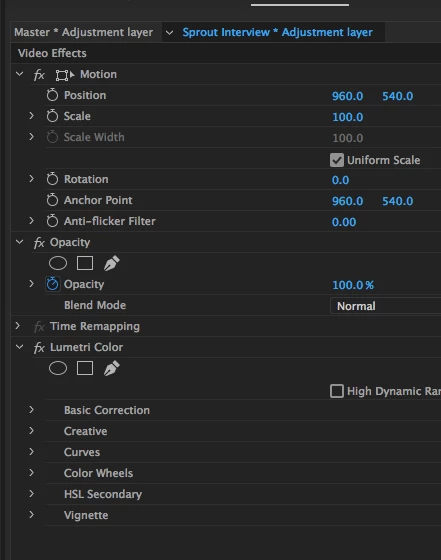
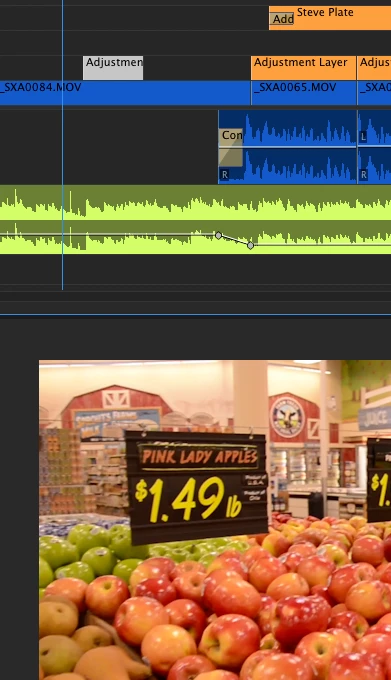
I've recently experienced this issue and I can't find out why it is happening. Upon creating an new Adjustment layer and putting it on a track over a clip, once I add an effect (like Lumetri Color - with no settings turn on, or any color correction) the output is black.  Turning off the whole track or turning off the Lumetri in Effects, turns on the raw output.  It's happening to any video I am working on. Adding Lumetri (or any effect) directly to the clip is fine.  Also, what is rather odd, but telling, is that when I look at the properties of the adjustment layer, both File Path and Type are Black Video.  That probably is the problem, but what's the solution?

Is it a current Premiere glitch or just happening on my machine or a setting?  Hopefully there is a simple remedy.  The attached pics show the raw video output, then with the new adjustment layer, and the settings for the effect (ie Lumeti has nothing turned on).   Any help is appreciated.
This topic has been closed for replies.
Correct answer Sextonartsm423

With a lot of testing, I opened the project on another computer with same Premiere version (2017) It worked fine.  So I checked settings specific to this machine.  File--> Project Settings reveled that I was using the Metal version of the Mercury Playback engine (I'm not sure why it was set or reset to this.  Upon switching to the Open GL version, things now work fine.  Enjoy.

5 replies

Participant
August 19, 2022

"Adjustment layer and putting it on a track over a clip, once I add an effect (like Lumetri Color - with no settings turn on, or any color correction) the output is black" I get a black frame on beginning of timeline. This is 19 Aug 2022 Adobe still haven't fixed it they left us video editor behind.

R Neil Haugen
Legend
August 19, 2022

What's your hardware?


This happens only on some specific gear, and a fix is I've heard out in the public beta. Should be in a patch some time not too far out for the 'shipping' version.


Neil

Everyone's mileage always varies ...
R Neil Haugen
Legend
October 9, 2019

Any of these apps can have issues on someone's system. I'm on the LGG forum daily, mostly colorists, mostly Resolve based, and well ... there's shops that never used any 15.x version of Resolve because in their shop it wasn't stable. Others have been working with 16.1. I've been using Premiere 13.x since it came out. Had an issue with the transmit-out monitor not sticking with 13.0 but they patched that in a few weeks.


And yea, a lot of users aren't happy about Apple ditching OpenCL ... but ... that's Life.


Neil

Everyone's mileage always varies ...
R Neil Haugen
Legend
October 8, 2019

Bmartin,


OpenCL is going buh-bye. Whether or not we prefer doesn't seem to matter. Apple is throwing everything at Metal and asking all vendors leave off work with OpenCL.


And of course most of us are several versions into Premiere 2019.


Neil

Everyone's mileage always varies ...
Inspiring
October 9, 2019

Wow didn't know that about Metal, that's unfortunate. It's (way) slower then OpenCL on my comp. Yeah, about 2019 - I sort of don't want to touch it with a 10ft pole until 2020 comes out. I was told by one of the vets on here that being on the latest version is just being Adobe's guinea pig amd I tool that to heart lol. I'm sure it's stable by now, but there aren't any concrete reasons for me to update so I try to stay with a stable system. Though that is seeming more out of my grasp by the day...

Inspiring
March 3, 2017

I have this exact same problem. It happened to me in CC 2015 and now is happening to me again in CC 2017. I frequently use adjustment layers to make a 2.35 crop, but if I add anything else to the adjustment layer (like Lumetri) it makes all of my video underneath the adjustment layer go black. If I turn off the track that has the adjutment layer, everything comes back. It is super annoying. What just happened today, is that I tried to make a simple opacity mask directly on one of the 2 videos underneath my crop adjustment layer, and even that makes my adjustment layer turn everything black.

Inspiring
March 3, 2017

Oh and I'm in Open CL

Participant
March 3, 2017

ok guys, what do I have to do, if I get a project from a Mac Pro which uses Metal

and I want to work on its sequence with adjustment layers causing black on my macbook pro

which does not have Metal but only OpenCL and Software????

When I switch to Software only the adjustment layer behaves normal but I loose GPU acceleration.

I'm not updating Yosemite OS right now because I'm in a current project.

So is there a possibility to set back or change the type of Mercury on the particular adjustment layers?

e.g. save lumetri as preset - apply preset to new adjustment layer or anything else? I also would accept

hacking for the moment....

Any ideas?

Sextonartsm423
Sextonartsm423AuthorCorrect answer
Participant
February 19, 2017

With a lot of testing, I opened the project on another computer with same Premiere version (2017) It worked fine.  So I checked settings specific to this machine.  File--> Project Settings reveled that I was using the Metal version of the Mercury Playback engine (I'm not sure why it was set or reset to this.  Upon switching to the Open GL version, things now work fine.  Enjoy.

Vidya Sagar
Adobe Employee
Adobe Employee
February 19, 2017

Hi Sextonartsm,

Glad the issue is resolved with the change of the Renderer from Mercury Playback Engine GPU acceleration(Metal) to OpenGL.

Can you provide us the information related to System Configuration for documentation purpose?

1. What is the exact dot version of Premiere Pro? FAQ: How to find the exact version of Premiere Pro you're using?

2. What is the GPU model number?

3. What is the OS version number?

4. Is this happening with all projects? Create a new project & test.

5. Please post a screenshot of Sequence settings. FAQ: How do I capture and post a screen shot or video?

Thanks,

Vidya Sagar.

Sextonartsm423
Participant
February 20, 2017

Vidya, This was affecting all of the recent projects.  Im not sure how that setting was switched.  Im am running on a ~2yr old iMac with no advanced graphics etc.  I have attached screen shots to help you out.  Let me know if you need more info.

Pr 2017.02 v11.0