
August 8, 2022
Question

new IMPORT tab doesn't allow to unselect all or multiple items (Premiere 2022)
  • August 8, 2022
  • 4 replies
  • 7507 views

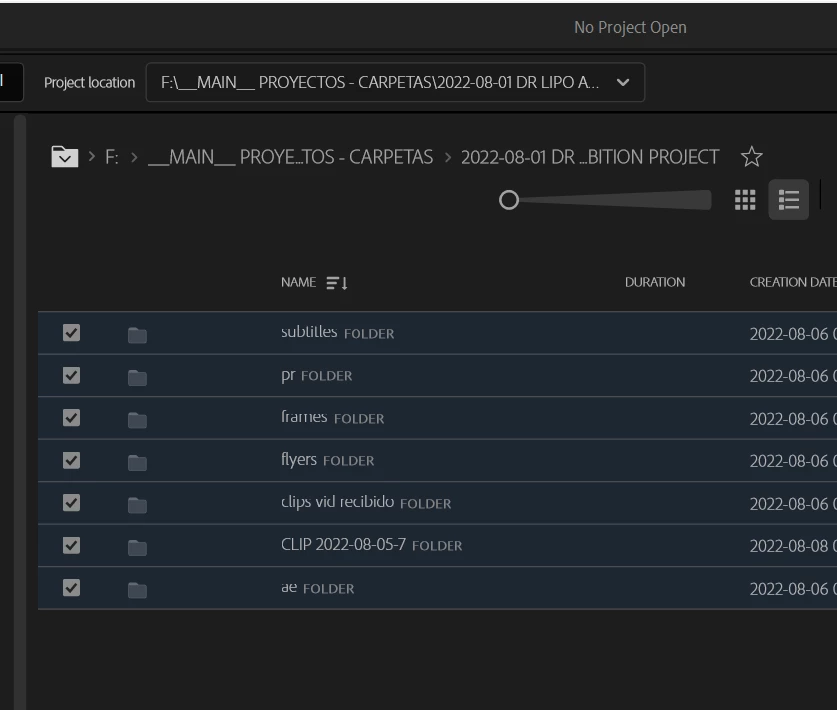
Hello! when creating a new project I want to import only ONE subfolder/file from the main folder where my whole project is located, but there is no way to unselect all but one folder/file,  premiere just automatically selects all files from the previously double-clicked main folder, that has inside many folders and files, but I just only need one of them and unselecting one by one is a waste of time, especially if there are hundreds of files for example.
Am I doing something wrong? Or it's just a poorly designed Import tab.

4 replies

Participant
August 20, 2024

UPDATE: not sure if this existed before but there's currently the option to right click on the folder of selected files in the bottom left tray before clicking Create.

Known Participant
February 29, 2024

I thought I was going insane today. I couldn't figure out how to select or unselect. It was trying to import my entire computer. I immedately got on here to see I am not the only one. It's inexuseable bug that needs to be fixed or at least give us buttons to toggle the behavior on or off. 

R Neil Haugen
Legend
February 29, 2024

I'm puzzled as I cannot replicate this behavior.


In the Import page, I go to any 'main' folder of media, with subfolders, and no subfolder is auto-selected. I can select or unselect folders at will.


So I'm trying to figure out what gets the behavior you're getting.

Everyone's mileage always varies ...
R Neil Haugen
Legend
February 29, 2024

Something that's not obvious, is that Premiere's Select/Deselect keyboard shortcuts work in this panel also.


On my rig, that's Ctrl-A for select all, and Ctrl/Shft-A for deselect all.


That may help you out some.

Everyone's mileage always varies ...
R Neil Haugen
Legend
August 8, 2022

Ann's right ... name your project, select a location, click Create and build your project in the normal ways for more complex or specific needs.


The new import process was added as a replacement for the options on the old 'new project' dialog that few users ever used. This added import process is something that is designed for someone who needs to make and finish quick projects ... maybe many in a day ... an example would be a TV newsroom editor.


So it's simple, grabs everything in the folder & under in one 'flat' bin ... and I've been told is fantastic for those that need that.


But for most of us, it ain't a good way to start a project, and we weren't expected to use it anyway.


Neil

Everyone's mileage always varies ...
Participant
August 4, 2023

I create vids for different clients on a daily basis using the same open and close from their past videos.  I remove the old video and insert the new one, bringing them in from different folders.  I just change the text.  Please put in the select all or delete all check box.  You can have it default to all checked, but to have to uncheck 27 vids individually to get just one file is annoying and time consuming when I have other vides to complete.  Thank you, Trace

Participant
August 4, 2023

btw, I do not believe newsrooms are your primary user base.  Just sayin...

Ann Bens
Community Expert
Community Expert
August 8, 2022

You can skip the new import tab by giving your project a name and give it a location > OK

 Import your folder in the Project window or with the Media Browser.

Known Participant
February 20, 2024

While a "select all" and "select none" is, in my opinion, essential, if you go ahead and create your project and use the import file from the overhead (main) menu instead of the import tab, you do not get the same behavior - Premiere in this case defaulting to the behavior of expoler (Windows) or finder (Mac).

This purported workflow (above) needs work in my opinion as any check-to-select interface needs refinement options especially in the case of rapid turnaround work.

Participant
March 2, 2024

Please listen to Hunter!
Having to google how to get past this very simple user interface is embarrassing. God forbid my boss saw me struggle to deselect files. I get paid by the hour and him seeing me double click 200 files to unselect them is insanity. It points to a lack of quality assurance in what is supposed to be the brand name in video editing software.