
Ken Nielsen
Legend
December 4, 2020
Answered

New Premiere Pro v. 14.0 - Where Are Video Transitions?

  • December 4, 2020
  • 3 replies
  • 2436 views

The new version of Premiere Pro seems to be missing Video Transitions and also, I cannot even find the "Effects" menu but only a "Effects Controls" which has nothing in it - no Video Transitions like previous versions of Premiere Pro, What has happened? I simply want to make a 'Dip To Black' at the start and end of a sequence but am lost at this point. Are all of the old controls gone? How do I do simple transitios like dip to black and dissolves between clips and fade to black at the end? I have studied Premiere Pro for years but am completely lost with this new version. Please help me find or do the old menus even exist any more?

TIA,

Ken
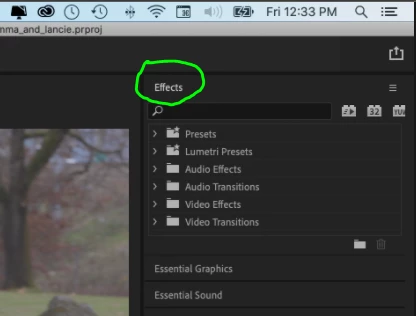
Correct answer Averdahl

but my question is 'where are effects and transitions' which used to be readily available in Premiere Pro but seem to be missing now'. 


They are in front of you, in the Effects panel. 🙂


Video: Intro to Adobe Premiere Pro CC - 03 Customizing Your Workspace, Docking, Undocking and Grouping

3 replies

Participant
June 27, 2025

Same! I actually told a student the other day that this is a good time to learn Premiere Pro as everything that I knew has vanished overnight and I'm starting again from scratch.

Community Manager
July 7, 2025

Hi chrisenwright,

Sorry to hear about this. Could you please confirm the version of Premiere Pro you are using & the effects/transitions that are missing?


Thanks,

Sumeet

Participant
January 9, 2023

So Ken, I have been using Premier Pro Elements. Just upgrage to Pro (regular? It is a subscription service). I am having the same problem as you. Can't find transitions) I look in the upper right hand corner and I see "Essencials". But in there it is so confusing. I click on effect where it should be and the screen goes back to my editing page. Frustrating. I guess I need to take tutorials on this. Or maybe go back to Final Cut? (I have both).

Thanks,

Jerry


Ann Bens
Community Expert
Community Expert
December 4, 2020

If Premiere is acting weird:

FAQ: How to reset (trash) preferences.

If that does not work

Reset Workspace.


BTW the newest version is not a version, nor is 14.0.

Please post exact version and build found under Help > About Premiere...

Ken Nielsen
Legend
December 4, 2020

Hi Ann, Thanks for responding, first, on the opening splash screen I've attached here shows a letter 'v' and number 14.0 led me to believe the letter 'v' stood for version but must be something else.. the complete build and version are at the top of the screen shot. That is the first screen shot here:

The second screen shot is Premiere Pro with a project open and nothing selected in the timeline...

The third screen shot is Premiere Pro with a clip selected in the timeline... the resulting 'Effects Controls' is my area of question... what has happend to 'Transitions' under effects?

There does not seem to be any strange behavior but my question is 'where are effects and transitions' which used to be readily available in Premiere Pro but seem to be missing now'. 

Would appreciate help in learning how to find 'transitions' if they are indeed still a part of Premiere Pro, or to learn how to do the things I've eluded to in my original post regarding applying transitions of 'dip to black' and also 'dissolves' between clips.

TIA,


Ken

Community Expert
December 4, 2020

Your effects panel is at the top right corner of your screen, and video transitions are there. You should apply the transition from that panel and then edit it's settings in the effect controls panel.