
Iván Gabaldón
Known Participant
October 26, 2022
Question

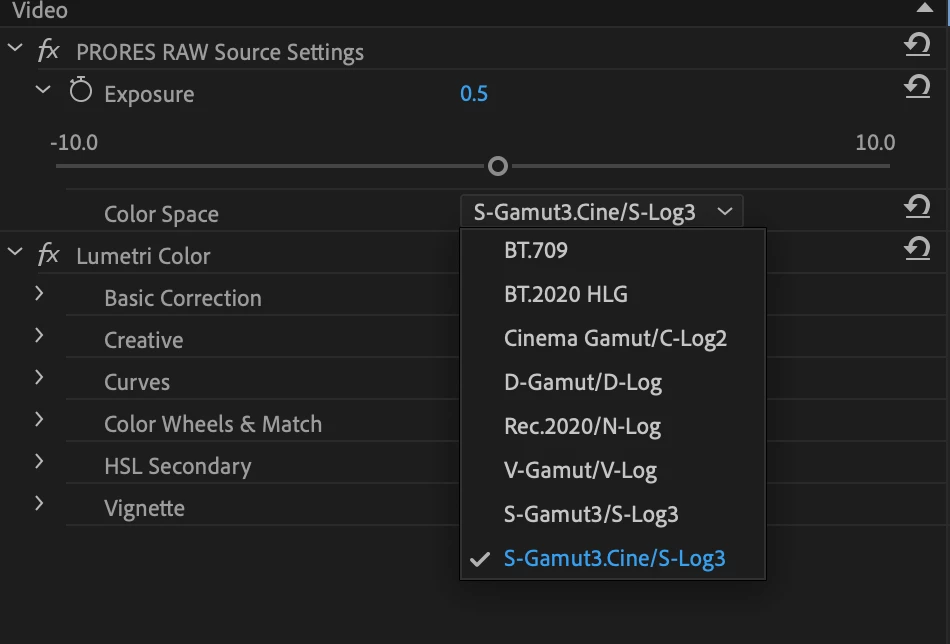
Nikon N-Log Color Space not available in ProResRAW settings

  • October 26, 2022
  • 1 reply
  • 1503 views

I'm trying to figure out a workflow in Premiere Pro for footage recorded with an Atomos Ninja V from a Nikon Z6II camera, via HDMI with ProResRAW enabled.

There's a tutorial from Atomos that shows how to do this, but when I open the Color Space options in Premiere's PRORES RAW Source Settings the Nikon N-Log option shown in the tutorial is not available. 

Is this something that I need to install?

Thanks in advance for any help! 🙂
This topic has been closed for replies.

1 reply

Kevin-Monahan
Community Manager
Community Manager
November 1, 2022

Good day, Iván,

I hope you are well. Sorry about this issue. Can you give us a bit more info? What kind of computer are you using: CPU/GPU/RAM/HD? Is it possible to upload a short sample file to Creative Cloud, Dropbox, or Google Drive (or whatever you use)? I don't have any clips of this footage, but if I did, I can test and pass it along to engineers. 


Thanks,
Kevin

Kevin Monahan - Sr. Community and Engagement Strategist – Adobe Pro Video and Audio
Iván Gabaldón
Known Participant
November 3, 2022

Hello Kevin, thanks so much for looking into this!


Here's the info you requested:


System I'm working on (still on the fence about which new Mac I'll upgrade to):

  Model Name: iMac

  Model Identifier: iMac15,1

  Processor Name: Quad-Core Intel Core i7

  Processor Speed: 4 GHz

  Number of Processors: 1

  Total Number of Cores: 4

  L2 Cache (per Core): 256 KB

  L3 Cache: 8 MB

  GPU: AMD Radeon R9 M295X

  VRAM: 4 GB

  Hyper-Threading Technology: Enabled

  Memory: 32 GB


Software: Adobe Premiere Pro Version 22.62 (Build 2)


DropBox link to a sample video file, Nikon ProRes RAW as recorded on the Atomos Ninja V (not much to look at, just some objects on my camera desk and a color chart):

https://www.dropbox.com/s/pxd3g3jtg5cd0f5/AN5_KIN_S001_S001_T011.MOV?dl=0


The Atomos tutorial I referenced earlier can be found on YouTube, keywords Joe Allam, Premiere, Atomos, Nikon ProRes Raw, tutorial.


Here's a screen capture of that same video, showing the Nikon specific option in Premiere that I don't have:


Again, thanks so much, let me know if you need any more information from me. 


Cheers.


Participant
May 28, 2024

Hello.


Has there been any update on this? I am hav ing the same problem using the same video.


Thanks