
kevink34003390
Participant
October 15, 2017
Answered

No Audio after export

  • October 15, 2017
  • 4 replies
  • 9305 views

I just created a short video in premiere pro, on my timeline everything works perfectly: Audio and video. When I export, there is no audio. I am trying to export H.264, export settings shown below. I see that is is a somewhat common problem but I don't see anything that has fixed my problem yet. I appreciate any help.

Thank You!
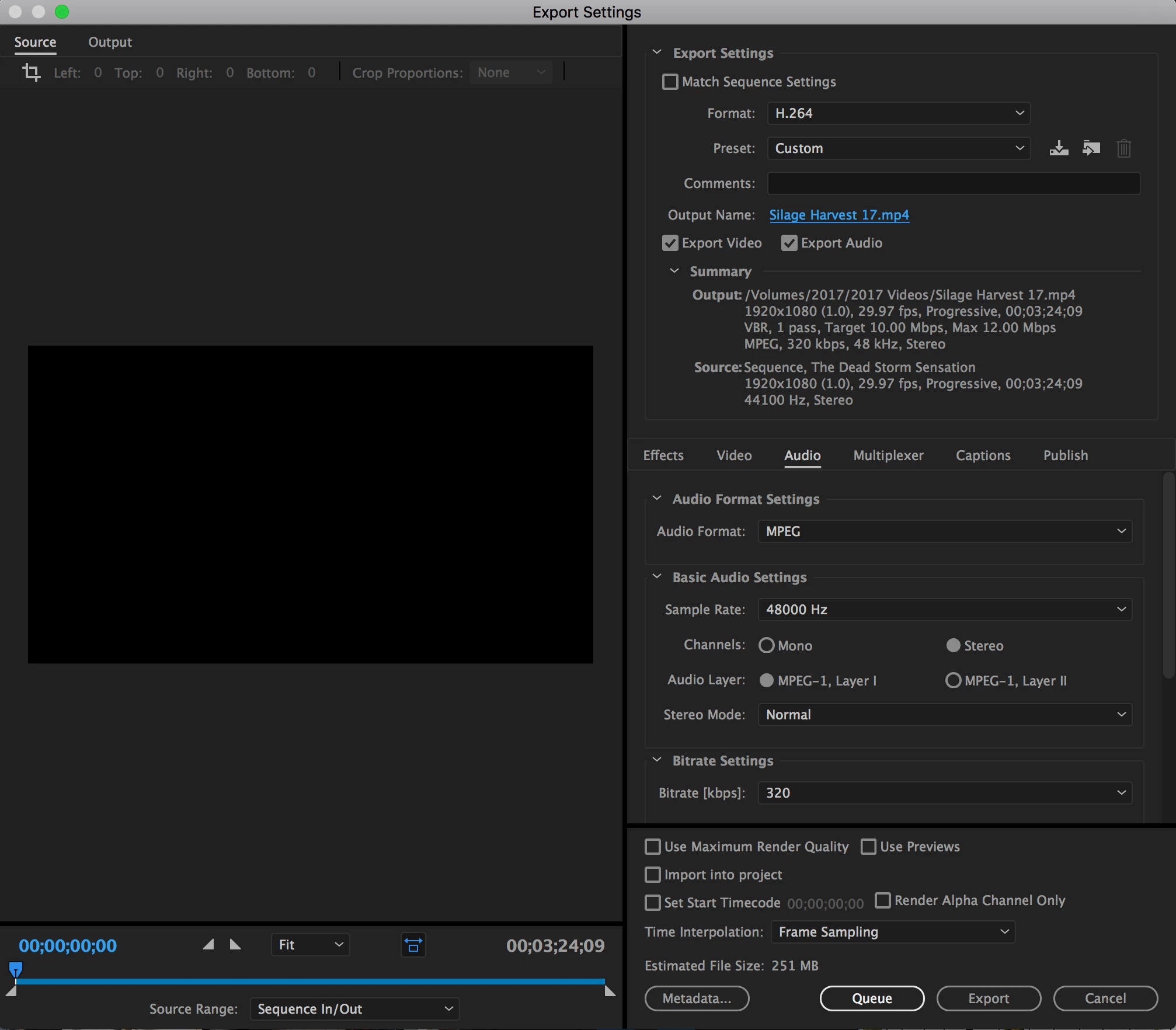
This topic has been closed for replies.
Correct answer Ann Bens

Set audio to AAC and try again.

4 replies

Participant
June 2, 2021

I've been struggling with this for weeks! But finally found a solution. Unistall premiere and install an old version. I used 14.9 and BOOM exported perfectly with regular default settings! Sometimes when things aren't broken, dont fix it. Updating was the problem.

Inspiring
August 3, 2021

Same issue exporting GoPro 4K Hero 9 footage recorded using H265 codec on Hero 9.


Timeline has mutiple video and audio tracks. The audio plays fine on the timeline. No sound is missing. 


The exported file is missing some audio at certain places.  


If you do anther export, the audio re-appears in places it was missing but disappears on places where the original export had audio. 


This happens in version 15.1 and v15.4.


Reverted to Version 14.7 and v14.9 and the exported file works fine with no missing audio. 


So, looks a bug in version 15.x 


Participating Frequently
January 7, 2022

How do you simply revert to a previous version? 


I seem to be having the same exact issue as you described. Audio was all fine in the editor. Once exported, random pieces of audio was missing. Tried re-exporting, and the missing pieces were in other places. 

Participant
February 13, 2018

I'm having the same issue with the 2018 update. If my project is more than a minute or two, it seems to have audio missing randomly out of the finished product. Any help or solutions?

Participant
February 10, 2021

this is a longshot, but did you find any solution to your problem? just made a post about something that sounds similar

Participant
April 7, 2021

Did anybody find solution for this? i read all the threads and im exporting audio in AAC and the video keeps exporting with no audio, tried to unlink all the audios from video, tried to export only the audio. Nothing works! please help!

Legend
October 15, 2017

MPEG-1 Layer 1 is a reeeeealy old format.  It's possible your media player just can't play it.

I would agree with Ann.  Leave the default audio options in place.

kevink34003390
Participant
October 15, 2017

Is AAC defualt? What are the other default options? If I changed anything, it was not on purpose.

Ann Bens
Community Expert
Ann BensCommunity ExpertCorrect answer
Community Expert
October 15, 2017

Set audio to AAC and try again.

Participant
February 24, 2022

How do you do that?