LaurelLament
Participant
December 14, 2016
Answered

No Audio with Proxy

  • December 14, 2016
  • 7 replies
  • 17853 views

Hello! I am new to using proxies in Premiere Pro CC, and have run into a problem I can't find an answer to. (I'm n00b-to-middling when it comes to Premiere in general.)

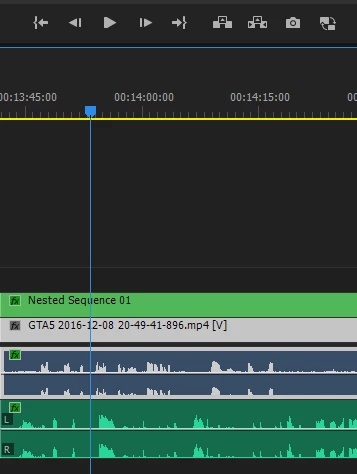
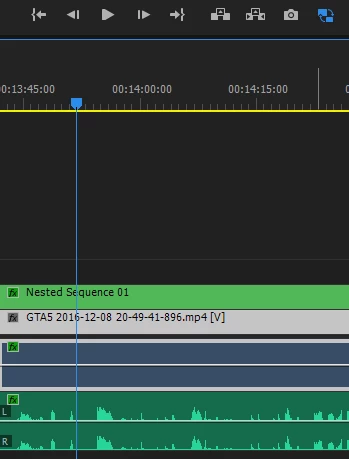
I have created and attached a proxy for an audio/video file twice, using two different formats (H.264 and QuickTime), and each time I toggle proxies the audio does not play and the waveforms disappear. If I turn proxies off the audio immediately plays and the waveforms come back.

Below are the properties for the movie:

Type: MPEG Movie

File Size: 3.78 GB

Image Size: 1920 x 1080

Frame Rate: 30.00

Source Audio Format: 48000 Hz - compressed - Stereo

Project Audio Format: 48000 Hz - 32 bit floating point - Stereo

Total Duration: 01:50:50:23

Pixel Aspect Ratio: 1.0

Proxy Media

File Path: D:\Series\GTA V\Copied_GTA V 05-06\Proxies\GTA5 2016-12-08 20-49-41-896_Proxy.mov

Type: QuickTime Movie

File Size: 54.78 GB

Image Size: 1280 x 720

Frame Rate: 30.00

Source Audio Format: 48000 Hz - 16 bit - Stereo

Project Audio Format: 48000 Hz - 32 bit floating point - Stereo

Total Duration: 01:50:50:23

Pixel Aspect Ratio: 1.0

QuickTime Details:

Movie contains 1 video track(s), 1 audio track(s), 0 closed caption track(s), and 1 timecode track(s).

Video:

There are 199523 frames with a duration of 1/30th.

Video track 1:

Duration is 1:50:50:23

Average frame rate is 30.00 fps

Video track 1 contains 1 type(s) of video data:

Video data block #1:

Frame Size = 1280 x 720

Compressor = GoPro CineForm

Quality = Most (5.00)

Audio:

Audio track 1 contains 1 type(s) of audio data:

Audio data block #1:

Format = 16 bit - Stereo

Rate = 48000 Hz

Compressor = sowt

Timecode:

Timecode track 1 contains 1 type(s) of data:

Timecode data block #1:

Start Time = 00:00:00:00

Reel name =

VR Projection: None
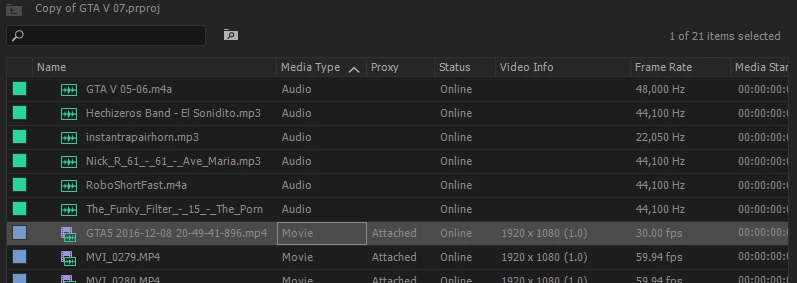
I'm really confused. I've watched multiple tutorials on using proxies and I think I'm doing it right, but obviously I'm missing something.

Thank you!

This topic has been closed for replies.
Correct answer excited_Genie16B8

This happened to me recently for one clip.  Just a glitch with the proxy.  Try creating it again.

7 replies

Participant
July 17, 2024

Read through everything here and just decided to use AE 🙂 works fine.

Side not everytime I think I'll use premiere for my editing I find Premiere just has issues with playback & or some glitch and MG are painful to create. I never get in AE.  For my workflow 30 sec commercials and promos there really is no reason to keep trying premiere, Lesson learned, again. 


Participant
August 16, 2022

Somebody heeeelp, y u do dis proxy?

pcbredemeier
Participant
October 23, 2022

Hi - it does work.  Just do this. 

first - make sure you can see that your files are "attached" or "offline" in your Project window.  (the window with all your clips and sequences in it.).   If you don't see that right click on the bar in the window (where it says name, frame rate etc) - then click on metadata display, then under premier project meta data make sure "Proxy" is checked.  It will show up wayyy to the right of your project window - drag it over so it's next to the clip names.  OK - most of that was unnecessary - but now you can see if it's offline or attached.


Find the clip in your project window - right click it - and "reveal in finder".  When you have it  - hopefully it's in a folder called "proxies" next to the original media.  Create another folder called "boxies" - then move the proxies into the boxies folder.  Then go into your Project window back insinde premeire.  Check that proxies say "offline".  Then right click them and go down to proxies - attach proxies.  re-attach them from the new folder.  It works.  🙂

Participant
October 24, 2022

Hi pcbredemeier,

Thank you for trying to help. The audio in slo-mo clips sounds distorted.

I don´t know if its a way to fix it :S

Participant
May 5, 2022

Year 2022, had the same issue as described, and detaching the proxy and attaching them again fixed it...still a bug all those years after

Participant
February 20, 2022

Come on Adobe, its 2022 and there is still no solution 😞 PLEASE!!

Known Participant
May 15, 2024

No, now its 2024 and there is still no solution. Just happened to me. 

Kevin-Monahan
Community Manager
Community Manager
May 15, 2024

Hi @MunchyBugs

Thanks for the message. This is an old post. I am sorry you are having trouble with the current version. Would you like me to move this post out to the main forum so you can get better help? Let me know. I hope the community can help you.


Thanks,
Kevin

Kevin Monahan - Sr. Community and Engagement Strategist – Adobe Pro Video and Audio
Participant
February 9, 2021

This doesn't actually work, despite the reply being highlighted as the "correct answer."


I am having an issue with proxies playing without audio and I cannot figure it out. The correct answer worked once, but then it happened again. And I'm working with project file with thousands of clips, there's no way to just recreate the proxy for dropped audio for every clip every time the audio drops.


This is a bug that Abode should address.

cameranimal
Participant
November 13, 2018

Just encountered this. I found that selecting "edit Clip in Adobe Audition" forced the audio and waveform to appear, even with the proxy toggled on. Still a time waster, but not as much as re-importing!

Participant
November 18, 2020

If you don't have Audition, another way worked for me :

- copy somewhere the proxy file which audio doesn't link correctly, and remove it from the folder

- unlink the original media of the same clip (of course don't delete the media - I dont' know if it's useful but... it worked this way !). Your clip is full offline.

- re-put the proxy file in the folder.

- re-join the proxy file with the clip, and relink the same clip to the original media too.

- Play : sound works for me, both with proxies enabled or disabled.

One more of these voodoo stuff you have to find with Adobe premiere...

excited_Genie16B8Correct answer
Legend
December 14, 2016

This happened to me recently for one clip.  Just a glitch with the proxy.  Try creating it again.

LaurelLament
Participant
December 17, 2016

Weird, I guess third time's a charm! Thank you very much for your quick response!

Participant
July 11, 2018

Glitch still happening v. 12  

Making the tracks play on Solo sometimes works. Restart sometimes works. Really a waste of time though