JeanK77,
It shouldn't be happening to you just because you're on 1809. In fact, mine only started that recently, and as Ann mentioned, it started with an update and it cut off Premiere's access to the Shure X2U. It may have been a minor update that broke it—not the feature update to 1903 I can't remember exactly when it happened.
What you could try...
There should be microphone icon that pops up in your task bar showing you when an app is trying to access your microphone. If this is turned off in your taskbar/icon settings—turn it on, start Premiere and see if the microphone appears. Then mouse over that icon and double-click it to open the privacy settings and see if it gives you the option to whitelist Premiere.
There are probably registry hacks that will fix it, too.
But yes, if you are certain you don't have that entry for desktop apps below the list of apps, then you could update to 1903.
A word of caution...1903 is a big update.
I think they've worked out most of the bugs, but my 1809 system wouldn't even take it. I had to rebuild the system from scratch. If you do this (and I'm not telling you to do the same necessarily) at least make a Macrium image so you can restore your system. It will roll back on its own if it fails, but having a backup is a good idea.
I build all my own systems, so I do this stuff in my sleep. Always wary about suggesting others to do it. Hope you understand.
BTW...here is what the list looks like.
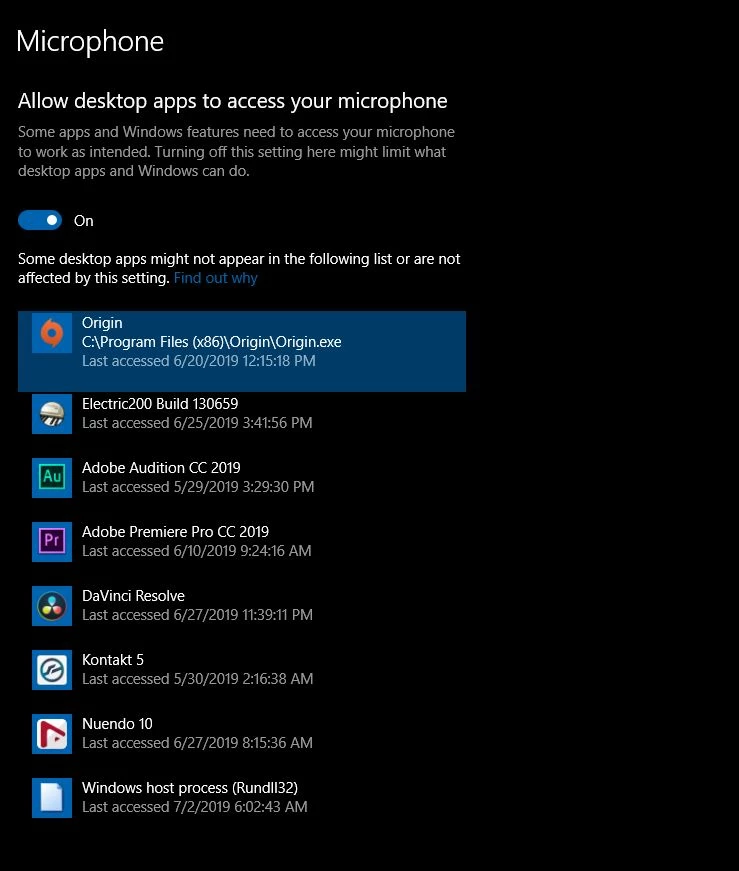
Yep, I'm one of those that have Origin, Steam, Gog, etc. on my editing system...Heaven forbid ;-)
Hello
Many thanks for all your help and recomandations.
I upgrade my PC to version 1903 !!
Everything worked fine and without any upgrade problem, the microphone problem IS SOLVED
My Shure Mic is now in the list and works fine.
The additionnal switch for microphone access for desktop apps is now present and on.


 AdChoices