
Question
No video on exported mp4 - only audio with black screen (I've tried everything suggested in forum)
Please help!
Usual Scenario:
- I edit a 1-hour webinar in Premiere Pro 2020 and export it in Media Encoder 2020. (worked perfectly)
What I've done since it worked perfectly:
- Downloaded the Intel video driver .exe but didn't run it.
Current Problem Scenario and what I've tried to fix it:
- When I upload a 1-hour webinar recording (from Crowdcast) into Premiere, the audio/video are not synced in Premiere. (It is synced in the regular media player.)
- To fix the sync/VFR problem, I loaded the video into Wondershare Video Converter and exported it. Audio/video is now synced when I upload to Premiere.
- When I export the edited video (no settings changed from when it was working perfectly), the mp4 plays as a black screen with audio. There is also an .mv4 file in the folder, which never happened before. When I put the mp4 back into Premiere, it only shows the audio track.
- Updated my NVIDIA drivers and all Adobe apps, and restarted my computer a few times.
I've read several posts in the forums, checked YouTube, checked Google results, and I don't see anything wrong from what I've read.
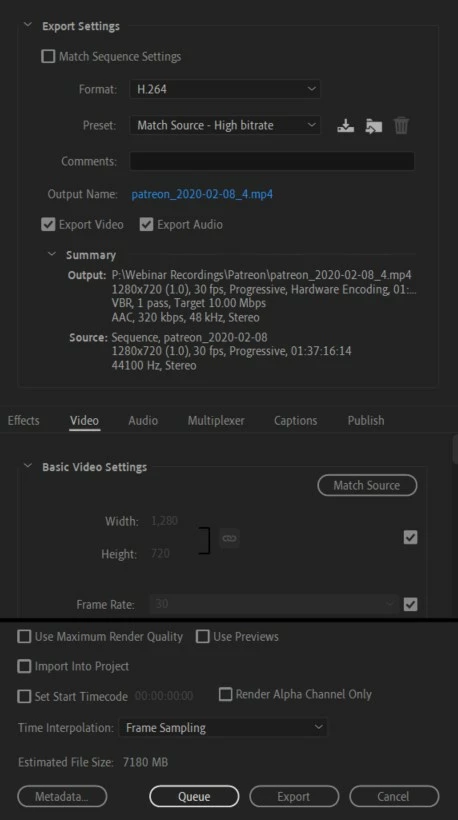
Here are the settings that I have when exporting the mp4 that has black screen with audio.
Any suggestions or solutions? THANK YOU IN ADVANCE! 🙂
 AdChoices