Participating Frequently
July 22, 2017
Answered

No video only audio

  • July 22, 2017
  • 3 replies
  • 37623 views

So i just downloaded the premiere pro trial to try it out. But when i want to drag some files i only get the audio one. I have been looking for solutions from anywhere.

    Correct answer premieregal

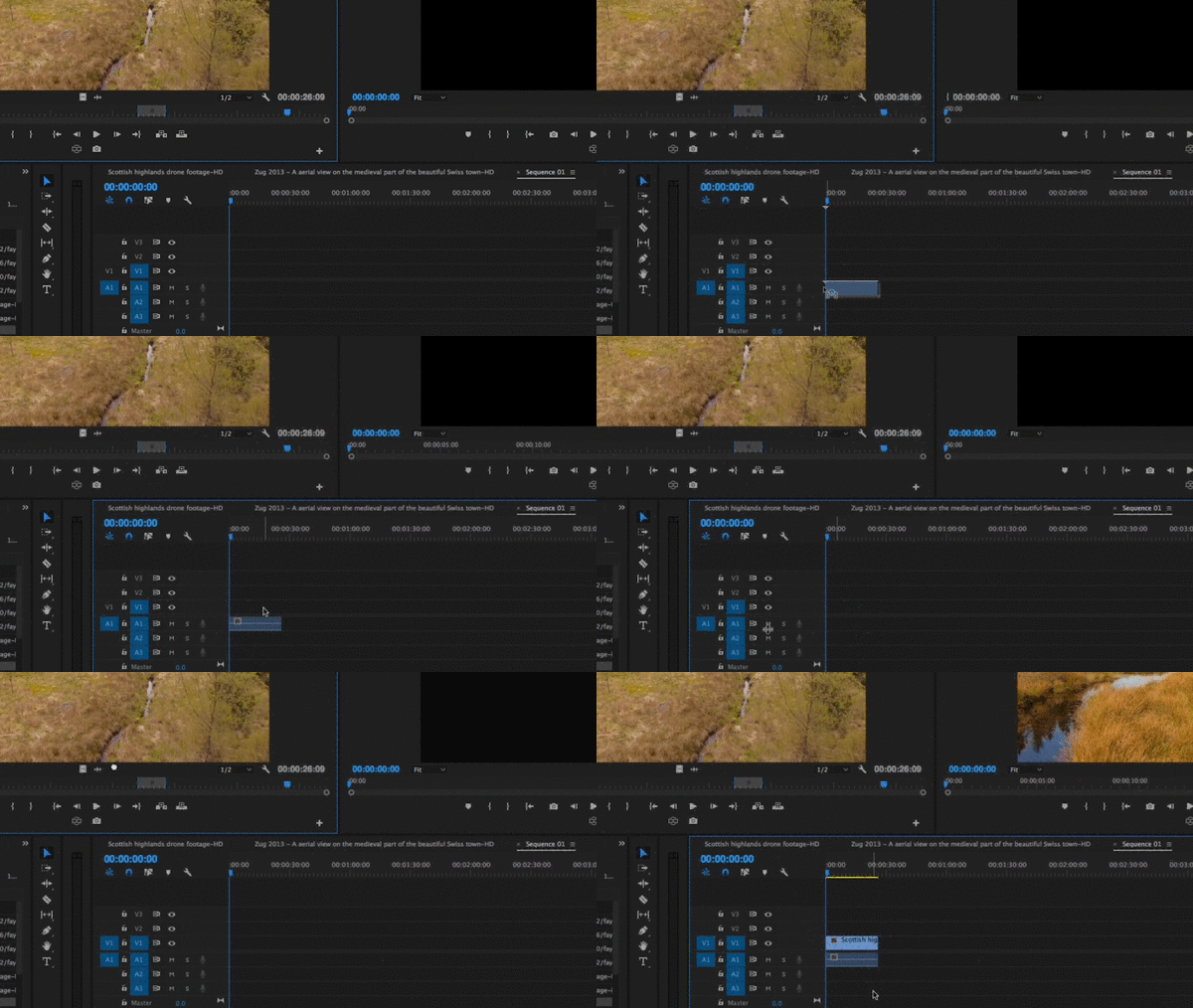
    Hi kelar - I made a quick screen recording to show you. see the GIF below. As Ann mentioned above, just make sure you have the "v1" selected when you drag your media into your sequence so video and audio will transferred on to your sequence.  The first time I bring down the footage from the source panel, I do not have the v1 source patching on, but once on, you see that it now brings video as well.
    3 replies

    Legend
    July 23, 2017

    Try step 2b below.  Report back.

    Unofficial Premiere Pro Troubleshooting Guide

    Participating Frequently
    July 23, 2017

    Did not work

    Ann Bens
    Community Expert
    Community Expert
    July 23, 2017

    Premiere only imported the audio part of the videoclips, hence being the problem.

    Where do these clips come from, what camera was used?

    Post a screenshot of a clip in MediaInfo and post the outcome in treeview here on the forum.

    Participating Frequently
    July 23, 2017

    But like if i drag my files to anywhere in premiere pro it dosent show the video, black screen only and audio icon.

    Ann Bens
    Community Expert
    Community Expert
    July 23, 2017

    Double click on the clip in the Project Window so it opens in the Source Monitor and at the same time source patches your track, then drag into timeline.

    Or do you mean you have your clip in the timeline and the Progam Monitor shows black?

    Participating Frequently
    July 23, 2017

    Ann Bens
    Community Expert
    Community Expert
    July 22, 2017

    You need to source patch the tracks first.

    Participating Frequently
    July 22, 2017

    And how can i do that?

    premieregal
    Community Expert
    premieregalCommunity ExpertCorrect answer
    Community Expert
    July 23, 2017

    Hi kelar - I made a quick screen recording to show you. see the GIF below. As Ann mentioned above, just make sure you have the "v1" selected when you drag your media into your sequence so video and audio will transferred on to your sequence.  The first time I bring down the footage from the source panel, I do not have the v1 source patching on, but once on, you see that it now brings video as well.