Inspiring
January 11, 2021
Answered

No waveform audio on multicam

  • January 11, 2021
  • 6 replies
  • 5296 views

Hi,


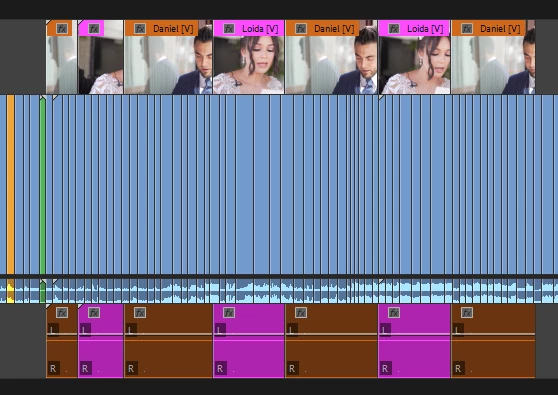
Sometimes the audio waveform just does not show up even thoug there is audio...

I tried selcting the tracks, muting, unmuting, nothing seems to work. How to fix?
 

Correct answer Phillip Harvey

Have you tried going to Sequence > Render Audio?

6 replies

MyerPj
Community Expert
Community Expert
June 6, 2024

I have one source sequence, where it is currently working, and one where it's not. 

@jameskolsby 

Participant
November 8, 2023

Hi! I use multicam to sync audio for editing and wanted to follow up on this! Today I learned that you can see the audio waveform of multicam clips as long as there is only one unmuted audio track, and the output mix has just one channel. Do the following to make it render so you can edit more quickly: 

Participant
January 31, 2024

THANK YOU, JAMES!


That solve totally did the trick for me and way cleaner than having to render or otherwise adjust the clip/sequence.

Participant
February 16, 2023

I found this worked.
Right click layer - multicam - unselect enable option  - then reselect enable.


MyerPj
Community Expert
Community Expert
February 16, 2023

I gave that a try, it didn't do anything for me. 

Win11, PP 23.1

Community Expert
February 16, 2023

Hey Myer, I work with multicam sequences on a daily basis, it's been years since I have had such problems, have you tried my workflow (no audio effects, no levels keyframes inside of multicamera sequence)?

Community Expert
January 12, 2021

If you add any keyframe to any audio clip inside of your multicam sequence, the waveform will just disappear in your main sequence, that's why I never do that.

Besides rendering audio as Phillip suggested you may find right-click on audio and choosing Multi-camera > flatten to be useful

Community Expert
January 12, 2021

Also, if you apply any audio effect to any clip in your multicam sequence, the waveform will just disappear in your main sequence, so you may apply those effects in your main timeline to avoid the problem

Inspiring
January 13, 2021

Interesting, good to know thank you!!

MyerPj
Community Expert
Community Expert
January 12, 2021

Mine does that too. 'Render Audio' brings it back until the next restart of PP. It's not the most informative screenshot. I take it that really tall track is the MCam audio. I gave up trying to fix it.


Inspiring
January 13, 2021

Thank you for the reply, yes the tall track is the MCam

Phillip HarveyCommunity ExpertCorrect answer
Community Expert
January 12, 2021

Have you tried going to Sequence > Render Audio?

Inspiring
January 13, 2021

Thank you so much it worked (no for every clips for some reasons but for 99% of them)
