
Participating Frequently
August 27, 2020
Answered

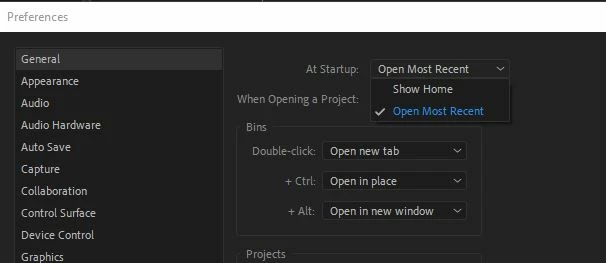
No way to stop Home or Recent Project on launch?

  • August 27, 2020
  • 8 replies
  • 5565 views

I'm fairly new to Premiere Pro, and I'm hoping the developers are not so bad that I have to choose either the Home screen or opening the Most Recent project every day when I open Premiere Pro?!?


Please tell me this isn't true - I though we left horrible designs like this back in the 80's?


Really, why would they not include the option, "just open the dang software so I choose what I want to work on and get some work done" which is the default mode for EVERY other software package I use?!?


😞


Correct answer Kevin-Monahan

Hey Shawn,

Sorry for the frustration. You wrote:

"Dear Adobe - please add a third option to choose neither pop-up, and help us get more work done."


Please create a feature request here.


Thanks,
Kevin

8 replies

MyerPj
Community Expert
Community Expert
June 9, 2024

I think the difference is that in AE you can go to the program screen and do something, (add a comp, work from scratch). PP seems to need a project, thus when you go to bare program screen, there's nothing to do, except open a project (new or existing), or using the help menu.


I take it that's a fundamental thing PP has since the beginning. So, not much point in not opening the Home screen, you're an ESCape key away from the raw, I can do nothing except open a project, but you can open a recent or easily create a new .prproj on the home screen.

Warren Heaton
Community Expert
Community Expert
June 9, 2024

It would be nice if there was something that matches After Effects' Preferences > Startup & Repair > Enable Home Screen or Photoshop's Preferences > General > Auto show the Home Screen.

If put in the form of a feature request (rather than an angry rant), I'd vote for it.


Inspiring
May 22, 2023

I'll add to the feature request link to add for a third option to not show anything. As stated before, other Adobe apps allow it to be turned off. In a studio environment with multiple editors on a server, "most recent" is a pretty useless to me. I use Premiere in full screen (which has its own bugs), so having the Home screen show up on another desktop is annoying. I wasn't aware of the Esc button to clear the home screeen away. For now I think I'll program a hot key on my StreamDeck to close the project and Esc as a single button. Its nice when you close out of something that you can be back to a clean desktop and not still having an app layer between you and the Finder in the case of OSX. 

Kevin-Monahan
Community Manager
Kevin-MonahanCommunity ManagerCorrect answer
Community Manager
September 24, 2020

Hey Shawn,

Sorry for the frustration. You wrote:

"Dear Adobe - please add a third option to choose neither pop-up, and help us get more work done."


Please create a feature request here.


Thanks,
Kevin

Kevin Monahan - Sr. Community and Engagement Strategist – Adobe Pro Video and Audio
MyerPj
Community Expert
Community Expert
September 24, 2020

Wow! For a new user... so negative and inflexible. I quite like the 'small hill to die on' comment.


BTW: you can simply press ESCape on the home screen and it's gone, all the while you can be heading for the FILE menu.


Also simply, you can keep desktop shortcuts for any project. It will be available and right where you put it each time.

Community Expert
August 28, 2020

While I don't necessarily disagree that it doesn't hurt to have the option. Unless I'm missing something, it seems like a fairly small hill to die on, so to speak.

V1 - Home screen: Click Premiere, Click on recent project or New Project (2 clicks)

V2 - No Home screen: Click Premiere, Click File, Move to Recent Files, Click Project. (3 clicks - same if starting a new project.)

V3 - Direct via Folder: Click Finder/Explorer, Click Project Folder (will assume it's favorited), Double click Project (3+ clicks)


Opening DaVinci Resolve I get the same type of home screen. I didn't see a way to turn that off either, but I don't know that software nearly as well.

Participating Frequently
September 24, 2020

I dont' disagree that this is not a big deal for you, and probably many others.


And you know what, if I was just creating a home video for the family once every few weeks then it wouldn't be a big issue.


But that's not me.


I'm using Premiere for work, and the more work I get done the more I get paid.


So this isn't a "hill to die on," this is about effiecientcy, common sense, and exercising my Right as a paying customer to provide feedback about a bad feature that's slowing me down.


At least with Premeire Elements and Photoeshop Elements there "IS" a way to get rid of the help screen.


Sadly not so in Premiere Pro currently.

Dear Adobe - please add a third option to choose neither pop-up, and help us get more work done.

Shawn Tierney

Participating Frequently
September 24, 2020

And now it seems I can't edit my reply to fix the typo's 😞

MarekMularczyk
Community Expert
Community Expert
August 27, 2020

These are the only options available I'm afraid. However, if you don't want to see any of these, just start by opening your Premiere project from Explorer/Finder and it will load straight into the project itself skipping welcome screen

Adobe Community ExpertAdobe Certified Professional
Participating Frequently
September 24, 2020

Thanks for the tip - I may try that - I really just want the program to launch and let me choose file - open recent

MarekMularczyk
Community Expert
Community Expert
November 6, 2024

Yes, I usually just open the project straight from Explorer and it launches Premiere with the project open.


Adobe Community ExpertAdobe Certified Professional
Legend
August 27, 2020

just double-click on the project you want to load before launching premiere and away you go.  

Participating Frequently
September 24, 2020

That's not a bad suggestion really, it's just in every other software program (including Photoshop and Premiere Elements) I do it the other way because the program filter out files that are not native...