
Sammy5FA2
Participant
July 7, 2021
Answered

Not seeing multi cams on Program Monitor, only Source Monitor
  • July 7, 2021
  • 5 replies
  • 12675 views


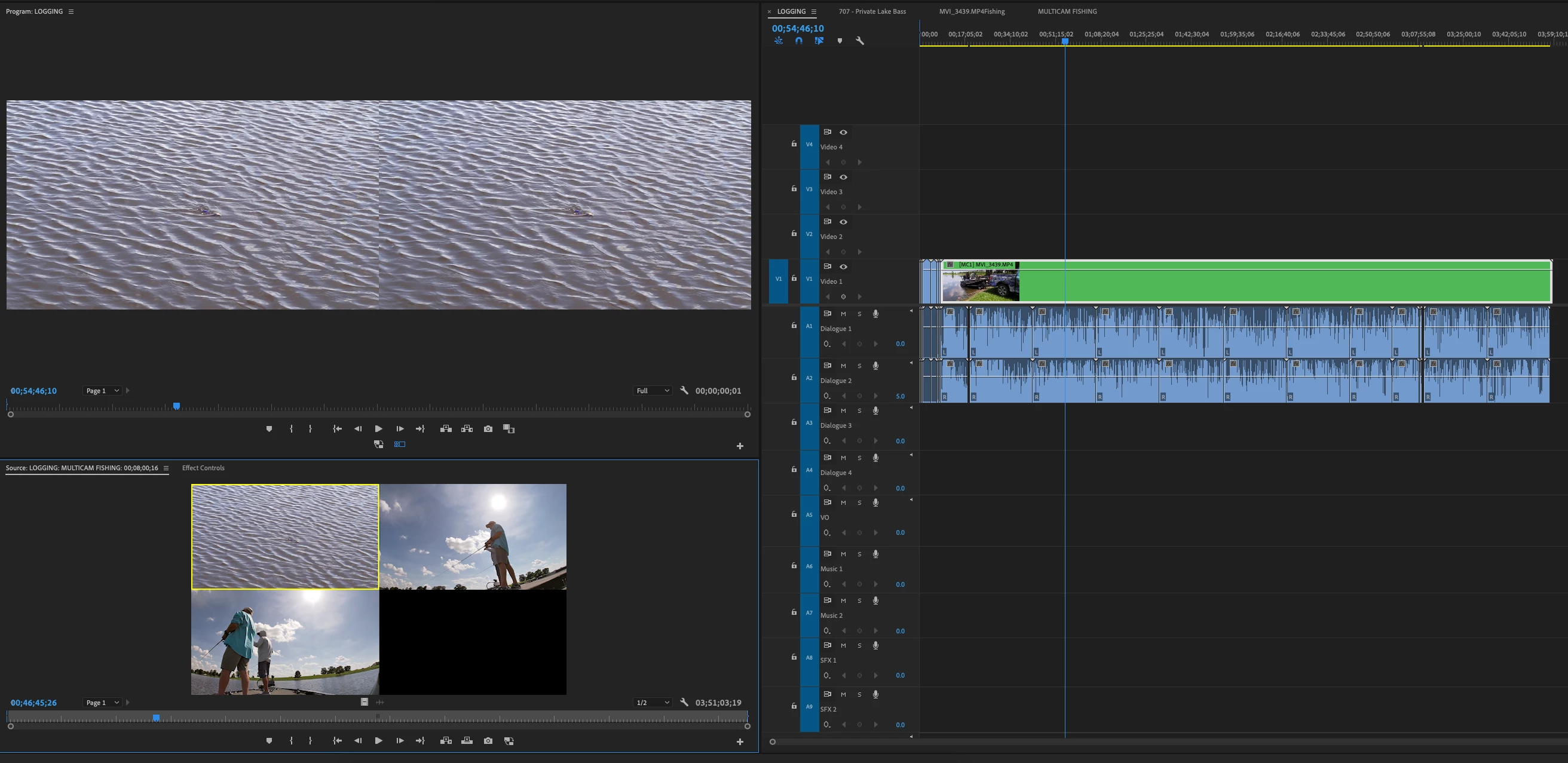
I'm not sure why, but the multicam icon on the Program Monitor is not showing the other cameras, but I am able to see them in the source monitor.  My V1 track is selected/highlighted blue, and I've toggled the video tracks up and down, but still do not see the other cameras available in the Program Monitor no matter what I do.  Can anyone help me with this? Thanks!

    Correct answer MyerPj

    Try unchecking Multi-Camera Selection Top Down, then toggle the multicam button on the monitor off then on. Anything?

    5 replies

    Participant
    July 26, 2023

    You should try to click the visible/unvisbile icon on the video track that holds the multicam sequence.

    R Neil Haugen
    Legend
    July 7, 2021

    Do you have the Program monitor set in its control menu to show multicam? If not, you won't see the multicam view there.


    Go to either the Wrench icon and select MultiCam, or right-click in the Program monitor and select display mode/multicam.


    Neil

    Everyone's mileage always varies ...
    Sammy5FA2
    Sammy5FA2Author
    Participant
    July 7, 2021

    It looks like it is set for multicam unless I'm missing something.    You can see my multicam icon is toggled on and is highlighted blue as well.

    Participant
    May 16, 2023

    I just found a solution that works for me! Make sure you have only the videolayer with the multicam sequence selected (blue). Unselect all others. The blue videoclip is the one with multicam... and the layer in premiere is V3. If I also select V2 then multicam wont work.


    This worked for me! thank you


    Sammy5FA2
    Sammy5FA2Author
    Participant
    July 7, 2021

    I'm using Premiere Pro, thanks!

    Peru Bob
    Community Expert
    Community Expert
    July 7, 2021

    I've moved this from the Using the Community forum (which is the forum for issues using the forums) to the Premiere Pro forum so that proper help can be offered.

    LinSims
    Community Expert
    Community Expert
    July 7, 2021

    Please let us know which program you are having problems with. Someone will be along to move this post to the appropriate product forum, where you are more likely to get an answer to your question.

    The Using the Community forum is for help in using the Adobe Support Community forums, not for help with specific programs. Product questions should be posted in the associated product community.