

J.J. McCullough
Participating Frequently
January 12, 2022
Answered

Numbers and punctuation jumping around in Premire Pro

  • January 12, 2022
  • 4 replies
  • 1797 views

So I've seen people attemp to describe similar problems, but it's also a bit difficult to describe, so let me be as clear as I can. 

I am using Premire Pro 22.1.2 on a Macbook. Using the text tool, I want to write

DECEMBER

25, 1971


However, when I go to write the second line, it glitches up like this:

 To be clear, I typed in "25, 1971" in that exact order, yet it appeared on the screen like you see above.

I can write other things with puncutation that doesn't misbehave, for example see:

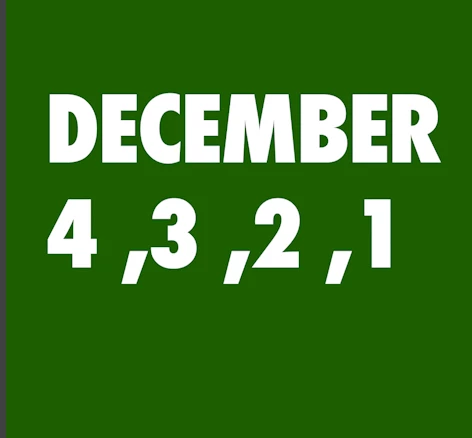
But for some reason anything with numbers appears backwards. For example, here is what happens when I attempt to write 1, 2, 3, 4:
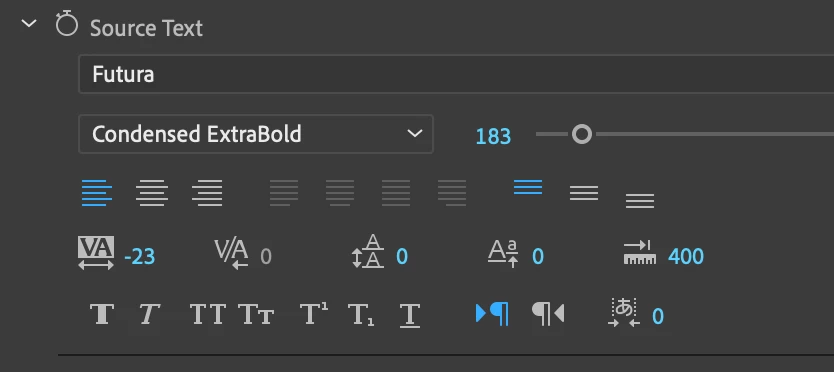
Here are my settings. Nothing looks weird to me here. Any ideas?
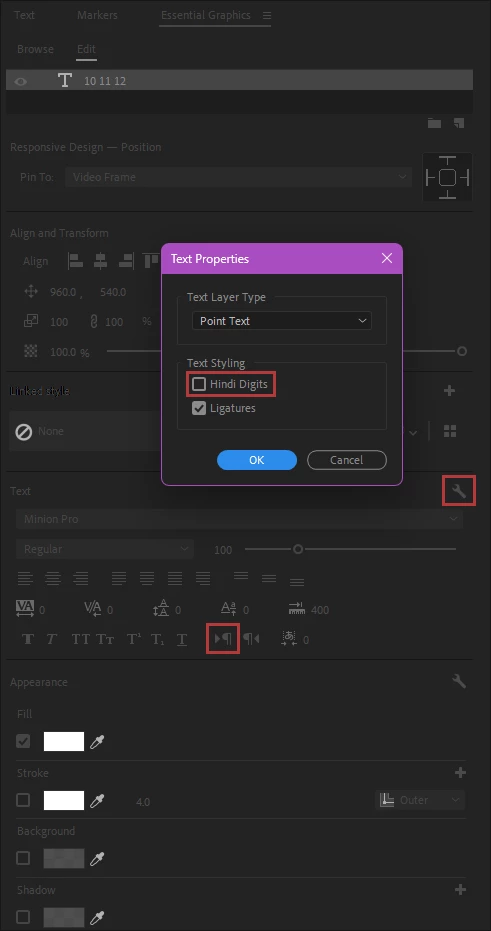
Correct answer Ali Jaber

Be sure that the text direction is set to Left to Right, AND that Hindi Digits is turned off:

4 replies

jamesh19144346
Participant
May 3, 2024

Just curious if you ever found a solution to this issue. This exact thing has been happening to me and it's driving me crazy. 

Ali JaberCommunity ExpertCorrect answer
Community Expert
May 3, 2024

Be sure that the text direction is set to Left to Right, AND that Hindi Digits is turned off:

jamesh19144346
Participant
May 3, 2024

crazy — i think that may have fixed it. I must have tried every possible combination of Ligature/Hindi/L>R/R>L and somehow didn't land on that one. thank you! 

J.J. McCullough
Participating Frequently
January 14, 2022

It seems to be a unqiue problem only affecting numbers. It does not allow me to type sequences of numbers in any sort of normal order. So for example, if I attempt to type 10 11 12 (even without commas, just spaces) it comes up as 12 11 10.

Stan Jones
Community Expert
Community Expert
January 14, 2022

Very odd. You're showing the settings from the effects control. Any difference in the settings in the Essential Graphics Panel?


But I can't think of any way to get what you are seeing!


Stan


J.J. McCullough
Participating Frequently
January 20, 2022

Here's the essiential graphics. See anything that looks sus? 

Community Expert
January 12, 2022

Strange, usually numbers behave like that when you enable right to left direction:


Anyway, try to reverse the text direction and see if it works for you

J.J. McCullough
Participating Frequently
January 14, 2022

It did not. 

Ann Bens
Community Expert
Community Expert
January 12, 2022

Have you tried setting Tracking to 0?

J.J. McCullough
Participating Frequently
January 14, 2022

Does nothing.